 Embedded HandbookApps
84а. From sketch to registers: one device on four levels
Sections 80–84 built a prototype on Arduino: a sketch, digitalWrite,
millis(), interrupts. Section 5 covered the three levels of ST libraries —
CMSIS, HAL and LL. Here they meet: the same device is written
four times — as an Arduino sketch, on HAL, on LL and on bare registers — and
all four are built and measured. A button on PA0 with debouncing lights
the LED on PA1, the built-in LED on PC13 blinks from timer TIM2 once a
second, and once a second the line ticks N presses M goes out on USART1.
The build runs in Docker: the sketch with arduino-cli 1.2.2 and the STM32duino 3.0.0 core
(STMicroelectronics:stm32) for the BluePill F103C8 and for the F407 Discovery;
HAL, LL and registers with the same arm-none-eabi-gcc 14.2.1 compiler from
the core, with the STM32CubeF1 1.8.7 libraries from disk. Sizes come from size,
contents from nm, code from objdump. How many instructions one write to a port costs
was counted in qemu-system-arm -M stm32vldiscovery (Cortex-M3, F1
family): QEMU with -singlestep -d exec logs the address of every executed instruction.
Sources: the STM32duino core sources in the stm-arduino:1 image
(wiring_digital.c, digital_io.h, pins_arduino.h, PortNames.h,
pinmap.h, License.md); STM32CubeF1 1.8.7 — HAL, LL, startup code;
section 5 — the CMSIS/HAL/LL levels; section 8 — the BSRR register. Check:
_verify/sketch84b_check.py.
Terms used in the documentation
Term Meaning sketch an Arduino program with setup()andloop()core (Arduino core) the Arduino support for a family of boards: digitalWrite,millis,Serialvariant the description of a specific board: pin table, clocks pin number / PinName an Arduino pin number / an STM32 pin name ( PA_1)HAL (hardware abstraction layer) an abstraction layer: structures, functions with checks LL (low-layer) thin inline functions over the registers BSRR (bit set/reset register) the port register that sets and resets bits weak symbol a definition you can replace with your own inline the function body is inserted at the call site tail call a jump instead of a call and a return
84а.1 One device, four programs
| Level | File | How the pin is configured | How it blinks | How it writes to the serial port |
|---|---|---|---|---|
| sketch | l1_arduino.ino |
pinMode |
HardwareTimer and attachInterrupt |
Serial.print |
| HAL | main_hal.c |
HAL_GPIO_Init |
HAL_TIM_Base_Start_IT and a callback |
HAL_UART_Transmit |
| LL | main_ll.c |
LL_GPIO_SetPinMode |
LL_TIM_EnableIT_UPDATE |
LL_USART_TransmitData8 |
| registers | main_regs.c |
GPIOA->CRL |
TIM2->DIER |
USART1->DR |
The device logic — debouncing and building the line — is shared by the HAL, LL and
register levels (app84.h), so that only the hardware accesses
are compared. The sketch does the same with Arduino means:
void loop()
{
  static uint32_t changed, last_print, presses;
  static int stable = HIGH, seen = HIGH;
  int now = digitalRead(PA0);
  if (now != seen) {                            // уровень сменился — ждём, пока успокоится
    seen = now;
    changed = millis();
  }
All builds passed without warnings: the three sketches according to the
arduino-cli output, our own HAL, LL and register files with -Wall -Wextra -Werror.
84а.2 Size: flash and RAM
| Build | Flash (text) |
data |
bss |
|---|---|---|---|
| sketch, BluePill F103C8 | 15072 | 256 | 2744 |
| the same sketch, F407 Discovery | 18432 | 272 | 2808 |
| HAL, F103 | 4436 | 20 | 180 |
| LL, F103 | 1400 | 12 | 36 |
| registers, F103 | 1064 | 8 | 36 |
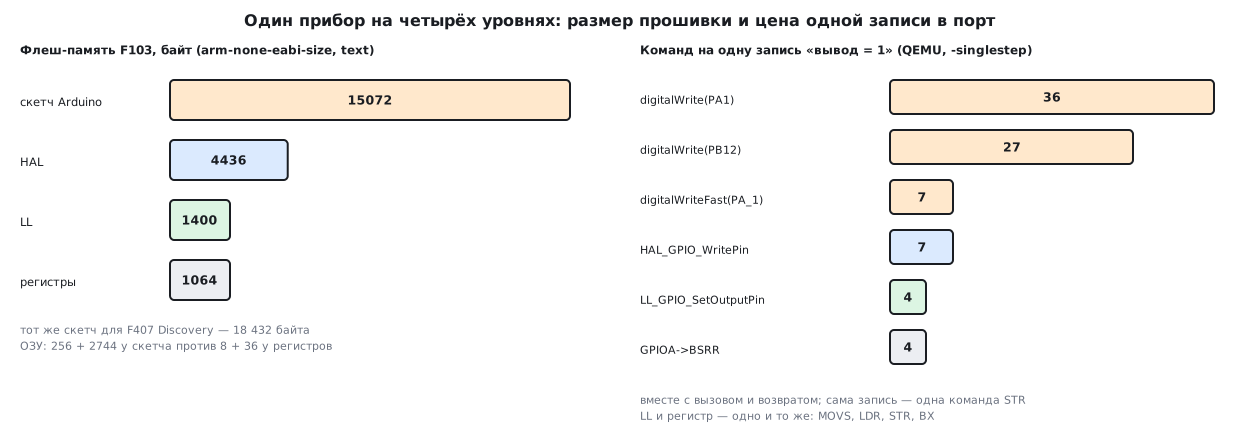
The sketch is 14 times larger than the register version and 3.4 times larger than the HAL version.
Moving the sketch from the F103 to the F407 cost one line: a different board in
-b — and it built for another chip. The register version cannot be
ported like that: on the F4 the ports sit on a different bus at different addresses, CRL is replaced by
MODER, the clocks are different.
Of the 1064 bytes of the register version, our own code (main, two handlers and
put_uint) is 538 bytes, half. The rest is the vector table from
the Cube startup file for F103xB (268 bytes), stub handlers and
the C library start-up initialisation.
84а.3 What Arduino pulls in
The twelve largest symbols of the sketch by nm --size-sort:
| Symbol | Bytes | Where | What it is |
|---|---|---|---|
HAL_RCC_OscConfig |
824 | flash | oscillator setup — HAL inside the core |
HAL_UART_IRQHandler |
660 | flash | the UART interrupt for Serial |
PinMap_TIM |
516 | flash | the board variant's "pin — timer channel" table |
pin_SetF1AFPin |
504 | flash | F1 pin remapping |
pin_function |
356 | flash | pin setup from the tables |
uart_init |
332 | flash | the core's wrapper over HAL UART |
gpio_irq_conf |
320 | RAM | the attachInterrupt handler table |
HAL_RCC_ClockConfig |
312 | flash | clock switching |
__sf |
312 | RAM | the C standard library streams |
HAL_TIM_IRQHandler |
296 | flash | the timer interrupt for HardwareTimer |
Serial1 |
280 | RAM | the port object with its buffers |
_malloc_r |
256 | flash | the C library dynamic memory |
The sketch carries 45 HAL_… functions inside — more than the HAL version
of the device (20): the Arduino core is itself built on ST's HAL and LL. Add pin
tables for every case (PinMap_TIM), a table of external interrupt
handlers, the Serial1 object with buffers, and malloc. That is the price
of pinMode and Serial.begin working with any pin of any
board in the list.
84а.4 What digitalWrite does inside
According to the core sources the chain is short, but it goes through three tables:
digitalWrite(pin, val)(wiring_digital.c) — converts the Arduino number into an STM32 pin name with thedigitalPinToPinNamemacro (pins_arduino.h): through the board variant'sdigitalPin[]table.digitalWriteFast(pn, val)(digital_io.h) — from the pin name gets the port with theget_GPIO_Portmacro (theGPIOPort_listtable) and the pin mask with theSTM_LL_GPIO_PINmacro (thepin_map_lltable).digital_io_write—LL_GPIO_SetOutputPinorLL_GPIO_ResetOutputPin: one write toBSRRorBRR.
In objdump all of this is one digitalWrite function of 116 bytes: the calls
are inlined by the compiler. The port write is str r3, [r2, #16] (offset
0x10 — BSRR) for HIGH and str r3, [r2, #20] (0x14 — BRR) for
LOW. The rest is number checks and three table reads; the address of the port
table in the bench code is 0x20000004, which means it lives in RAM.
The number PA1 is "analog". In the core PA1 is defined as PIN_A1,
and that is PNUM_ANALOG_BASE + 1 = 0xC1: an analog input number.
digitalWrite first compares it with the number of digital pins (35),
fails, and takes the second branch — through the analogInputPin[] table.
That is why the same call costs differently for different pins (84а.5).
The STM32duino core is distributed under several licences: according to its
License.md the cores/arduino files are LGPL-2.1, HAL is BSD-3-Clause,
the USB libraries are ST SLA0044. What this means for firmware built with this
core is covered in section 205б.
84а.5 How many instructions one port write costs
Two benches were built the same way as the devices and run in QEMU
stm32vldiscovery — a model of a board with an F100 from the same F1 family; it accepts
a port write at address 0x40010800 without an error. The sketch bench
replaces the core's weak function init() with an empty one — QEMU cannot get through the clock
setup, and it is not needed for a port write:
extern "C" void init(void) {}

__attribute__((noinline)) void bench_pa1(void) { digitalWrite(PA1, HIGH); }         // номер PA1 — «аналоговый»
__attribute__((noinline)) void bench_pb12(void) { digitalWrite(PB12, HIGH); }       // обычный цифровой номер
__attribute__((noinline)) void bench_fast(void) { digitalWriteFast(PA_1, HIGH); }   // по имени вывода, без таблицы
__attribute__((noinline)) void bench_ll(void) { LL_GPIO_SetOutputPin(GPIOA, LL_GPIO_PIN_1); }   // LL прямо в скетче
__attribute__((noinline)) void bench_bsrr(void) { GPIOA->BSRR = GPIO_BSRR_BS1; }                // регистр прямо в скетче
The count runs from the first instruction of the bench function to the return to the caller:
| How it is written | Total instructions | Of them inside the library function |
|---|---|---|
digitalWrite(PA1, HIGH) |
36 | 33 in digitalWrite |
digitalWrite(PB12, HIGH) |
27 | 24 in digitalWrite |
digitalWriteFast(PA_1, HIGH) |
7 | — (inlined) |
HAL_GPIO_WritePin(GPIOA, GPIO_PIN_1, GPIO_PIN_SET) |
7 | 3 in HAL_GPIO_WritePin |
LL_GPIO_SetOutputPin(GPIOA, LL_GPIO_PIN_1) — in the sketch and in the LL version |
4 | — (inlined) |
GPIOA->BSRR = GPIO_BSRR_BS1 — in the sketch and in the register version |
4 | — |
The four LL and register instructions are identical: movs r2, #2,
ldr r3, [pc, …] (the port address 0x40010800), str r2, [r3, #16],
bx lr. The LL function was inlined without a trace. HAL_GPIO_WritePin also has
only three instructions inside: the "set or reset" check and the write.
digitalWrite is 7–9 times longer because it converts the Arduino number into a port
and a mask.
This is an instruction count, not a cycle count: QEMU does not model execution time. Cycles on the board were not measured here.
84а.6 How to mix the levels and when to pick which
The sketch bench shows the main point: in a sketch you can write LL and registers
directly — the core already includes the CMSIS and LL headers, and the lines
LL_GPIO_SetOutputPin(...) and GPIOA->BSRR = ... built without
a single #include and produced the same code as the pure LL and
register versions. That is how it is done on a prototype: everything is pinMode,
Serial, millis, and the one bottleneck is a register.
Rules for mixing:
- leave pin configuration to the core (
pinMode) and use the fast path only to write and read — otherwise the core's settings and yours will fight; - do not reconfigure, with registers behind the core's back, the timers and interrupts the core uses (
HardwareTimer,SysTickformillis); - if you need a fast write by Arduino number, use
digitalWriteFastwith the pin name (PA_1): 7 instructions instead of 27–36.
When to use which level:
| Level | Strength | Cost |
|---|---|---|
| sketch | a device in one evening, port to another board by changing -b |
15 KB instead of 1 KB, hidden timers and buffers, up to 36 instructions per write |
| HAL | all peripherals in a uniform way, CubeMX code generation | 4 KB, structures and callbacks, checks in every call |
| LL | code like registers, but with readable names | every field is configured by hand |
| registers | full control, minimum size | the reference manual at hand, porting between families from scratch |
84а.7 Pitfalls
digitalWrite on an "analog" pin costs more. PA1 is the number
PIN_A1 (0xC1), and the write goes through an extra table: 36 instructions
versus 27 for PB12. For the fast path use digitalWriteFast(PA_1, …).
The sketch does not fit into a small chip. A device that does almost nothing takes
15072 bytes of flash and 2744 bytes of bss. On a chip with 16 KB of flash
that is almost all of it. Count with size, not by the number of lines
in the sketch.
The register version "does not port". The sketch built for the F407
by changing the board; the F103 register code (CRL, APB2ENR) on the F407 means
other registers (MODER, AHB1ENR) and other addresses.
Your own interrupt handler versus the core. The core defines
timer handlers itself — TIM2_IRQHandler lives in HardwareTimer.cpp.
Your own definition of the same name in the sketch will clash with it; a timer
the core uses is better taken through HardwareTimer.
Replacing init() is for the bench only. An empty init() throws away
the clock setup and everything the core does before setup(). This was done only
to count instructions in QEMU; in a real device the core's init() is needed.
An instruction count is not time. QEMU knows nothing about flash and bus wait states: 4 instructions versus 36 is a ratio of the amount of work, not of microseconds on the board.
84а.8 Summary
- One device: the sketch takes 15072 bytes of flash, HAL 4436, LL 1400, registers 1064; RAM: 256 + 2744 for the sketch, 8 + 36 for the registers.
- The same sketch for the F407 Discovery is 18432 bytes: ported by changing the board.
- The sketch has 45
HAL_…functions — more than the HAL version (20): the Arduino core sits on ST's HAL and LL; the largest areHAL_RCC_OscConfig(824 bytes) andHAL_UART_IRQHandler(660). digitalWrite: Arduino number →digitalPin[]table → port and mask from two tables → write toBSRR/BRR; one function of 116 bytes.- A "pin = 1" write in QEMU:
digitalWrite(PA1)— 36 instructions,digitalWrite(PB12)— 27,digitalWriteFastand HAL — 7 each, LL and the register — 4 each. - LL and registers can be written right in the sketch — the same code; just do not touch the core's pin setup and timers.
Full source code
l1_arduino.ino — level 1 — the Arduino sketch: a button, LEDs, a line on Serial.
// Раздел 84а, уровень 1 — скетч Arduino (ядро STM32duino). Прибор: кнопка PA0 → светодиод PA1 с антидребезгом,
// встроенный светодиод мигает по таймеру раз в секунду, раз в секунду строка в Serial (USART1, PA9).
#include <Arduino.h>

const uint32_t DEBOUNCE_MS = 20;
HardwareTimer blink(TIM2);
volatile uint32_t ticks;

void onTimer()
{
  digitalToggle(LED_BUILTIN);
  ticks++;
}

void setup()
{
  pinMode(LED_BUILTIN, OUTPUT);
  pinMode(PA1, OUTPUT);
  pinMode(PA0, INPUT_PULLUP);
  Serial.begin(115200);
  blink.setOverflow(2, HERTZ_FORMAT);           // два переключения в секунду — мигание 1 Гц
  blink.attachInterrupt(onTimer);
  blink.resume();
}

void loop()
{
  static uint32_t changed, last_print, presses;
  static int stable = HIGH, seen = HIGH;
  int now = digitalRead(PA0);
  if (now != seen) {                            // уровень сменился — ждём, пока успокоится
    seen = now;
    changed = millis();
  }
  if (now != stable && millis() - changed >= DEBOUNCE_MS) {
    stable = now;
    digitalWrite(PA1, stable == LOW ? HIGH : LOW);
    if (stable == LOW)
      presses++;
  }
  if (millis() - last_print >= 1000) {
    last_print += 1000;
    Serial.print("ticks ");
    Serial.print(ticks);
    Serial.print(" presses ");
    Serial.println(presses);
  }
}
bench_arduino.ino — the QEMU bench: how many instructions "PA1 = 1" costs by different paths.
// Раздел 84а: стенд для QEMU stm32vldiscovery — сколько команд стоит «PA1 = 1» из скетча разными путями.
// init() ядра подменён пустым: без настройки тактов, которой QEMU не умеет. Выход — через semihosting.
#include <Arduino.h>

extern "C" void init(void) {}

__attribute__((noinline)) void bench_pa1(void) { digitalWrite(PA1, HIGH); }         // номер PA1 — «аналоговый»
__attribute__((noinline)) void bench_pb12(void) { digitalWrite(PB12, HIGH); }       // обычный цифровой номер
__attribute__((noinline)) void bench_fast(void) { digitalWriteFast(PA_1, HIGH); }   // по имени вывода, без таблицы
__attribute__((noinline)) void bench_ll(void) { LL_GPIO_SetOutputPin(GPIOA, LL_GPIO_PIN_1); }   // LL прямо в скетче
__attribute__((noinline)) void bench_bsrr(void) { GPIOA->BSRR = GPIO_BSRR_BS1; }                // регистр прямо в скетче

static void semi_exit(void)
{
  register int r0 __asm__("r0") = 0x18;
  register int r1 __asm__("r1") = 0x20026;
  __asm__ volatile("bkpt 0xAB" : "+r"(r0) : "r"(r1) : "memory");
}

void setup()
{
  bench_pa1();
  bench_pb12();
  bench_fast();
  bench_ll();
  bench_bsrr();
  semi_exit();
}

void loop() {}
Next: section 85 "TinyML: machine learning on a microcontroller".