 Embedded HandbookApps
92. Radio site survey and coverage map
The link budget (section 93) tells you how much the signal may lose along the way. How much it actually loses in this particular building only a survey will show. The section answers three questions: - how to carry out a survey and what to measure; - how to build a model and a coverage map from the measurements; - what to do with the result.
Checked with a model: a 120 × 40 m warehouse, 48 measurements. The model fit and the map are done in portable C and independently repeated in numpy.
Terms used in the documentation
Term Meaning site survey measuring radio conditions on site coverage map, heatmap a map of signal strength over the area RSSI, SNR, ESP (estimated signal power) power at the receiver input; signal-to-noise ratio; power of the signal alone PER (packet error rate) the share of lost packets path loss, log-distance model loss along the path; a model where loss grows with the logarithm of distance path loss exponent how fast loss grows with distance shadowing random spread caused by objects in the path fade margin reserve against fading antenna gain (dBi), radiation pattern how the antenna concentrates power; its directional shape VSWR, mismatch loss voltage standing wave ratio; loss due to poor matching
92.1 Survey procedure
- Preparation. The goal: a coverage map, finding weak spots, a place for the gateway, or finding interference. Equipment: an analyser, an app or a survey device. A building plan with wall materials, racks, windows and doors — without materials you cannot build the model (92.3).
- Measurements. Power, SNR, test packet loss, latency. Measure where the devices will stand, at their height, and in both directions: the gateway hearing the device and the device hearing the gateway are not the same thing.
- Analysis. Coverage map, loss zones, interference sources.
- Actions and repeat. Move the gateway or the antenna, change the channel — and measure again. The outcome is written down: method, map, conclusions, recommendations (section 90.7).
92.2 What to measure
| Metric | What it means |
|---|---|
| RSSI | power at the receiver input — the signal together with the noise |
| SNR | how much stronger the signal is than the noise; in LoRa it can be negative (section 93.2) |
| ESP | power of the signal alone: RSSI + SNR − 10·lg(1 + 10^(SNR/10)) |
| packet loss | from gaps in the numbering of test packets |
| latency | from sending to receiving; important for control |
| frequency, channel | where you operate and who else is there |
Why RSSI alone is not enough. Below the noise the receiver mostly sees noise, and that is what RSSI shows. Let RSSI be −120 dBm and SNR −10 dB. Then the signal itself is −130.4 dBm, 10 dB less than it seems. At SNR +10 dB ESP is −120.4 dBm, almost the same as RSSI.
The survey device numbers its test packets, and the receiver counts the gaps:
struct link_stats {
    uint16_t last;
    uint32_t got, lost;
    int started;
};

/* Пришёл пакет с номером seq: пропуски в нумерации — потерянные пакеты.
 * Разность считается в 16 битах, поэтому переполнение счётчика не мешает;
 * повтор и запоздавший старый пакет не учитываются. */
void link_seen(struct link_stats *s, uint16_t seq)
{
    if (s->started) {
        uint16_t gap = (uint16_t)(seq - s->last);
        if (gap == 0 || gap >= 0x8000u)
            return;
        s->lost += gap - 1u;
    }
    s->last = seq;
    s->started = 1;
    s->got++;
}

/* Мощность самого сигнала: RSSI меряет сигнал вместе с шумом, и ниже шума
 * почти всё, что она показывает, — шум. ESP = RSSI + SNR − 10·lg(1 + 10^(SNR/10)) */
float esp_dbm(float rssi_dbm, float snr_db)
{
    return rssi_dbm + snr_db - 10.0f * log10f(1.0f + powf(10.0f, snr_db / 10.0f));
}
A test sequence of numbers: 65530, 65531, 65533, 65534, 65535, 0, 3, 3, 4, 2, 5. It contains a counter wrap, gaps, a duplicate and a late packet. The result: 9 packets received, 3 lost, 25.0 %. The counter survived the 65535 → 0 transition.
How many packets you need. Zero losses out of 100 packets means losses are below 3 % with 95 % confidence. Zero out of 10 means only "below 26 %". Ten packets per point is too few for a conclusion.
Airtime counts too. 100 packets at SF7 are 6.17 s of airtime. Under the 1 % rule the device will spend 10.3 minutes on a single point. At SF12 — 4.1 hours. That is why you measure at SF7 and add the margin for SF12 by calculation: the SF12 threshold is 12.5 dB lower (section 93.2).
92.3 A path loss model from measurements
You have measurements at points, but you need the map everywhere. The bridge between them is a path loss model:
PL(d) = PL₀ + n·10·lg d + L·(number of walls) + shadowing
- PL₀ — the loss over the first metre.
- n — the path loss exponent: 2 in free space, more indoors.
- L — the loss in one wall.
- Shadowing — racks, people, reflections. It is random and zero on average.
The three unknowns are found from the measurements by least squares:
/* Модель потерь PL = PL0 + n·10·lg d + L·(число стен) по замерам — метод
 * наименьших квадратов. walls == NULL — модель без стен (L не ищется).
 * *sigma — разброс замеров вокруг модели. Вернёт 0 или −1. */
int fit_path_loss(const float *d_m, const uint8_t *walls, const float *pl_db, unsigned count,
                  float *pl0, float *n, float *wall_db, float *sigma_db)
{
    double m[3][3] = {{0}}, b[3] = {0}, x[3] = {0};
    unsigned k = walls ? 3u : 2u;
    for (unsigned i = 0; i < count; i++) {
        double r[3] = {1.0, 10.0 * log10(d_m[i]), walls ? walls[i] : 0.0};
        for (unsigned a = 0; a < k; a++) {
            b[a] += r[a] * pl_db[i];
            for (unsigned c = 0; c < k; c++)
                m[a][c] += r[a] * r[c];
        }
    }
    if (count <= k || solve(m, b, x, k) != 0)
        return -1;
    double sq = 0;
    for (unsigned i = 0; i < count; i++) {
        double e = pl_db[i] - (x[0] + x[1] * 10.0 * log10(d_m[i]) + (walls ? x[2] * walls[i] : 0.0));
        sq += e * e;
    }
    *pl0 = (float)x[0];
    *n = (float)x[1];
    *wall_db = (float)x[2];
    *sigma_db = (float)sqrt(sq / (count - k));
    return 0;
}
solve is Gaussian elimination for a 2×2 or 3×3 system. The fit computes in double,
and the Cortex-M4 FPU is single precision only, so double, log10 and sqrt
go through a software library on the M4 too (as in section 97.6). The fit
takes 344 bytes of stack, and the survey device can build the model
right on site.
Experiment. A 120 × 40 m warehouse, two walls across it — at 40 and at 80 m, the gateway 10 m from the end wall. The "truth" that the survey must find was set in advance: - 868 MHz, free-space loss over the first metre; - path loss exponent 3.5; - wall 15 dB; - shadowing 4 dB.
Measurements were taken at 48 points, 10 m apart:
| Model | Loss at 1 m | Exponent n | Wall | Shadowing |
|---|---|---|---|---|
| "truth" | 31.2 dB | 3.5 | 15 dB | 4 dB |
| fit without walls | −6.0 dB | 6.74 | — | 6.9 dB |
| fit with walls | 31.4 dB | 3.45 | 15.6 dB | 3.9 dB |
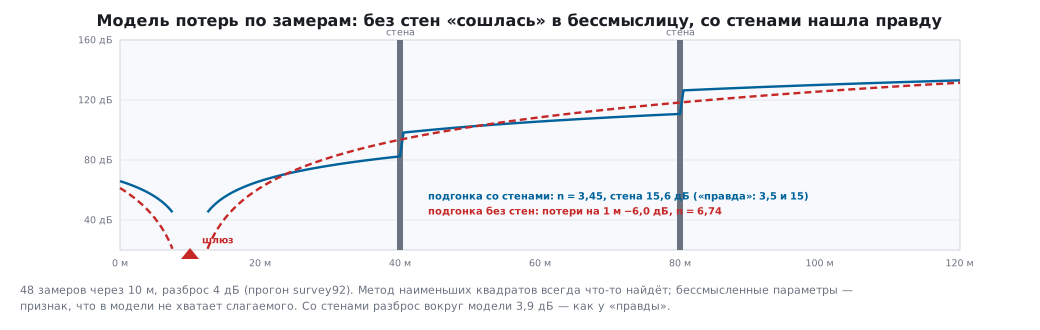
The model without walls also "converged": least squares always finds something. But a negative loss over the first metre and an exponent of 6.7 are nonsense, and predictions from such a model are wrong. With walls the survey found the "truth" to within the shadowing. Hence the rule: the model must include everything that noticeably affects the signal, and for that you need a plan with materials.
Margin for shadowing. Shadowing of 4 dB with a 10 dB margin is 2.5 sigma. Take a place where the model promises exactly the threshold plus the margin. The link there will work in 99.4 % of such places.
92.4 Coverage map
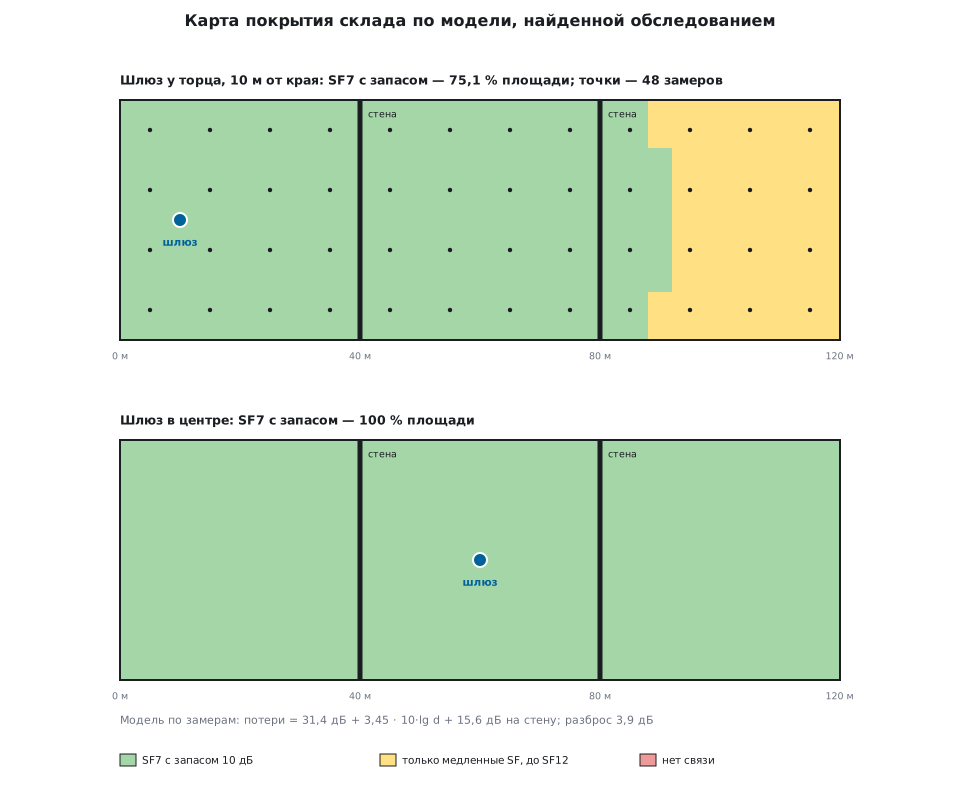
The fitted model computes the power in every 1 × 1 m cell — that is 4800 cells in the warehouse. The colour of a cell shows whether SF7 with a 10 dB margin is enough (section 93.4) or only the slow SFs:
| Gateway position | SF7 with 10 dB margin | SF12 with 10 dB margin |
|---|---|---|
| 10 m from the end wall | 75.1 % of the area | 100 % |
| in the centre, at 60 m | 100 % | 100 % |
| at 100 m | 83.5 % | 100 % |
Moving the gateway is the cheapest improvement. A gateway at the end wall sends its signal through both walls, while from the centre it goes through one at most. After the move, the measurements are repeated: the model is a hypothesis, and only a new measurement confirms it.
92.5 Antenna, cable, location
- Gain and pattern. An antenna does not create power, it redistributes it. An omnidirectional antenna with high gain has its beam flattened towards the horizon: far away the signal is stronger, directly under the antenna it is weaker.
- Matching. Part of the power is reflected back if the antenna is poorly matched. Mismatch loss at VSWR 2 is 0.51 dB, at VSWR 3 it is 1.25 dB. An antenna for the wrong band loses incomparably more.
- Cable. Loss grows with length and frequency. Put the receiver close to the antenna, not the antenna close to the receiver.
- Location. Higher up, away from metal and concrete columns. A metal cabinet around the antenna acts as a shield.
- Power. More power means more range and more interference for neighbours, and the limit is set by the rules (section 93.4).
92.6 Wi-Fi: the same procedure
A Wi-Fi survey follows the same four steps: plan, measurements, map, actions. You measure with an app on a phone or a laptop. The thresholds differ: in Wi-Fi each data rate needs its own SNR, so the map is built for the data rate the devices need. At 2.4 GHz interference comes from neighbouring networks, Bluetooth and microwave ovens. Channel selection is covered in section 89.5.
92.7 Pitfalls
Measurements in an empty building. Racks, goods and people will add loss, and the model does not know about them.
Measurements at hand height. The device will stand near the floor or in a cabinet.
Only RSSI, without SNR. In a noisy workshop a high RSSI is noise.
Ten packets per point. They tell you nothing about the loss.
Measurements at SF12. The 1 % rule will not let you take even a couple of points per hour.
A model without walls. Nice numbers, wrong predictions.
Only one direction was checked. The gateway hears the device, but the device does not hear the gateway: the gateway has the better antenna, the device the weaker transmitter.
No new measurement after moving the gateway. The map stayed a hypothesis.
An antenna for the wrong band. All calculations lose their meaning.
92.8 Summary
- A survey takes four steps: preparation with a plan and materials, measurements where the devices will be, analysis, actions and a repeat measurement.
- Measure RSSI together with SNR. Below the noise the signal itself is weaker than RSSI shows: at SNR −10 dB by 10 dB.
- Packet loss is counted from the numbering. To say "below 3 %" you need 100 packets without loss. Measure at SF7 and add the margin for SF12 by calculation.
- The path loss model is fitted to the measurements, and walls are mandatory in it. Without walls you get nonsense; with walls the warehouse gave n 3.45 and a wall of 15.6 dB.
- The map shows where to put the gateway. Moving it from the end wall to the centre raised SF7 coverage with margin from 75.1 % to 100 % of the area.
Next: section 93 "LoRa: the radio, the SX1276 module, range".