 Embedded HandbookApps
83. I²C and SPI on a prototype: a sensor and a display
On a prototype you connect a sensor over I²C, a thermometer over 1-Wire and a colour display over SPI — and every step hides a trap that the textbook circuit does not show. The buses themselves on STM32 are covered in sections 17 (I²C) and 18 (SPI). This section is about what comes up when you port a prototype: addresses, pull-ups, 1-Wire without a dedicated block, display memory and byte order, and the mistakes in typical examples.
The portable code was built with armclang, the bus scanner with the real
HAL headers; the test and the out-of-bounds example were run on a
PC, and AddressSanitizer caught the out-of-bounds access.
Terms used in the documentation
Term Meaning controller / target (master / slave) the device that drives the bus / the device that answers 7-bit address, reserved addresses a seven-bit address, addresses reserved by the standard bus scan probing every address on the bus pull-up, rise time a resistor to the supply, the time an edge takes to rise bus capacitance the total capacitance of the bus wires and inputs 1-Wire, ROM code, family code 1-Wire, the device address, the device type byte presence pulse the device's reply to a reset half-duplex transmit and receive on one wire, in turns chip select (CS) the line that selects one device framebuffer a memory copy of the whole frame RGB565 colour in 16 bits: 5 + 6 + 5 buffer overflow / underflow access past the end / before the start of an array
83.1 I²C: the address that "does not respond"
There are fewer addresses than it seems. Seven bits give 128 addresses, but 0x00–0x07 and 0x78–0x7F are reserved by the standard, which leaves devices 112, from 0x08 to 0x77. A typical scanner walks 8…126 and also knocks on seven reserved addresses. The correct sweep stops at 0x77.
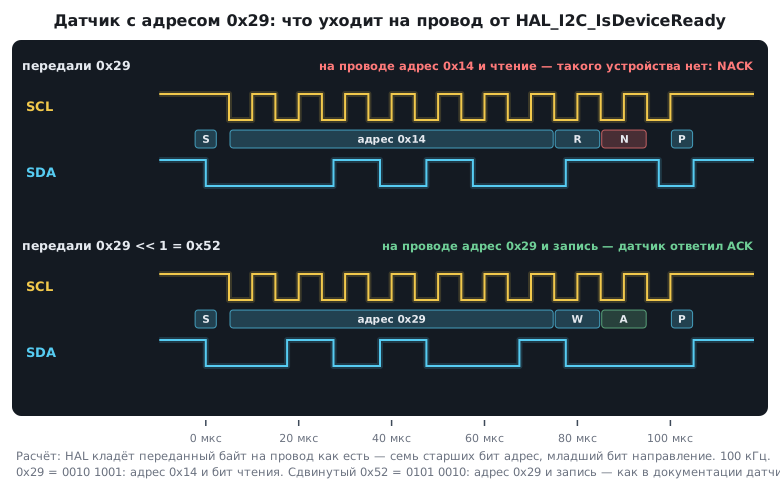
Seven bits or eight. The sensor datasheet gives a seven-bit address,
for example 0x29. The Arduino Wire library takes it as is. HAL
on STM32 expects the address already shifted one bit to the left — 0x52; the HAL
source says exactly that. Pass 0x29 and you get "sensor does not
respond" with a perfectly good circuit. The shift itself and the direction bit are covered in
section 17.2.
/* found — найденные семибитные адреса; вернёт их число */
int i2c_scan(uint8_t *found, int max)
{
    int n = 0;
    for (uint8_t a = 0x08; a <= 0x77 && n < max; a++)
        if (HAL_I2C_IsDeviceReady(&hi2c1, (uint16_t)(a << 1), 1, 10) == HAL_OK)
            found[n++] = a;
    return n;
}
Three mistakes from typical examples for a sensor on Wire:
Wire.begin()is called once insetup(), before the first transfer, not inside the loop afterbeginTransmission;- waiting for a reply with
while (Wire.available() == 0);hangs forever if the sensor did not answer.requestFromitself returns the number of bytes received — check that instead; - the distance reading is turned into an LED number with
map(dist, 0, 200, 0, 8)and used to index an array of eight. At a distance of 200mapreturns 8 — an index past the end of the array.
Pull-ups. Both I²C lines are pulled high by resistors (section 17.1). They are sized by the edge rise time: roughly 0.85·R·C. With a bus capacitance of 100 pF:
| Pull-up | Edge | 100 kHz (up to 1000 ns) | 400 kHz (up to 300 ns) |
|---|---|---|---|
| 4.7 kΩ | 398 ns | ✓ | ✗ |
| 2.2 kΩ | 186 ns | ✓ | ✓ |
For 400 kHz at 100 pF the pull-up must be no more than 3.5 kΩ, and from below it is limited by the current the pin sinks to pull the line low: at 3 mA and 3.3 V — no less than 967 Ω. Every ready-made module carries its own 4.7 kΩ, and on a shared bus they end up in parallel: three modules give 1.57 kΩ, still fine; five give 940 Ω, already below the limit. Remove the extra pull-ups from the modules.
83.2 1-Wire: a thermometer on a single wire
The 1-Wire bus gets by with one data line (plus ground): the controller pulls it to ground with pulses of different length, the pull-up brings it back high. Every device carries a factory-programmed 64-bit address: a family code byte, 48 bits of serial number and a CRC byte. The CRC is computed from the other bytes, so there are 2⁵⁶ ≈ 7.2·10¹⁶ distinct addresses, and within one family 2⁴⁸ ≈ 2.8·10¹⁴.
| Action | Low level |
|---|---|
| reset | at least 480 µs, then the device answers with a presence pulse |
| write 0 | about 60 µs |
| write 1 or read | no more than 15 µs |
The address CRC is the eighth byte. Always check it: the wire is long, the data is slow, interference is likely. A handy property: the CRC of all eight bytes of a valid address is zero.
/* ── 1-Wire: CRC-8 с полиномом x^8 + x^5 + x^4 + 1, младшим битом вперёд ── */
uint8_t crc8_1wire(const uint8_t *p, size_t n)
{
    uint8_t crc = 0;
    while (n--) {
        uint8_t b = *p++;
        for (int i = 0; i < 8; i++) {
            uint8_t mix = (uint8_t)((crc ^ b) & 1);
            crc >>= 1;
            if (mix)
                crc ^= 0x8C;
            b >>= 1;
        }
    }
    return crc;
}
The check value of this polynomial for the string "123456789" is A1; the test
confirmed it, and also that a single flipped address bit gives a non-zero CRC.
1-Wire on STM32 without counting microseconds. STM32 has no dedicated 1-Wire block. You can toggle a pin from a timer, but it is simpler to use a UART in half-duplex: the TX pin is open-drain with a pull-up, transmit and receive share one wire. The length of the low level is set by the byte itself:
| What you need | Baud rate | Byte | Low level |
|---|---|---|---|
| reset | 9600 baud | 0xF0 |
start + 4 zeros = 520.8 µs |
| write 0 | 115200 baud | 0x00 |
9 bits = 78.1 µs |
| write 1 or read | 115200 baud | 0xFF |
start bit only = 8.68 µs |
The echo comes back into the receiver: if the sensor pulled the line low — with a presence pulse after a reset or with a zero during a read — the received byte differs from the one sent.
/* Сброс: 0xF0 на 9600 бод. Датчик отвечает, прижимая линию, — эхо не 0xF0. */
int ow_reset(void)
{
    USART2->BRR = PCLK1 / 9600u;
    uint8_t echo = ow_xfer(0xF0);
    USART2->BRR = PCLK1 / 115200u;
    return echo != 0xF0;                      /* 1 — на шине кто-то есть */
}

/* Бит: 0x00 записывает ноль, 0xFF — единицу или читает бит от датчика */
int ow_bit(int bit)
{
    return ow_xfer(bit ? 0xFF : 0x00) == 0xFF;
}
On the F1 USART half-duplex is enabled with the HDSEL bit. USART2 sits on the
36 MHz bus: the divisors are 3750 and 312, and the second rate comes out at 115385 baud —
an error of 0.16 %, with plenty of margin for 1-Wire (section 16).
83.3 SPI and the display
The bus itself is section 18. On a prototype with a display three things matter.
A pull-up on the select pin. People often write that SPI needs no pull-ups. For the clock and data lines that is true, but the chip select pin (CS) is pulled up to the supply: while the microcontroller is in reset or booting, its pins float, and a display or flash memory may take garbage as a command. With a pull-up the device stays deselected until the program starts.
Memory. A 240×240 frame in 16-bit colour is 115200 bytes. The F103C8 has only 20 KB of RAM: even a 128×160 frame (40960 bytes) does not fit. You draw in pieces — one line or one rectangle at a time, setting a window on the display. On the F407 a 240×240 frame fits in RAM.
Time. A full 240×240 frame over SPI at 18 MHz (the SPI limit of the F103, section 18.3) takes 51.2 ms, at 9 MHz — 102.4 ms. On breadboard wires anything above 8–10 MHz usually fails (section 18), so on the prototype the animation lags, and on the board it does not.
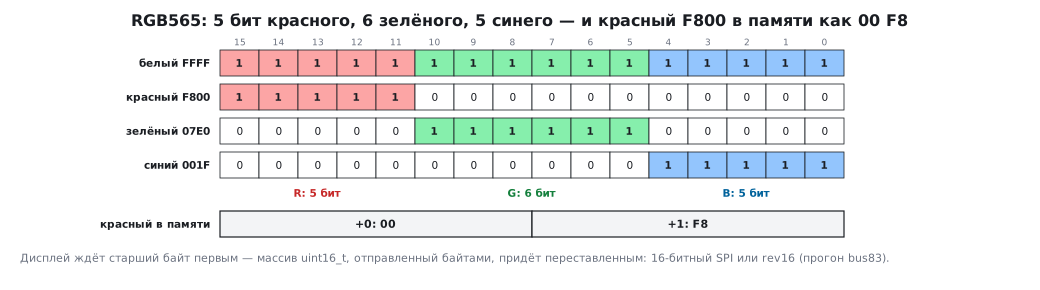
Colour and byte order. Displays take colour in 16 bits: 5 bits of red, 6 of green, 5 of blue.
/* ── цвет для дисплея: 5 бит красного, 6 зелёного, 5 синего ── */
uint16_t rgb565(uint8_t r, uint8_t g, uint8_t b)
{
    return (uint16_t)(((r & 0xF8u) << 8) | ((g & 0xFCu) << 3) | (b >> 3));
}
White is FFFF, red is F800, green is 07E0, blue is 001F.
The display expects the high byte first, while in Cortex-M memory red F800
is stored as 00 F8 — low byte first (section 67). A uint16_t array
sent over SPI byte by byte, or through DMA in bytes, arrives with
its bytes swapped, and the colours "drift". The cure is the 16-bit SPI mode
or swapping the bytes — on Cortex-M that is a single rev16 instruction
(section 78.2).
83.4 A number on the screen: two buffer mistakes
A buffer with no room for the terminator. A typical example prints the ADC reading
through a char[4] array. But 1023 is four characters, plus the terminating
zero — five bytes. Tested: in char[4] the number 1023 turns into
"102", in char[5] it is printed in full; −12 in char[3] becomes
"−1". Size the buffer for the longest value with its sign and the terminator, and
snprintf returns the length it needed — that shows the truncation:
int fmt_value(char *buf, size_t n, int v)
{
    return snprintf(buf, n, "%d", v);
}
On AVR with 2 KB of RAM there is also the String class, which takes
memory from the heap on every conversion — heap fragmentation (section 72).
A static buffer and snprintf are more reliable.
Shifting the history past the start of the array. A temperature graph keeps the 120 latest values and shifts them by one place on every measurement:
for (int a = 119; a >= 0; --a)      /* при a = 0 читает history[-1] */
    history[a] = history[a - 1];
The last step of the loop reads the element before the array. On Arduino this
silently corrupts a neighbouring variable; on a PC AddressSanitizer
stops the program with the diagnosis stack-buffer-underflow. With the condition
a >= 1 the program works and puts new values at the front: 22, 21,
20. Better still, do not shift 120 numbers on every measurement at all: a ring
buffer with a write index, as in the moving average (section 81.4), does
the same with a single write.
83.5 Pitfalls
An I²C sensor "does not respond" after the move to STM32. HAL was given the seven-bit address without the shift.
The scanner finds "devices" at odd addresses. It was probing the reserved addresses 0x78–0x7E.
The program hangs while polling the sensor. An endless wait on
Wire.available() without checking for a reply.
The I²C bus works at 100 kHz and fails at 400. A 4.7 kΩ pull-up is too weak for that capacitance.
With five modules the bus stopped working. Their pull-ups ended up in parallel — below the minimum allowed resistance.
The thermometer sometimes shows nonsense. The CRC is not checked.
At power-up the display shows garbage. The CS pin has no pull-up.
The colours on the display are mixed up. The byte order of the 16-bit colour.
The framebuffer does not build for the F103. 115200 bytes against 20 KB of RAM — draw in windows.
The reading 1023 is printed as 102. The buffer has no room for the terminator.
A variable next to the graph gets corrupted. The history shift reads before the start of the array.
83.6 Summary
- There are 112 I²C addresses, from 0x08 to 0x77; HAL expects the address shifted left,
Wiredoes not. - The pull-up is sized by the 0.85·R·C edge: 4.7 kΩ is for 100 kHz; for 400 kHz at 100 pF — no more than 3.5 kΩ; the modules' pull-ups in parallel add up.
- 1-Wire: one wire, a 64-bit address with CRC; on STM32 it is convenient through USART in half-duplex — reset with the byte 0xF0 at 9600, bits at 115200.
- The CS pin is pulled up to the supply. A 240×240 frame does not fit in the F103C8; over SPI it takes 51.2 ms at 18 MHz. RGB565 colour goes out high byte first — not the way it is stored in memory.
- A text buffer is sized for the longest value plus the terminator; shifting
an array with the condition
a >= 0reads before its start.
Next: section 84 "Interrupts and timing on a prototype".