 Embedded HandbookApps
Appendix E. Board pinouts
Three boards this handbook is written on: BluePill (F103), Nucleo‑64 (F401/F411 and others in the same package) and Discovery F407. For each one, what is wired to what on the board itself: LEDs, buttons, crystals, USB, and which pins are therefore taken.
All designations are as on the board silkscreen. Alternate functions of the pins come from the reference manual; here are only those that matter for the projects from the catalog (section 38).
E.1 BluePill — STM32F103C8T6
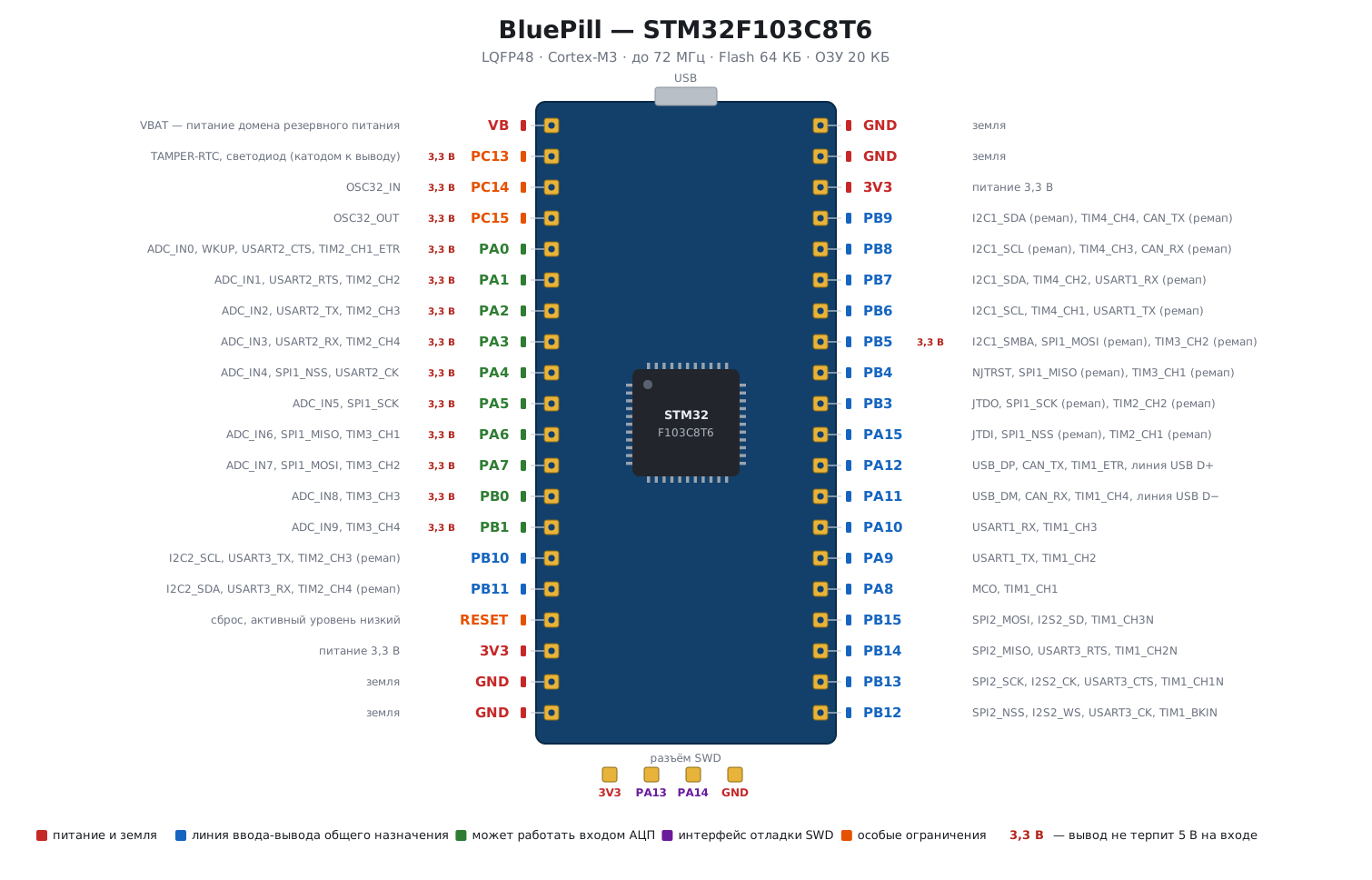
| On the board | Pin | Note |
|---|---|---|
LED PC13 |
PC13 |
cathode to the pin: 0 means on, 1 means off; the pin current is small, do not load it |
| HSE crystal | PD0/PD1 |
8 MHz; the pins are taken |
| LSE crystal | PC14/PC15 |
32768 Hz, footprint for it; when used, these are weak pins |
| USB | PA11 D−, PA12 D+ |
the D+ pull-up on the board is often not 1.5 kΩ (section 20) |
| debug | PA13 SWDIO, PA14 SWCLK |
four-pin header; PB3/PB4/PA15 are taken by JTAG after reset; you free them by disabling JTAG (below) |
| boot | BOOT0, BOOT1 (PB2) |
jumpers; BOOT0 = 1 starts the bootloader on UART1 |
| reset | NRST |
button |
| power | 5V, 3.3, GND, VBAT |
the on-board regulator is weak: power LED strips and modules from a separate source |
Taken and conditionally taken: PC13–PC15 (LED, LSE), PD0/PD1
(HSE), PA11/PA12 (USB), PA13/PA14 (SWD), PB2 (BOOT1).
There are 27 free general-purpose lines, but three of them have to be freed first.
PB3, PB4 and PA15 belong to JTAG after reset: JTDO, NJTRST
and JTDI, even if only SWD is connected. A classic BluePill trap:
"PB3 and PB4 do not work as outputs". They become ordinary pins
if you disable JTAG and keep SWD:
RCC->APB2ENR |= RCC_APB2ENR_AFIOEN;
AFIO->MAPR = (AFIO->MAPR & ~AFIO_MAPR_SWJ_CFG) | AFIO_MAPR_SWJ_CFG_JTAGDISABLE;
5 V tolerant (FT in the datasheet): PA8–PA15, PB2–PB4,
PB6–PB15. Not 5 V tolerant: PA0–PA7, PB0, PB1, PB5
and PC13–PC15. For inputs from 5-volt logic use only the tolerant ones,
and without the pull-up enabled.
Default buses:
| Block | Pins |
|---|---|
| USART1 | PA9 TX, PA10 RX |
| USART2 | PA2 TX, PA3 RX |
| USART3 | PB10 TX, PB11 RX |
| I2C1 | PB6 SCL, PB7 SDA (remap: PB8/PB9) |
| I2C2 | PB10 SCL, PB11 SDA |
| SPI1 | PA5 SCK, PA6 MISO, PA7 MOSI, PA4 NSS |
| SPI2 | PB13 SCK, PB14 MISO, PB15 MOSI, PB12 NSS |
| CAN | PA11 RX, PA12 TX — shared with USB |
| ADC1 | PA0–PA7, PB0, PB1 (channels 0–9) |
| TIM1 | PA8–PA11 channels 1–4 |
| TIM2 | PA0–PA3 |
| TIM3 | PA6, PA7, PB0, PB1 |
| TIM4 | PB6–PB9 |
E.2 Nucleo‑64 — STM32F401RE / F411RE
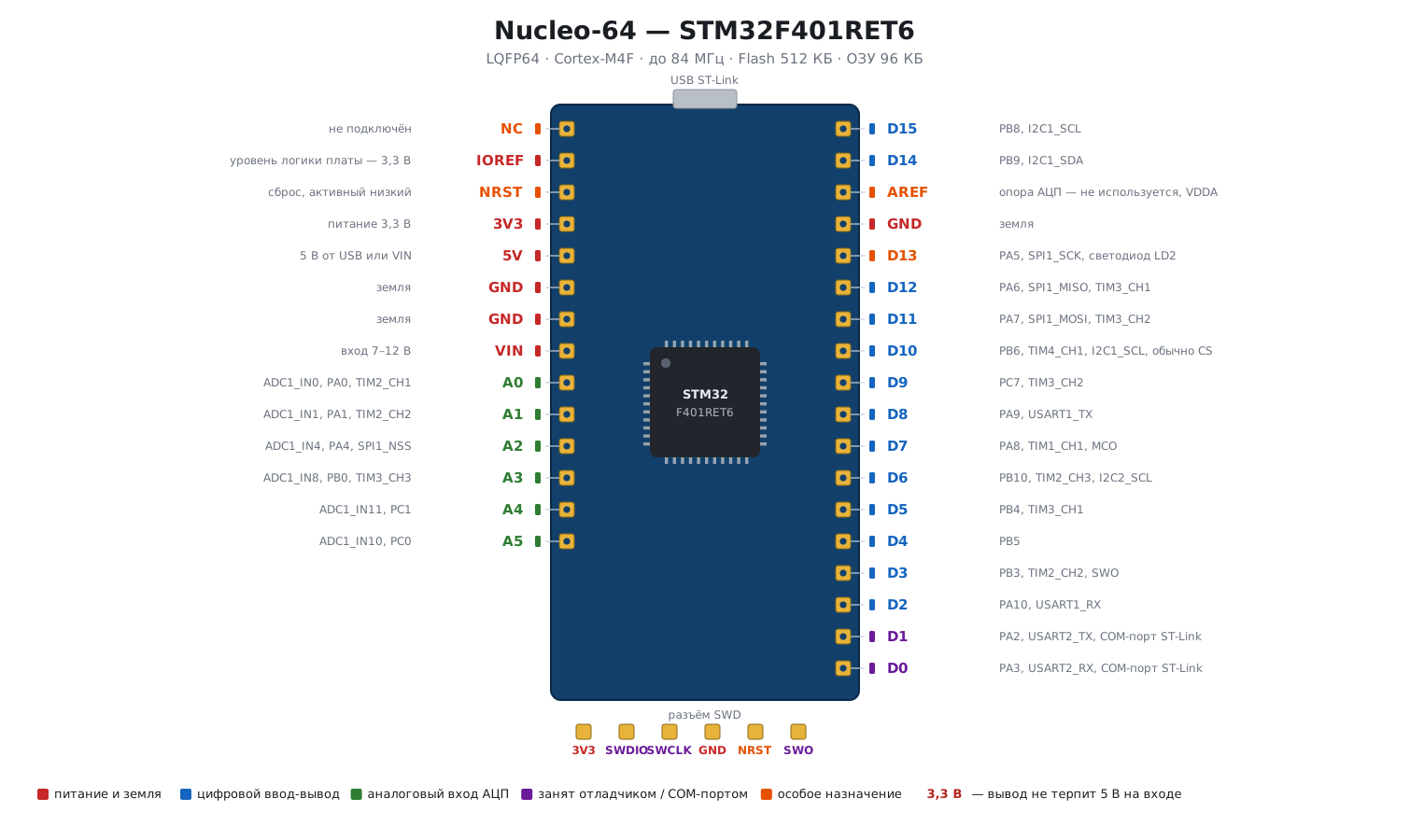
A board with two rows of headers: the inner Arduino-style one (CN5–CN9)
and the outer Morpho one (CN7, CN10) with all the chip pins. The
ST‑Link debugger is on the board, and the virtual COM port is wired to USART2.
| On the board | Pin | Note |
|---|---|---|
LED LD2 (green) |
PA5 |
anode to the pin: 1 means on; it is also D13 and SPI1_SCK |
button B1 (blue) |
PC13 |
pressed gives a low level; pull-up on the board |
| virtual COM port | PA2 TX, PA3 RX |
USART2 through ST‑Link; do not use for anything else |
| HSE crystal | PF0/PF1 (PH0/PH1) |
on many revisions not fitted: the clock comes from the ST‑Link MCO, 8 MHz |
| LSE crystal | PC14/PC15 |
32768 Hz, fitted |
| debug | PA13, PA14 |
through ST‑Link; PB3 is SWO |
| reset | NRST |
button B2 |
⚠️ HSE on Nucleo is not a crystal but a signal from the debugger. By default the jumpers are set so that
OSC_INreceives 8 MHz from the MCO of the ST‑Link chip. So in the RCC settings (section 6) you select an external signal, not a crystal (bypass mode), otherwise the PLL will not start. And with the debugger disconnected there is no clock, only HSI.
Arduino headers
| Label | Pin | Functions |
|---|---|---|
D0 |
PA3 |
USART2_RX — taken by the virtual port |
D1 |
PA2 |
USART2_TX — taken |
D2 |
PA10 |
USART1_RX |
D3 |
PB3 |
TIM2_CH2, SWO |
D4 |
PB5 |
|
D5 |
PB4 |
TIM3_CH1 |
D6 |
PB10 |
TIM2_CH3, I2C2_SCL |
D7 |
PA8 |
TIM1_CH1, MCO |
D8 |
PA9 |
USART1_TX |
D9 |
PC7 |
TIM3_CH2 |
D10 |
PB6 |
TIM4_CH1, I2C1_SCL, usually CS for SPI |
D11 |
PA7 |
SPI1_MOSI, TIM3_CH2 |
D12 |
PA6 |
SPI1_MISO, TIM3_CH1 |
D13 |
PA5 |
SPI1_SCK, LED |
D14 |
PB9 |
I2C1_SDA |
D15 |
PB8 |
I2C1_SCL |
A0 |
PA0 |
ADC1_IN0, TIM2_CH1 |
A1 |
PA1 |
ADC1_IN1, TIM2_CH2 |
A2 |
PA4 |
ADC1_IN4, SPI1_NSS |
A3 |
PB0 |
ADC1_IN8, TIM3_CH3 |
A4 |
PC1 |
ADC1_IN11 |
A5 |
PC0 |
ADC1_IN10 |
The LED on D13/PA5 is the same line as SPI1_SCK: when you work
with SPI1 the LED flickers, and its resistor loads the line. For SPI1
on Nucleo either accept that or move it to PB3 with a remap.
E.3 Discovery — STM32F407VGT6
A board with the chip in an LQFP100 package, four LEDs,
an accelerometer, a microphone and an audio DAC. All pins go to two rows
of pin headers, P1/P2.
| On the board | Pin | Note |
|---|---|---|
LD4 green |
PD12 |
anode: 1 means on; TIM4_CH1 |
LD3 orange |
PD13 |
TIM4_CH2 |
LD5 red |
PD14 |
TIM4_CH3 |
LD6 blue |
PD15 |
TIM4_CH4 |
button B1 (blue) |
PA0 |
pressed gives a high level; pull-down on the board |
| HSE crystal | PH0/PH1 |
8 MHz, fitted; PLL: M = 8, N = 336, P = 2, Q = 7 → 168 MHz and 48 MHz for USB |
| LSE crystal | PC14/PC15 |
32768 Hz |
| USB OTG FS | PA11 D−, PA12 D+, PA9 VBUS, PA10 ID |
micro‑USB connector CN5; the pull-up is built in (section 20) |
| LIS3DSH accelerometer | SPI1: PA5 SCK, PA6 MISO, PA7 MOSI; PE3 CS; PE0/PE1 INT |
takes SPI1 |
| MP45DT02 microphone | PC3 data, PB10 clock |
I2S2 |
| CS43L22 audio DAC | I2S3: PC7 MCK, PC10 CK, PC12 SD, PA4 WS; I2C1: PB6/PB9; PD4 reset |
takes I2S3 and I2C1 |
| debug | PA13, PA14, PB3 SWO |
ST‑Link on the board |
Four LEDs on four channels of a single TIM4 make a ready-made bench
for PWM (section 13): four independent brightness levels from one timer.
⚠️
PA0on Discovery is a button with a pull-down, unlike BluePill and Nucleo, where the button pulls to ground. The active level is high; do not enable the internal pull-up, it will fight the external one.
Taken by the board peripherals: SPI1 (accelerometer), I2S2 (microphone),
I2S3 and I2C1 (audio), PA0 (button), PD12–PD15 (LEDs),
PA9–PA12 (USB). When you use these blocks for your own purposes, keep the
connected chips in mind: the accelerometer holds CS high and does not interfere
as long as PE3 is not pulled low.
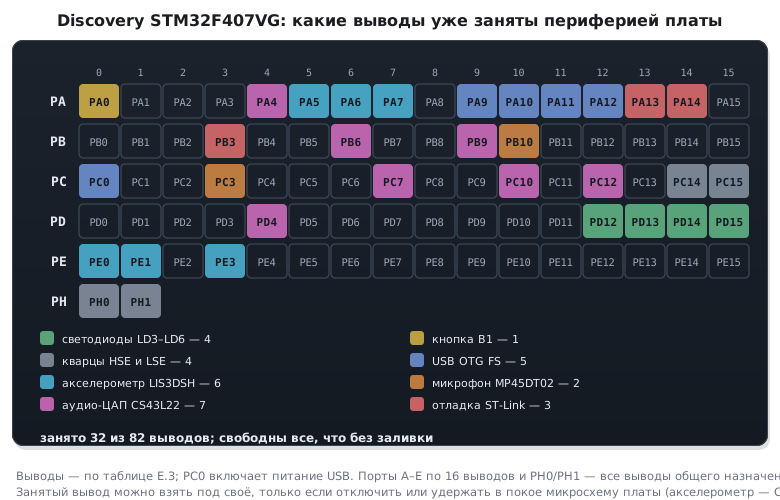
Free buses: USART2 (PA2/PA3), USART3 (PB10/PB11;
PB10 is shared with the microphone), SPI2 (PB13–PB15), I2C2 (PB10/PB11),
I2C3 (PA8/PC9), CAN1 (PD0/PD1), CAN2 (PB12/PB13, shared
with SPI2), ADC on PA1–PA3, PC1, PC2, PC4, PC5 (PC0 switches on the USB
power, PC3 is the microphone data), TIM1–TIM3, TIM5, TIM8.
The alternative CAN pins are taken on this board: for CAN1 on PB8/PB9 the obstacle is
PB9, the SDA line of the audio DAC; for CAN2 on PB5/PB6 it is PB6, SCL of the same DAC.
E.4 Common to all boards
| BluePill | Nucleo‑64 | Discovery F407 | |
|---|---|---|---|
| LED | PC13, active 0 |
PA5, active 1 |
PD12–PD15, active 1 |
| button | none | PC13, active 0 |
PA0, active 1 |
| HSE | 8 MHz crystal | 8 MHz signal from ST‑Link (bypass) | 8 MHz crystal |
| debugger | external | on the board | on the board |
| COM port | external adapter | USART2 through ST‑Link |
none, use an adapter |
| USB device | PA11/PA12, external pull-up |
no connector | PA11/PA12, built-in pull-up |
| core frequency | 72 MHz | 84 (F401) / 100 (F411) | 168 MHz |
Three things break porting code between boards: LED polarity, button polarity and HSE mode. A project that blinks on BluePill stays lit all the time on Discovery; a project with a button from Nucleo sees it as permanently pressed on Discovery; a project with a crystal from BluePill on Nucleo does not start the PLL. All three are in the first lines of initialization.