 Embedded HandbookApps
193. Device service: systemd, journal, permissions and watchdog
A program on a microcontroller starts by itself: you flash it and it runs
from the first clock cycle. On a Linux device someone has to start the program,
restart it after a crash, send its output to a log and keep it from having extra
privileges. That is the job of systemd, and all of it is described in a single text file.
The experiments run in the stm-linux:1 image: the service file is parsed by systemd itself
(version 252) with systemd-analyze verify; _verify/linux191_check.py checks the results.
Terms used in the documentation
Term Meaning unit, service unit a configuration unit; a service systemd target a set of services, a state of the system notify protocol, sd_notify the service telling the manager it is ready watchdog a timer the service must check in with regularly journal one place for the output of all services udev rule a rule that assigns permissions and names to devices hardening restricting a service's privileges with kernel features drop-in an addition to a service file that leaves the original untouched
193.1 The whole service file
The service file shipped with the image goes to
/usr/lib/systemd/system/device.service, and /etc/systemd/system/ is left
for changes made on the device — full replacements and device.service.d/ drop-ins (193.6).
Three sections: who we are, what to run, when to start.
[Unit]
Description=Прибор: сбор телеметрии и связь с микроконтроллером
After=network-online.target dev-ttyS0.device
BindsTo=dev-ttyS0.device
Wants=network-online.target

[Service]
Type=notify
ExecStart=/usr/bin/device --port /dev/ttyS0 --config /etc/device.conf
ExecReload=/bin/kill -HUP $MAINPID
Restart=always
RestartSec=2
WatchdogSec=30
TimeoutStopSec=10
User=device
SupplementaryGroups=dialout gpio i2c spi
StateDirectory=device
NoNewPrivileges=yes
ProtectSystem=strict
ProtectHome=yes
PrivateTmp=yes

[Install]
WantedBy=multi-user.target
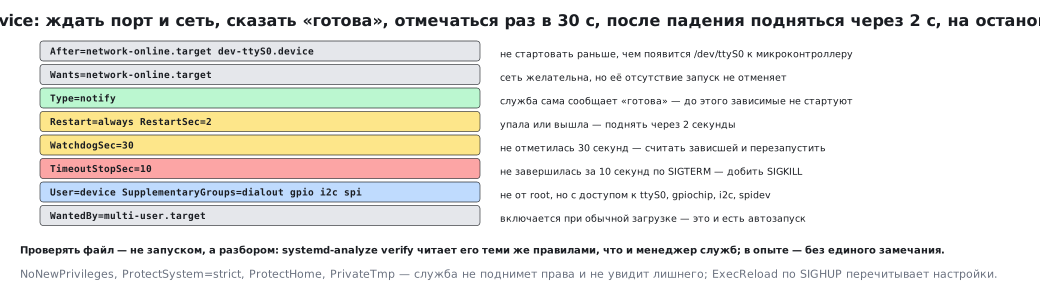
| Line | What it means on the device |
|---|---|
BindsTo= and After= … dev-ttyS0.device |
wait for the serial port to the microcontroller to appear and stop if it disappears; an After= alone without a dependency waits for nothing |
Wants=network-online.target |
the network is desirable, but its absence does not cancel the start |
Type=notify |
the service itself says "I am ready" — until then dependent units do not start |
Restart=always, RestartSec=2 |
crashed or exited — bring it back up after two seconds |
WatchdogSec=30 |
no check-in for 30 seconds — consider it hung and restart it |
TimeoutStopSec=10 |
did not exit within 10 seconds after SIGTERM — finish it with SIGKILL |
User=device |
does not run as root |
SupplementaryGroups= |
but gets access to /dev/ttyS0, gpiochip, i2c, spidev (section 192) |
StateDirectory=device |
the only directory the service writes to under ProtectSystem=strict: /var/lib/device (193.5) |
WantedBy=multi-user.target |
enabled on a normal boot — this is what autostart is |
Check the file not by starting it but by parsing it: systemd-analyze verify
reads it with the same rules as the service manager. In the experiment the file above
was accepted without a single remark.
But verify does not check users and groups. The experiment image had
neither the device user nor the gpio, i2c and spi groups — and zero remarks.
Starting the same service in the same image under a real systemd ended with code
217/USER, and with the user but without the groups — 216/GROUP. A clean Debian
does not have these three groups; you create them together with the user:
useradd --system device
groupadd --system gpio
groupadd --system i2c
groupadd --system spi
193.2 An error in the file is visible before the start
Two typos, each of which would cost a reboot on the device:
| What was written | What systemd-analyze verify says |
|---|---|
Restart=всегда |
Failed to parse service restart specifier |
WatchdogSec=30x |
Failed to parse sec value |
⚠️ The exit code of
verifydoes not always reflect a parse error. In the experiment both typos were printed to the output, but the exit code stayed zero. So the build checks the command's output, not only its exit code: empty output means the file is clean.
193.3 The service watchdog
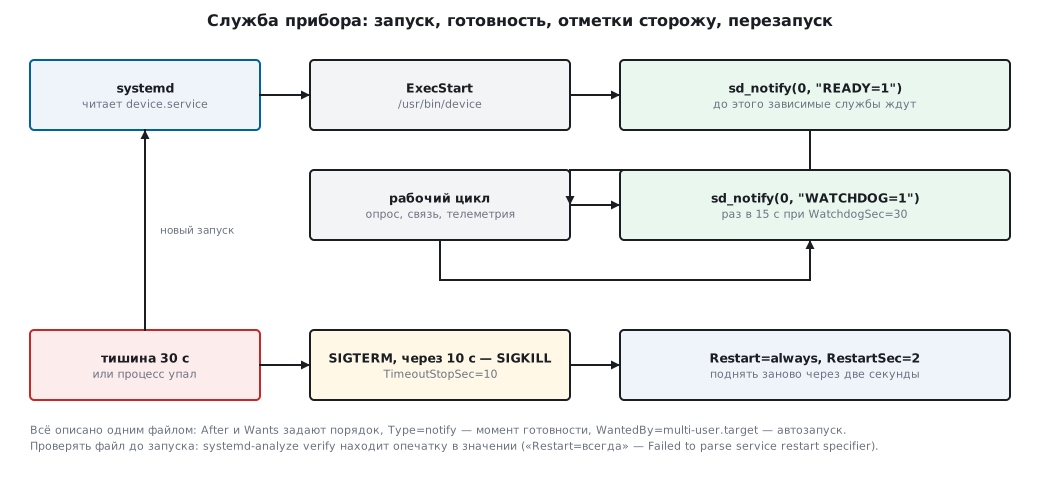
WatchdogSec=30 turns on the same thing as IWDG on a microcontroller
(section 12.2), except that systemd acts as the watchdog. The service must
check in periodically:
#include <systemd/sd-daemon.h>

sd_notify(0, "READY=1");                 /* для Type=notify: «я поднялась» */
for (;;) {
    do_work();
    sd_notify(0, "WATCHDOG=1");          /* отметка сторожу */
}
The usual practice is to check in twice as often as the timeout: with WatchdogSec=30, once every 15 seconds.
Then one missed check-in does not kill a working device, and a hang
is still detected. The check-in is made in the same loop as the useful
work: a separate timer thread will keep checking in faithfully even for a hung
service — exactly the same mistake as "feeding IWDG from a timer interrupt"
(section 12.7).
Restart after a hang is configured right there: Restart=always brings
the service back up after a watchdog kill too. If the device must reboot
entirely, add StartLimitAction=reboot and a limit on attempts.
But WatchdogSec watches the service, not the system: if the kernel or systemd
itself hangs, there is nobody to restart anything. The direct counterpart of IWDG is the processor's hardware
watchdog /dev/watchdog, and systemd feeds it by itself if you set RuntimeWatchdogSec=30s
in the [Manager] section of /etc/systemd/system.conf.
The kernel hangs — the board reboots. A device uses both levels: the hardware
watches systemd, systemd watches the service.
193.4 The journal instead of a log file
Everything the service prints to stdout and stderr is collected by the journal. You do not need
your own file, and that is a win: on an embedded machine a partition filling up
with logs is a common cause of failure.
journalctl -u device -f            # смотреть в реальном времени
journalctl -u device -b            # только с этой загрузки
journalctl -u device -p err        # только ошибки
journalctl --disk-usage            # сколько занято журналом
The level of a line is set by a prefix: <3> is an error, <6> is information,
<7> is debug. Printing printf("<3>no reply from the controller\n") lands
in the journal as an error, and journalctl -p err shows it.
One subtlety: the service output goes not to a terminal but to a stream to the journal, and
printf accumulates lines in a buffer — 4096 bytes in the experiment. Lines arrive in the journal
in batches, and when the service dies they are lost: a service with two printf calls and abort()
delivered none of them to the journal, with line buffering it delivered both. In the same way both
lines were lost for a hung service that the watchdog finished off: systemd kills it with the same
SIGABRT, and what gets lost is precisely the last lines before the hang. So
at the start of main you put
setvbuf(stdout, NULL, _IOLBF, 0); /* сбрасывать буфер на каждой строке */
or call fflush(stdout) after important lines; stderr is not buffered
at all.
The journal size is limited in /etc/systemd/journald.conf:
[Journal]
# держать между перезагрузками
Storage=persistent
# больше не занимать
SystemMaxUse=64M
RuntimeMaxUse=16M
A comment in these files goes only on a line of its own, starting with # or ;.
A trailing "# …" after a value becomes part of the value. In the experiment journald
answered such a file with the lines Failed to parse storage setting, ignoring
and Failed to parse size value, ignoring and kept the defaults:
auto storage instead of persistent and its own size limit instead of 64 MB.
193.5 Permissions: not as root
The service from the example runs as the device user. For it to still
see the buses, you need two things: groups in the service file and a udev rule
that gives the group access to the character devices (section 192).
SUBSYSTEM=="gpio", KERNEL=="gpiochip*", GROUP="gpio", MODE="0660"
SUBSYSTEM=="i2c-dev", GROUP="i2c", MODE="0660"
SUBSYSTEM=="spidev", GROUP="spi", MODE="0660"
Three rules, mode 0660: the owner and the group read and write, others
do not. The file goes to /etc/udev/rules.d/99-device.rules.
The four restriction lines in the service file are worth understanding:
| Line | What it forbids |
|---|---|
NoNewPrivileges=yes |
gaining privileges above its own — even through a setuid program |
ProtectSystem=strict |
writing anywhere except what is explicitly allowed |
ProtectHome=yes |
seeing home directories |
PrivateTmp=yes |
seeing someone else's /tmp and leaving traces there |
State (settings, accumulated data) is written not "somewhere" but
to a directory that systemd creates itself: StateDirectory=device gives
/var/lib/device with the right owner.
193.6 Updating the device
You do not edit the service file in place — you add a drop-in:
mkdir -p /etc/systemd/system/device.service.d
printf '[Service]\nEnvironment=DEVICE_LOG=debug\n' > /etc/systemd/system/device.service.d/log.conf
systemctl daemon-reload
systemctl restart device
This way an image update does not overwrite your changes, and systemctl cat device
shows both the original and all drop-ins.
The usual order for updating the device program: put the new file next to the old one,
systemctl restart device, check systemctl is-active device and the journal;
if it did not come up, put the previous file back. Updating the whole image at once
(two partitions, switching the active one) is another story, but there too the service
is described the same way.
193.7 Pitfalls
The service starts before the hardware. After= only orders the start and by itself
waits for nothing: in the experiment a service with just After=dev-ttyS9.device started
without the port, while with BindsTo= it waited for the device. For a port you need the pair
BindsTo=dev-ttyS0.device and After=, for the network — Wants= and
After=network-online.target (and the target itself must be enabled).
Type=simple instead of notify. The manager considers the service ready right
after the process starts, and dependent units start too early.
Watchdog check-ins from a separate thread. The service hangs, but the check-ins keep coming: the watchdog is useless. Check in from the work loop.
Restart=always with a configuration error. The service crashes instantly and
restarts in a loop. The cure is a limit: StartLimitBurst and
StartLimitIntervalSec, otherwise the device is busy doing nothing but restarts.
Logs to your own file. The partition fills up, and the device stops. The journal with
SystemMaxUse will not overflow the disk.
You made a change in /etc/systemd/system, but the service did not change. You need
systemctl daemon-reload: the manager keeps the parsed files in memory.
Running as root "to make it work". The real cause is the permissions on
/dev/...; the cure is a udev rule and groups, not superuser privileges.
193.8 Summary
- A device service is one text file:
Aftersets the order,WantsandBindsToset dependencies,ExecStartsays what to run,WantedBy=multi-user.targetgives autostart. - Check the file with
systemd-analyze verify: in the experiment the correct file was accepted without remarks,Restart=всегдаgaveFailed to parse service restart specifier,WatchdogSec=30xgaveFailed to parse sec value. The exit code stays zero — the build looks at the output. WatchdogSec=30is the same watchdog asIWDG, only external: check in withsd_notify(0, "WATCHDOG=1")twice as often as the timeout and from the work loop. The kernel andsystemditself are watched by the hardware watchdog:RuntimeWatchdogSec=insystem.conf.- Service output goes to the journal; the line level is set by the
<3>prefix, the size is limited bySystemMaxUse. The service'sstdoutgets line buffering (setvbuf), otherwise the lines before a crash are lost. - Permissions are granted with a group and a
udevrule (MODE="0660"), not by running asroot;NoNewPrivileges,ProtectSystem,ProtectHome,PrivateTmprestrict the service in four lines. - Changes go into a drop-in in
device.service.d/, not into the file from the image.
Next: section 194 "Link to the microcontroller: the port on the Linux side, COBS frames and CRC".