 Embedded HandbookApps
37. IoT applications
A device that sends its readings to a server is the most common task today, and it has two levels: how to connect to the network and what to send over it. This section covers the ways of connecting that exist for the F103 and F407, how they differ in cost and complexity, and why the protocol for talking to the server is almost always MQTT.
Terms used in the documentation
Term Meaning network stack / TCP/IP stack the network protocol stack AT command a text command sent to a module hardwired TCP/IP a stack implemented in hardware inside the controller MAC / PHY the data link layer controller / the physical-layer transceiver socket a socket, an endpoint of a connection broker the broker, the MQTT intermediary server topic a topic, the name of a publication channel publish / subscribe publish / subscribe QoS (quality of service) the level of delivery guarantee keep-alive the connection supervision interval retained message a message stored on the broker last will the "last will", a message sent when the connection drops remaining length the length of the rest of the packet
37.1 Three ways to connect
The F103 has no network controller at all. The F407 has an Ethernet controller, but it needs an external physical-layer chip and a TCP/IP stack in the firmware. Hence three paths.
| Module over UART | Module over SPI | Built-in Ethernet | |
|---|---|---|---|
| chip | any | any | F407 only, F107 |
| interface | UART, 2 wires | SPI, 4 wires + INT |
RMII, 9 wires + PHY |
| TCP/IP stack | in the module | in the module, in hardware | in your firmware |
| memory on the STM32 | buffers, ~1 KB | buffers, ~1 KB | tens of KB |
| speed | up to ~1 Mbit/s in practice | up to ~10 Mbit/s | 100 Mbit/s |
| Wi‑Fi | yes | usually wired | no |
| complexity | string parsing | registers and sockets | a full stack |
| "hangs and does not respond" | often | rarely | your responsibility |
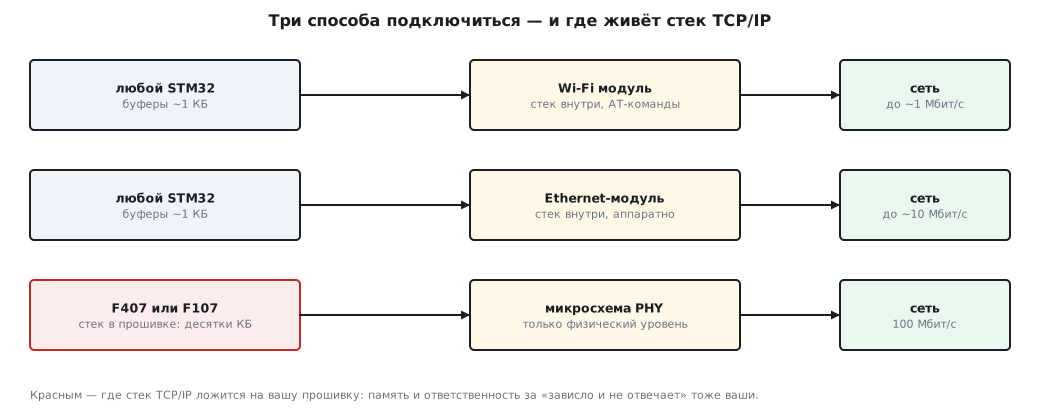
⚠️ The header will not tell you whether the block exists. The file
stm32f10x.his shared by the whole F1 family and declaresETH_BASE,ETH_TypeDefand the pointerETHfor all of them, including the F103, which has no such controller. An accessETH->MACCR = …on the F103 builds without a warning and gives a BusFault at a non-existent address (section 35). Under the conditionSTM32F10X_CLthere are only theETH_IRQnvector and two RCC registers. On the F4 the headers are separate per chip:stm32f407xx.hdeclares Ethernet,stm32f401xe.hdoes not. Check that a block exists in the datasheet, not by whether the code compiles.
Module over UART: AT commands
The cheapest and most common path is a Wi‑Fi module that accepts text commands and replies in text. Usually it is an ESP8266 or ESP32 with AT command firmware — the commands below come from its set:
AT+CWJAP="имя_сети","пароль"     → OK      (секунды)
AT+CIPSTART="TCP","192.168.1.10",1883
AT+CIPSEND=14                     → >       (ждёт данные)
<14 байт>                         → SEND OK
Simple to look at and treacherous to implement. Three things people trip over.
The reply arrives as a stream, not all at once. At 115 200 baud one byte takes
87 µs, a 30-byte line almost 3 ms. You cannot wait in a loop: reception goes
through a stream buffer (section 32) to a parser task that assembles
lines and recognizes OK and ERROR.
Timeouts of different orders. A simple command replies within tens of milliseconds, joining a network takes seconds, up to fifteen. A single "for everything" timeout is either too short for joining or too long for everything else. Each command has its own.
The module is a separate computer with its own failures. It can hang, reboot, lose the network, emit an unsolicited message in the middle of your reply. The program must survive all of this: a link watchdog timer (section 29), resetting the module through a pin, reconnecting on a schedule.
⚠️ Unsolicited messages. The module sends
WIFI DISCONNECT,+IPD,n:with incoming data and the like at any moment — including between your command and its reply. A parser that expects strictly "command → reply" breaks on the very first one. Parse every line by its beginning, not by what you expect.
Module over SPI: the stack in silicon
A chip with an Ethernet controller and a TCP/IP stack inside; the typical one is the W5500: it exposes eight sockets through registers over SPI. No strings, no parsing — you write the address and port, set the "open" bit, check the status, put the bytes into the transmit buffer.
| Pro | Con |
|---|---|
| deterministic: registers, not text | wired only, no Wi‑Fi |
| does not hang the way firmware-based modules do | needs a connector and a cable |
| 32 KB of buffers inside the chip itself | throughput limited by SPI |
| interrupt on event | eight sockets and no more |
At 10 MHz SPI that is 1.25 MB/s raw, half that in practice: more than enough for sensors, too little for video. Of the 32 KB of buffers, 16 are for transmit and 16 for receive; split evenly, each socket gets 2 KB for transmit and 2 KB for receive.
The right choice for a stationary wired device: nothing hangs, nothing needs parsing, all the complexity is in the silicon.
There are also Wi‑Fi modules over SPI with a stack inside, but the typical SPI module is wired. And there is a fourth path, between the second and the third: an Ethernet chip without a stack, for example the ENC28J60. Over SPI it gives you only the data link layer controller and the physical layer, 10 Mbit/s, while the TCP/IP stack lives in the firmware, as on the F407, but on any chip. On the F103C8 only a cut-down stack fits (37.3).
Built-in Ethernet on the F407
The data link layer controller is on the die, the physical layer is an external chip on nine RMII wires, the TCP/IP stack is in the firmware. Usually this is lwIP, and it takes tens of kilobytes of RAM — more than the F103C8 has in total.
| Bytes | |
|---|---|
| receive and transmit buffers with descriptors | 8–16 KB |
| the stack and its memory for connections | 16–24 KB |
| the stack task | stack of 1–2 KB |
In return: 100 Mbit/s, any number of connections, full control. And full responsibility: the stack is in your firmware, so it is your job to configure, maintain and debug it. This is the path for devices where networking is the main function, not an add-on.
Under the kernel the stack lives in a separate task, and application code works through sockets with blocking calls — as on a computer. Without a kernel the stack works too, but in polling mode, and that is noticeably less convenient.
37.2 What to send: why MQTT
You are connected. Next you need a protocol for the device to talk to the server. There are two candidates.
| HTTP | MQTT | |
|---|---|---|
| model | request — response | publish — subscribe through a broker |
| connection | usually a new one per request; HTTP/1.1 can keep it open | one, persistent |
| overhead bytes per message | hundreds | about ten |
| server → device | only when the device asks | at any moment |
| several recipients | no | yes, by subscription |
| link loss | not noticed | the broker sees it and sends the "last will" |
| parsing on the device | text, headers | binary, a dozen bytes |
MQTT is chosen for the first three rows: a persistent connection, a minimum of bytes and the ability of the server to speak first. For a battery-powered device the main one is not setting up the connection again: the TCP handshake is three packets, and TLS adds several more exchanges and kilobytes of certificates. The TCP/IP headers — 40 bytes per packet — are paid equally in both protocols, and against them a hundred overhead bytes versus ten is noticeable, but not decisive.
Packet structure
There are only two fields in the header: the type with flags in one byte and the remaining length.
байт 0:   тип << 4 | флаги
байт 1…4: длина остатка, по 7 бит на байт, старший бит — «есть ещё»
далее:    остаток — зависит от типа
| Type | Byte | Purpose |
|---|---|---|
CONNECT |
0x10 |
introduce yourself to the broker |
CONNACK |
0x20 |
the broker accepted |
PUBLISH |
0x30 + flags |
publish to a topic |
PUBACK |
0x40 |
acknowledgement for QoS1 |
SUBSCRIBE |
0x82 |
subscribe; flag 2 is mandatory |
SUBACK |
0x90 |
subscription accepted |
PINGREQ |
0xC0 |
"I am alive" |
PINGRESP |
0xD0 |
"so am I" |
DISCONNECT |
0xE0 |
disconnecting |
PUBLISH flags: bit 0 — retain on the broker, bits 1–2 — QoS,
bit 3 — duplicate.
The remaining length is encoded in a variable number of bytes: up to 127 — one, up to 16 383 — two, up to 2 097 151 — three, up to 268 435 455 — four; more than four never happens. For device messages it is almost always one.
A complete example — publishing "21.5" to the topic "home/t":
30                      PUBLISH, QoS0
0C                      длина остатка: 12
00 06  h o m e / t      топик: длина 6, шесть байт
2 1 . 5                 тело: 4 байта, без длины — до конца пакета
Fourteen bytes, ten of them overhead. The same HTTP request takes two hundred and more.
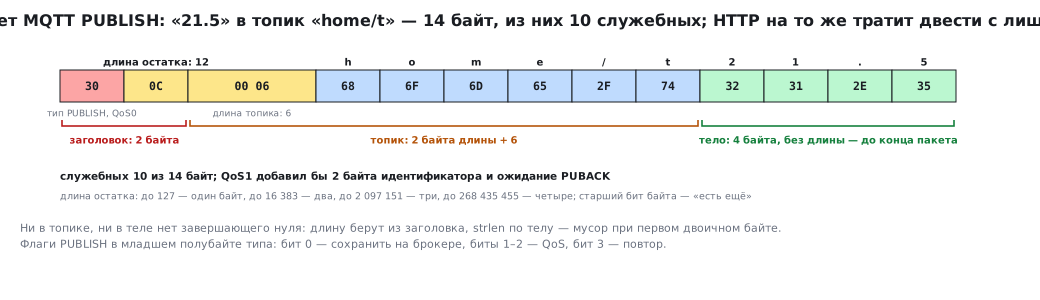
⚠️ The topic and the body are not strings. Neither the topic nor the body has a terminating zero: the topic is preceded by a two-byte length, the body takes everything up to the end of the packet.
strlenon the body gives garbage at the first binary byte. Take the length from the header instead of searching for a zero.
QoS: three levels and two useful ones
| QoS | Guarantee | Cost |
|---|---|---|
| 0 | "fire and forget" | nothing |
| 1 | "arrives at least once" | +2 bytes of identifier, waiting for PUBACK, a duplicate is possible |
| 2 | "arrives exactly once" | four packets per message |
For sensor readings use QoS0: if one is lost, the next one will arrive. For commands to the device use QoS1 and be ready for a duplicate. QoS2 is almost never used on a microcontroller: the cost does not pay off.
Keep-alive: an obligation, not an option
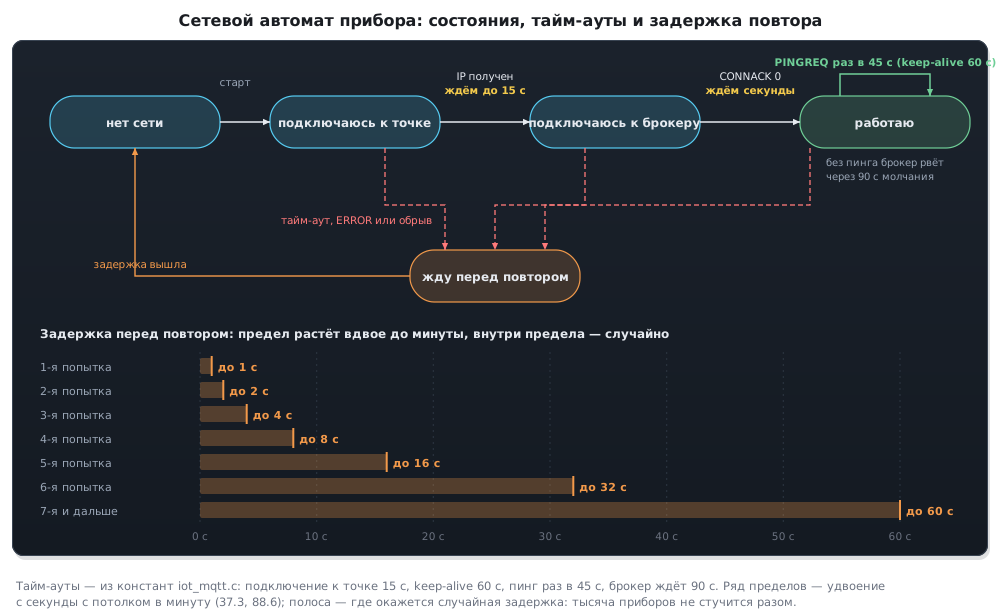
In CONNECT the device states an interval in seconds. The broker waits for one and a half
intervals of silence and drops the connection. At 60 seconds that is 90 seconds
of silence, and the device is disconnected without warning.
So the device must send PINGREQ more often than the interval — with a margin,
once every 45 seconds with an interval of 60. A software timer (section 29)
restarted on every transmission: if something went out, no ping is needed;
if things went quiet, the ping fires by itself.
The reply is awaited in the other direction too. If no PINGRESP arrives
within a few seconds of a PINGREQ, the connection is considered lost: close the socket
and move on to reconnecting. TCP itself will notice the break late — in section
106.6 it takes 924.6 s before it gives up on retransmissions — and all that time the device
accumulates readings for a broker that is no longer there.
⚠️ The broker notices a broken link by keep-alive, not by TCP. The radio is gone, the TCP connection hangs — the broker will learn about it only after one and a half intervals. Then it publishes the "last will", a message that the device left in
CONNECTin case of a break. This is how the server learns that the device is gone, without polling it.
A library or your own code
Parsing and building packets yourself is an evening's work: the format
is a dozen bytes. Ready-made clients for microcontrollers exist, and they
take care of keep-alive, QoS1 and reconnection. Use a ready-made one,
but understanding the format is a must: debugging bytes on the wire, when
"the broker answers CONNACK with code 5", is impossible without it.
37.3 Device architecture
A typical structure under the kernel, with a module over UART:
| Task | Priority | What it does |
|---|---|---|
| UART receive → stream buffer | interrupt | bytes into the buffer |
| module parser | 3 | lines, OK/ERROR, unsolicited messages |
| network state machine | 2 | connecting, reconnecting, keep-alive, sending |
| sensors | 2 | measurements → queue |
| main logic | 1 | what to show, what to send |
The network state machine is a finite state machine with the states "no network", "joining the access point", "connecting to the broker", "running", "waiting before a retry". Each state has its own timeout; each break returns to the start with a delay that grows exponentially: one second, two, four, up to a minute — and within that limit the delay is chosen at random (section 88.6). Without a growing delay a device that has lost the server will hammer it every second, and without the spread a thousand devices that lost the server at the same moment will knock on it at the same moment too.
Sensor readings do not go to the network directly: they are put into a queue,
and the network state machine takes them when the connection is alive. While there is no network,
the queue accumulates; when it overflows, drop the old ones, not the new ones. A kernel queue
rejects the new value on overflow, so the old ones are dropped explicitly: if
xQueueSend with zero wait returned errQUEUE_FULL, take out one
value with xQueueReceive(q, &old, 0) and send the new one again. There is only one writer
to the queue — the sensor task.
Memory on the F103C8
| Bytes | |
|---|---|
| kernel with the heap for tasks | ≈ 6 KB |
| communication buffers | 768 |
| a queue of readings for 32 entries | ≈ 400 |
| stacks of five tasks | 3–5 KB |
| total | ≈ 12 KB out of 20 |
It fits — with an external stack. A full stack in the firmware, as on the F407, will not fit here, so Ethernet is usually connected to the F103 with a module that has the stack inside. A cut-down lwIP — one TCP connection, DHCP and DNS, no-OS mode — in the experiment added 6.1 KB of RAM and 33 KB of Flash to the firmware: together with the table above that is 18 KB out of 20, just barely. This is how the fourth path from 37.1 works — an Ethernet chip without a stack.
37.4 Security: what you must not skip
The network and broker passwords do not go into the sources. Sources end up in repositories. The password is written during production into a separate page of the internal flash memory (section 11.5), and the chip is locked with read protection (section 11.6). External flash memory (section 41) removes the password from the repository but does not protect it: it is read with a programmer clipped onto its pins. The backup registers are small — 20 bytes on the F103C8, 80 on the F407, while a Wi‑Fi password can be up to 63 characters — and they are erased without a battery.
Encryption is TLS over TCP. On a module over UART the module does it on command; on the F407 with its own stack a library does it, and it takes another tens of kilobytes and loads the processor noticeably while the connection is being set up. TLS in firmware on the F103 is not realistic.
A broker without a password and without encryption is for the lab only, never in a product. An open broker with devices on it is the first thing scanners find.
Firmware updates over the network are a separate topic with a bootloader, signature verification and protection against a half-finished update when the link breaks. Without it a device that has gone out into the field cannot be fixed.
37.5 Pitfalls
The module answers ERROR to everything. Wrong UART speed, or
the previous command has not finished, or the module is in a different mode.
The parser gets confused. An unsolicited message arrived between the command and the reply. Parse every line by its beginning.
Joining the network gives ERROR after half a second. The timeout is too
short; joining takes seconds.
The broker disconnects every minute and a half. No PINGREQ more often than the keep-alive.
The device stays "online" for minutes with a broker that is gone. Nobody waits for
PINGRESP after PINGREQ, and TCP will give up only much later.
CONNACK with a non-zero code. 1 — protocol version, 2 — bad
identifier, 4 — login, 5 — not authorized.
A message arrives truncated. strlen on a body with a binary byte.
The server receives duplicates. QoS1 works as intended; make the handling idempotent.
After a break the device hammers the server every second. No growing delay between attempts.
A server that came back up falls over again under its own devices. They all retry at once: the delay has no random spread.
A module over UART loses bytes of incoming data. Reception in a loop instead of a stream buffer with an interrupt.
lwIP does not fit. The full one will not fit on the F103C8: use an external stack or a cut-down lwIP for one connection (37.3).
Works in the lab, does not work on site. A different network, a different broker, a different firewall, port 1883 is closed.
37.6 Summary
- Three paths: a module over UART (Wi‑Fi, string parsing), a module over SPI (wired, the stack in silicon), built-in Ethernet (F407 only, the stack in firmware); the fourth is an Ethernet chip without a stack and the stack in firmware on any chip.
- The F407 and F107 have Ethernet on the die, the F103 and F401 do not — but the F1 header declares its registers for all of them; check that a block exists in the datasheet.
- AT commands: reception through a stream buffer, each command has its own timeout, unsolicited messages are parsed by the beginning of the line.
- A full stack in firmware takes tens of kilobytes — more than the memory of the F103C8; a cut-down lwIP for one connection takes 6.1 KB of RAM and 33 KB of Flash, just barely.
- MQTT: a persistent connection, about ten overhead bytes versus hundreds for HTTP, the server can speak first.
- A packet is the type with flags plus the remaining length, 7 bits per byte; the topic has its length in front, the body has neither a length nor a zero.
- QoS0 for readings, QoS1 for commands, ready for a duplicate.
- Keep-alive is an obligation: ping more often than the interval, the broker drops the connection
after one and a half; if no
PINGRESParrives, reconnect. - Between connection attempts — a growing delay with a random spread.
- Passwords are not in the sources but in the internal flash memory under read protection; a broker without encryption is for the lab only.
Next: section 37а "What TLS costs on a microcontroller: Mbed TLS in flash and RAM" — what makes up the cost of a TLS client in flash memory, heap and time.