 Embedded HandbookApps
42. The FatFS file system
Raw flash memory is just numbered sectors. A file system turns them into files and directories, and above all makes the medium readable by a computer: take the card out, put it into a laptop, see the logs.
FatFS is a small library that implements FAT for microcontrollers. It knows nothing about your hardware: you give it five sector access functions, it gives you files.
Terms used in the documentation
Term Meaning volume / drive a volume / a disk to mount / unmount attach / detach a volume cluster the unit in which file space is allocated allocation table the table of allocated clusters long file name (LFN) a file name beyond the short format code page the character encoding for names sector size the size of one sector flush / sync write cached data out to the medium file allocation table (FAT) the table that maps files to clusters
42.1 Which FAT to choose
| FAT12 | FAT16 | FAT32 | exFAT | |
|---|---|---|---|---|
| maximum volume | 32 MB | 2 GB | 2 TB | huge |
| maximum file | — | 2 GB | 4 GB | no practical limit |
| overhead | small | small | medium | large |
| support in FatFS | always | always | always | must be enabled |
For an external SPI Flash of 2–16 MB, FAT12 or FAT16 fits — they are more economical in their service structures. For SD cards from a gigabyte up — FAT32. exFAT is needed only for cards larger than 32 GB, and you should enable it deliberately: it noticeably increases the code size.
FatFS formats the volume itself with the f_mkfs call; you do not have to choose the type — it
picks one by size. It needs a work buffer of at least one sector — with 4096 that is
4 KB, it will not fit on a task stack, so it is made static. In newer
versions the call looks like this: f_mkfs("", NULL, work, sizeof work), where NULL means
the default parameters.
42.2 What FatFS consists of
The library is split into two levels, and this split is the main thing you need to understand:
| Layer | Files | Who writes it |
|---|---|---|
| file system | ff.c, ff.h |
the library author, do not touch |
| medium access | diskio.c |
you |
| settings | ffconf.h |
you, once |
All that is required to run on your own hardware is to implement five functions
in diskio.c. The library calls them and asks nothing else.
42.3 Five mandatory functions
DSTATUS disk_initialize(BYTE pdrv);
DSTATUS disk_status(BYTE pdrv);
DRESULT disk_read (BYTE pdrv, BYTE *buff, LBA_t sector, UINT count);
DRESULT disk_write(BYTE pdrv, const BYTE *buff, LBA_t sector, UINT count);
DRESULT disk_ioctl(BYTE pdrv, BYTE cmd, void *buff);
The pdrv parameter is the physical drive number: if there is one medium, it is always 0.
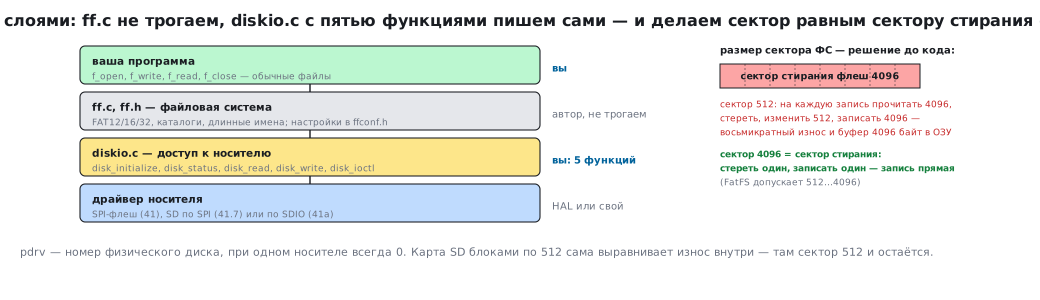
The key decision is made before writing code: which sector size to use.
For flash memory the minimum erase unit is a 4 KB sector. For a file system the traditional sector is 512 bytes. If you keep 512, every write turns into: read 4 KB into RAM → erase 4 KB → change 512 bytes → write 4 KB back. Eightfold wear and a write that is many times slower. There is no gain in memory either: the read-modify-write layer needs a 4 KB buffer, and with a 4096 sector FatFS itself holds the same buffer (42.8). The choice is decided by wear.
So the file system sector size is made equal to the erase sector — 4096 bytes. FatFS supports this (512…4096 are allowed), and the write becomes direct: erase one sector, write one sector.
Then the write looks like this:
DRESULT disk_write(BYTE pdrv, const BYTE *buff, LBA_t sector, UINT count)
{
    if (pdrv != 0 || (disk_state & STA_NOINIT)) {
        return RES_NOTRDY;
    }
    if (sector + count > FLASH_SECTOR_COUNT) {
        return RES_PARERR;
    }

    for (UINT s = 0; s < count; s++) {
        uint32_t base = (sector + s) * FS_SECTOR_SIZE;

        /* Стереть сектор целиком — иначе запись даст побитовое «И»
           со старым содержимым. */
        w25_sector_erase(base);

        /* Записать постранично: за одну команду больше страницы нельзя. */
        for (uint32_t off = 0; off < FS_SECTOR_SIZE; off += FLASH_PAGE_SIZE) {
            w25_page_program(base + off,
                             buff + s * FS_SECTOR_SIZE + off,
                             FLASH_PAGE_SIZE);
        }
    }
    return RES_OK;
}
And disk_ioctl answers four questions about the geometry:
DRESULT disk_ioctl(BYTE pdrv, BYTE cmd, void *buff)
{
    switch (cmd) {
    case CTRL_SYNC:                  /* всё ли записано на носитель */
        return RES_OK;               /* у нас запись синхронная */

    case GET_SECTOR_COUNT:
        *(LBA_t *)buff = FLASH_SECTOR_COUNT;
        return RES_OK;

    case GET_SECTOR_SIZE:
        *(uint16_t *)buff = FS_SECTOR_SIZE;
        return RES_OK;

    case GET_BLOCK_SIZE:             /* в единицах секторов */
        *(DWORD *)buff = 1;
        return RES_OK;

    default:
        return RES_PARERR;
    }
}
For an SD card everything is simpler: its block is 512 bytes anyway, no erase is needed,
and disk_write comes down to sending a block write command.
42.4 Configuration in ffconf.h
The configuration file decides how much space the library takes. The significant parameters:
| Parameter | What it does | What to set on an MCU |
|---|---|---|
FF_FS_READONLY |
removes all writing | 1 if you only read — saves kilobytes |
FF_USE_LFN |
long names | 0 — no; 1 — static name buffer (one task); 2 — on the stack, +0.5 KB of stack; 3 — on the heap |
FF_USE_STRFUNC |
f_gets, f_puts, f_printf |
1 if you need f_printf |
FF_CODE_PAGE |
name encoding | 866 for Cyrillic |
FF_LFN_UNICODE |
string encoding in calls | 2 (UTF-8) if the sources are in UTF-8 |
FF_MAX_SS |
maximum sector | 4096 for SPI Flash |
FF_FS_TINY |
a shared buffer instead of a buffer per file | 1 when RAM is short |
FF_USE_MKFS |
formatting | 1 if you want f_mkfs |
FF_FS_EXFAT |
exFAT | 0 if not needed |
⚠️
FF_FS_TINYsaves a noticeable amount. With zero, every open file holds its own sector buffer: with a 4 KB sector that is 4 KB per file — more than a quarter of all the BluePill's memory. With one, there is a single buffer, and it lives in the volume structure. The cost is slightly slower operation with several open files.⚠️ Cyrillic in names requires three settings:
FF_USE_LFNnot zero;FF_LFN_UNICODE = 2if the sources are in UTF-8 — otherwise FatFS treats the bytes of the string as code page characters, andлог.txtlands on the card as "╨╗╨╛╨│.txt";FF_CODE_PAGE = 866— for the short 8.3 names that are written alongside the long ones. Without long names, a name longer than 8.3 is not created at all (FR_INVALID_NAME), and files with long names are visible under short ones:Отчёт за май.txtasОТЧЁТЗ~1.TXT. In the old FatFS from the STM32Cube packages (R0.11, R0.12c) the parameters are named with an underscore (_USE_LFN,_CODE_PAGE), and there is no UTF-8 in calls — it appeared in R0.13a.
42.5 🔧 Working with files
FATFS fs;                        /* структура тома, живёт всё время работы */
FIL   file;
FRESULT res;
UINT   written;

/* Монтирование. Третий аргумент 1 — смонтировать немедленно,
   0 — отложить до первого обращения. */
res = f_mount(&fs, "", 1);
if (res != FR_OK) {
    /* тома нет или он не отформатирован */
}

/* Запись. FA_OPEN_APPEND дописывает в конец, не затирая. */
res = f_open(&file, "log.txt", FA_WRITE | FA_OPEN_APPEND);
if (res == FR_OK) {
    f_write(&file, "hello\r\n", 7, &written);
    f_close(&file);              /* именно закрытие фиксирует данные */
}

/* Чтение. */
char buf[64];
UINT got;
res = f_open(&file, "log.txt", FA_READ);
if (res == FR_OK) {
    f_read(&file, buf, sizeof(buf), &got);
    f_close(&file);
}
Formatted output is more convenient through f_printf — it is part of the library
and does not drag in the heavy printf from the standard library.
Listing a directory:
DIR dir;
FILINFO fno;

if (f_opendir(&dir, "/") == FR_OK) {
    while (f_readdir(&dir, &fno) == FR_OK && fno.fname[0] != 0) {
        if (fno.fattrib & AM_DIR) {
            /* это каталог */
        } else {
            /* файл, размер в fno.fsize */
        }
    }
    f_closedir(&dir);
}
An empty name in fno.fname marks the end of the listing, not an error.
Under an RTOS. If several tasks access files, without protection they
corrupt the volume: two tasks at once modify the allocation table and the window buffer
in FATFS. You set FF_FS_REENTRANT = 1 and give FatFS a kernel mutex —
the functions ff_mutex_create, ff_mutex_take, ff_mutex_give and
ff_mutex_delete in ffsystem.c (in old versions from STM32Cube —
ff_cre_syncobj, ff_req_grant and their neighbours in syscall.c). Simpler —
hand all files to a single gatekeeper task (30.8), and the others send it
requests through a queue. The stack of a task using FatFS has to be counted: the library itself on
Cortex-M3 takes about 0.4 KB, and with FF_USE_LFN = 2 the name buffer (512
bytes) goes on the stack, giving about 0.9 KB — plus the disk layer and the driver.
42.6 ⚠️ What happens when power is lost
The most painful property of FAT, and you need to know about it in advance.
When you call f_write, the data does not end up on the medium in full.
Three things change: the contents of the clusters, the allocation table and the directory
entry with the file length. Between these steps there are moments when the file
system is inconsistent.
A power loss at such a moment gives one of these outcomes:
- the file exists but has zero length — the data is written, the directory is not;
- the file has the right length but with garbage at the end;
- in rare cases — a damaged allocation table and a volume that will have to be checked on a computer.
What to do about it:
f_write(&file, data, len, &written);
f_sync(&file);        /* принудительно записать метаданные, не закрывая файл */
f_sync does everything f_close does but leaves the file open. Calling it
after every important write sharply narrows the window of vulnerability — at the cost of extra
accesses to the medium.
FAT does not solve the problem completely: it is not journaling. If the data is critical, use either a backup medium or your own journal format — sequential writes with a checksum on every record, so that broken tails can be discarded when reading.
42.7 ⚠️ Wear: FatFS does not level it
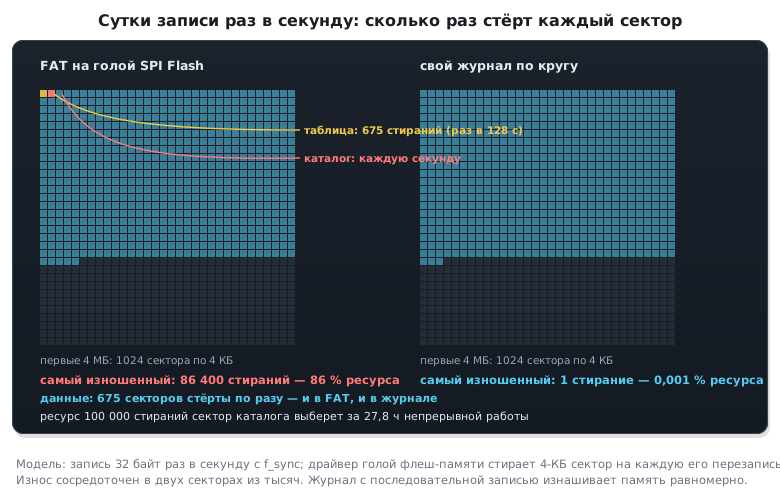
Something important that is rarely written about. FAT writes to the same place all the time — the allocation table and the root directory are updated on every file change. On an SD card this does not matter: inside the card its own controller spreads the writes over the chip. But on a bare SPI Flash the table sits in specific sectors, and they wear out first.
With an endurance of 100000 cycles and a write once a second with f_sync, the first to wear out
is the directory sector where the file length is stored: it is erased every second —
in about a day of continuous operation (100000 s ≈ 28 h). The allocation table
changes less often — with every new cluster — but also in the same sectors.
The practical conclusions:
- for intensive writing to SPI Flash use not FAT but your own journal: write sequentially in a circle, erase a sector before moving into it;
- if FAT is needed precisely for compatibility with a computer — write rarely and in large portions, accumulating data in RAM;
- on an SD card the problem is handled by the card's controller, but cheap cards level wear poorly — for critical tasks use industrial ones.
42.8 How much it takes
Orders of magnitude, to estimate whether it will fit:
| Flash | RAM | |
|---|---|---|
| FatFS without long names, read only | ~6 KB | ~1 KB |
| FatFS with writing, without long names | ~10 KB | 1 KB + a sector |
| with long names and code page 866 | ~14 KB | + a name buffer |
the FATFS volume structure |
— | ~50 bytes + FF_MAX_SS: the window buffer is always there |
the FIL file structure |
— | ~40 bytes, plus another FF_MAX_SS with FF_FS_TINY = 0 |
With a 4 KB sector the FATFS structure always takes a little over 4 KB, and every
open file with FF_FS_TINY = 0 another 4 KB. On the BluePill with its 20 KB of RAM
this is a lot. So there you set FF_FS_TINY = 1 or use an SD card
instead of SPI Flash. A 512 sector on SPI Flash does not save memory: the disk layer
then needs its own 4 KB buffer to rewrite the erase sector (42.3).
The code page 866 table alone takes several hundred bytes of Flash — when space is very tight, you give up Cyrillic in names.
42.9 Pitfalls
A zero-length file. f_close was forgotten, or power was lost before it. The cure is
f_sync after writing.
f_mount returns FR_NO_FILESYSTEM. There are three causes: the medium is not
formatted; the volume is exFAT while FF_FS_EXFAT = 0 — that is how cards larger than 32 GB
come from the factory; the disk layer reads the wrong sector — disk_ioctl returns
the wrong sector size, or the addressing of SDSC and SDHC cards is mixed up (41а.4).
So the firmware itself does not call f_mkfs on this code — that would erase the
user's card. Format only your own medium (SPI Flash) or on an
explicit command.
The FATFS structure is declared locally. It must live for the whole time you work
with the volume. Declared inside a function, its memory is released on return, and accesses
to the volume go through garbage.
An unaligned buffer. If the exchange with the medium goes through DMA, the sector buffer must be aligned, otherwise the transfer fails (section 9).
Russian names turn into garbage. FF_USE_LFN is missing, the code page is wrong,
or the strings are in UTF-8 with FF_LFN_UNICODE = 0 (42.4).
Slow writes. With a 512 sector on flash memory every write reads, erases and rewrites 4 KB. Matching the sector size to the erase size speeds everything up many times.
Stack overflow. A 4 KB sector buffer declared as a local variable will not fit into a microcontroller's stack. Make such buffers static.
42.10 Summary
- FatFS knows nothing about the hardware: you write five sector access functions, it gives you files and directories.
- Make the file system sector size equal to the erase sector of the flash memory — otherwise every write costs eightfold wear.
FF_FS_TINYsaves a sector buffer for every open file; with a 4 KB sector this decides whether everything fits into RAM.- Cyrillic requires long names enabled, code page 866 and, for
sources in UTF-8,
FF_LFN_UNICODE = 2. FR_NO_FILESYSTEMis not an order to format: exFAT and a disk layer error look the same.- Data is committed to the medium only by
f_closeorf_sync. Power lost before that leaves a zero-length file. - FatFS does not level wear. On a bare SPI Flash the allocation table wears out its sectors; for intensive writing you need your own journal or an SD card with an internal controller.
- The volume structure must live for the whole time you work with it; sector buffers must be static.
- Under an RTOS —
FF_FS_REENTRANT = 1with a mutex, or one task for all files.
Next: section 42а "LittleFS on SPI NOR: a file system that survives power loss" — files on a bare SPI NOR without corruption on power loss and with wear levelling.