 Embedded HandbookApps
159. Over-the-network updates on ESP32: OTA partitions, the bootloader, confirmation and rollback
A device that has gone out to a customer is not reflashed with a programmer — it is updated over the network. Over-the-air
(OTA) updates on the ESP32 work like this: the flash memory has two slots for the application, the new
firmware is written into the free one, and the bootloader decides which application to run from a record in the small otadata partition.
The main risk is firmware that downloads completely but does not
work: it must not turn the device into a brick. That is what confirmation and rollback are for.
Everything shown here is a live experiment in the emulator (_verify/esp159/). One program is built three times:
versions 1.0, 2.0 and 3.0. The first downloads the update over HTTP, the second confirms itself,
the third deliberately does not confirm itself — and the bootloader brings the device back to the working version.
Terms used in the documentation
Term Meaning OTA (over-the-air) update an update over the network, "over the air" factory app, ota_0, ota_1 the factory application and two partitions for updates otadata the partition that records which application to boot boot partition, running partition the partition selected for booting, and the one running now app description ( esp_app_desc_t)the image description: project, version, build date image state: PENDING_VERIFY, VALID, ABORTED the image state: waiting for confirmation, working, rejected rollback going back to the previous working application mark app valid confirm that the new firmware works anti-rollback, secure version forbidding a rollback to an old vulnerable version
159.1 Partitions: where the two firmware images live
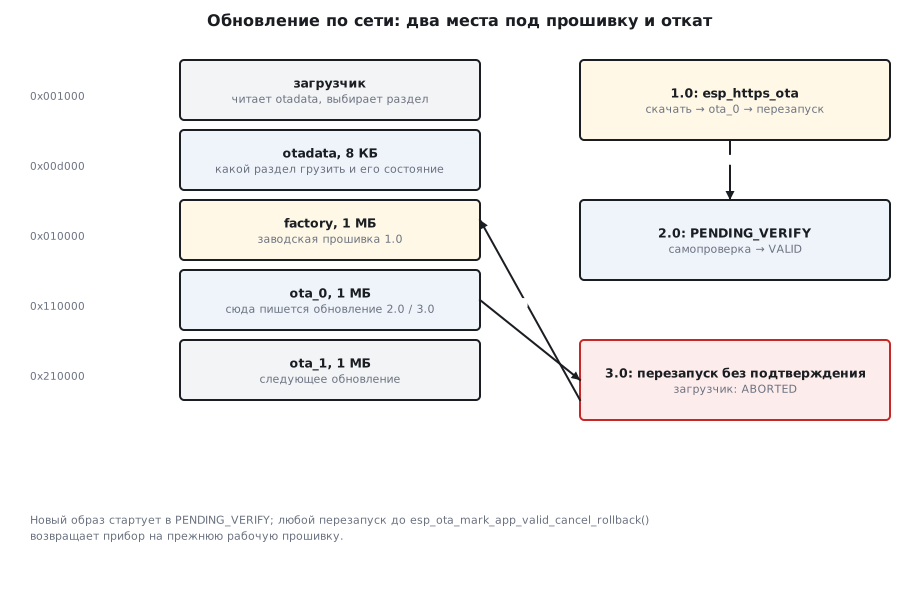
ESP-IDF has a ready-made partition table for updates (CONFIG_PARTITION_TABLE_TWO_OTA).
The built table, decoded:
nvs,data,nvs,0x9000,16K,
otadata,data,ota,0xd000,8K,
phy_init,data,phy,0xf000,4K,
factory,app,factory,0x10000,1M,
ota_0,app,ota_0,0x110000,1M,
ota_1,app,ota_1,0x210000,1M,
Three application slots of one megabyte each: the factory one, factory, and two for updates. An update
is always written into the partition that is not running right now: from factory into ota_0, from ota_0 into
ota_1, from ota_1 back into ota_0. The 8 KB otadata partition stores which of them to boot
and what state the image is in. On the first flashing it is filled from ota_data_initial.bin:
0x1000 bootloader/bootloader.bin
0x10000 ota159.bin
0x8000 partition_table/partition-table.bin
0xd000 ota_data_initial.bin
The image of this program is 564208 bytes and the partition is 1048576: the build itself reports that 46 % is free. If the application grows bigger than the partition, the build stops — and a device that is already shipped cannot be given a different partition table over the network. The size of the application partitions is chosen with a margin, once, before release.
159.2 Download and write: esp_https_ota
The esp_https_ota component does everything itself: it connects to the server, checks the image header,
writes to flash memory in chunks and at the end switches the boot partition. If you first need to look at
the version of the new image, the work is split into steps:
    esp_http_client_config_t http = { .url = CONFIG_LAB_OTA_URL, .timeout_ms = 20000 };
    esp_https_ota_config_t ota = { .http_config = &http };
    esp_https_ota_handle_t h = NULL;
    esp_err_t e = esp_https_ota_begin(&ota, &h);
        e = esp_https_ota_get_img_desc(h, &nd);             /* заголовок нового образа — до загрузки целиком */
        e = esp_https_ota_perform(h);
    esp_err_t fin = (e == ESP_OK) ? esp_https_ota_finish(h) : (h ? esp_https_ota_abort(h) : e);
The run of version 1.0:
запуск: раздел factory по 0x010000, версия 1.0, состояние ESP_ERR_NOT_SUPPORTED
обновление: http://10.0.2.2:8070/ota159.bin → раздел ota_0 по 0x110000, 1048576 байт
в образе: проект ota159, версия 2.0
скачано 564208 байт, итог ESP_OK; загрузка теперь из ota_0
factory has no state at all — hence ESP_ERR_NOT_SUPPORTED: the factory application
is always considered working. The version is taken from the project's version.txt file and goes into
esp_app_desc_t at build time; the program uses it to decide whether an update is needed at all, and does not
download the same firmware over and over. esp_https_ota_finish checks the whole image and only
then switches the boot partition; an interrupted download does not touch the boot partition — the device
stays on the old firmware.
159.3 The first start: PENDING_VERIFY and confirmation
After the restart the bootloader takes the application from ota_0:
rst:0xc (SW_CPU_RESET),boot:0x12 (SPI_FAST_FLASH_BOOT)
I (29641) boot: Loaded app from partition at offset 0x110000
запуск: раздел ota_0 по 0x110000, версия 2.0, состояние PENDING_VERIFY
подтверждение: ESP_OK
состояние после подтверждения: VALID
With rollback enabled (CONFIG_BOOTLOADER_APP_ROLLBACK_ENABLE) a new image starts in
the PENDING_VERIFY state — "waiting for confirmation". The program checks that everything
works and calls one function:
printf("подтверждение: %s\n", esp_err_to_name(esp_ota_mark_app_valid_cancel_rollback()));
The state becomes VALID, and from then on the device always boots from ota_0.
159.4 Rollback: when the new firmware has not confirmed itself
Version 3.0 is built so that after starting it does not confirm itself but restarts:
        printf("версия %s не подтвердила себя — перезапуск\n", app->version);
        esp_restart();                                      /* загрузчик пометит образ негодным и откатит */
запуск: раздел ota_0 по 0x110000, версия 3.0, состояние PENDING_VERIFY
версия 3.0 не подтвердила себя — перезапуск
rst:0xc (SW_CPU_RESET),boot:0x12 (SPI_FAST_FLASH_BOOT)
I (35236) boot: Loaded app from partition at offset 0x10000
запуск: раздел factory по 0x010000, версия 1.0, состояние ESP_ERR_NOT_SUPPORTED
откат: версия 3.0 в разделе ota_0 — ABORTED, работает factory
The bootloader saw that the image in ota_0 was still in PENDING_VERIFY after
the restart, marked it ABORTED and booted the previous working application. The old
firmware learns about the rollback with the esp_ota_get_last_invalid_partition function and can report
to the server that the update did not take.
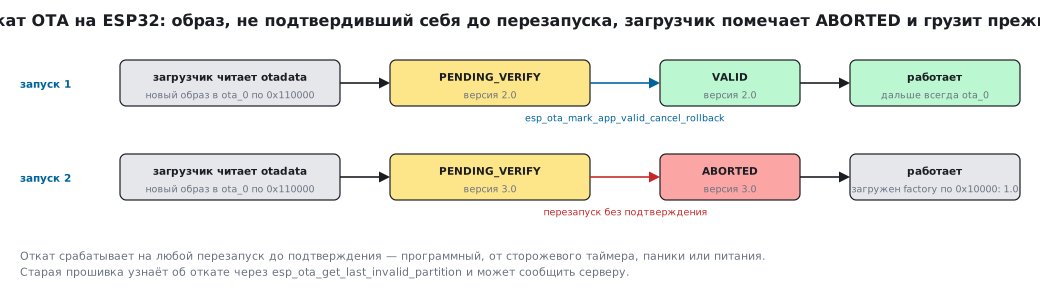
Rollback is triggered by any restart before confirmation: a software one, one from the watchdog,
from a panic, from a power loss. So firmware that crashes at startup will itself bring
the device back to the previous version. Firmware that hangs — only if the hang ends in a reset: the task watchdog
by default only prints the culprit (CONFIG_ESP_TASK_WDT_PANIC is off, section 152.5).
So in a product you enable CONFIG_ESP_TASK_WDT_PANIC or add your own timer that, after
a reasonable time without confirmation, calls esp_ota_mark_app_invalid_rollback_and_reboot() (159.5).
159.5 When to confirm
Confirmation is a promise: "this firmware can update itself further". Confirming in the first
line of app_main means switching the protection off. A sensible order:
- bring up the network and wait for an address;
- contact the update server — firmware that cannot get onto the network will never replace itself;
- pass a self-test: the sensors respond, the settings in NVS can be read;
- only then
esp_ota_mark_app_valid_cancel_rollback().
If the check has not passed within a reasonable time, esp_ota_mark_app_invalid_rollback_and_reboot()
rolls the device back without waiting for the watchdog.
159.6 Update security
In the experiment the image travels over plain HTTP (CONFIG_ESP_HTTPS_OTA_ALLOW_HTTP), and esp_https_ota
honestly warns about it on every update:
W (2865) esp_https_ota: Continuing with insecure option because CONFIG_ESP_HTTPS_OTA_ALLOW_HTTP is set.
In a product this is not acceptable: anyone on the same network can substitute the firmware. The minimum for a device is
HTTPS with your own server's certificate built into the firmware (.cert_pem in
esp_http_client_config_t). Next comes image signing (Secure Boot): the bootloader will not run
an image that is not signed with your key, even if someone managed to write it. And protection against a rollback to an old
version with a known vulnerability: the secure_version number in the image and a counter in eFuse.
159.7 Pitfalls
| Symptom | Cause |
|---|---|
| the update downloaded, but after a restart the old version is back | a restart before confirmation: rollback was triggered |
| rollback does not trigger — a hung firmware stays | CONFIG_BOOTLOADER_APP_ROLLBACK_ENABLE is not enabled, or the task watchdog does not reboot: CONFIG_ESP_TASK_WDT_PANIC is off |
| the new version has never confirmed itself but runs | confirmation is never called and rollback is off — there is no protection |
esp_https_ota_begin refuses an http:// URL |
without CONFIG_ESP_HTTPS_OTA_ALLOW_HTTP only HTTPS is accepted |
| the image does not fit into the partition | the application has grown bigger than ota_0; the partition table cannot be changed over the network |
| the device downloads the same firmware over and over | the version from esp_https_ota_get_img_desc is not compared with the current one |
after idf.py app-flash or flashing a single image the device boots the old version |
otadata points to ota_0, while the new image went into factory; idf.py flash also writes ota_data_initial.bin, and idf.py erase-otadata erases otadata on its own |
esp_ota_get_state_partition for factory returns an error |
the factory application has no state: ESP_ERR_NOT_SUPPORTED |
159.8 Summary
- Partitions:
factoryat 0x10000,ota_0at 0x110000,ota_1at 0x210000, 1 MB each;otadata— 8 KB at 0xd000. - An update is written into the free partition;
esp_https_ota_finishswitches the boot partition only after checking the image. - In the experiment: a 564208-byte image, 46 % of the partition free; the version from
version.txtis visible in the header before the download. - A new image starts in
PENDING_VERIFY;esp_ota_mark_app_valid_cancel_rollback()makes itVALID. - A restart before confirmation means rollback: the image is
ABORTED, the previous application runs. - In a product: HTTPS with the server's certificate, image signing and protection against a rollback to an old version.
Full source code
main.c — an update over the network: download, confirmation and rollback, three builds of one program.
/* Раздел 159: обновление прошивки по сети (OTA) в QEMU.
 * Одна программа, три сборки: 1.0 в разделе factory скачивает новую прошивку по HTTP в раздел ota_0
 * и перезагружается; 2.0 стартует в состоянии «ждёт подтверждения» и подтверждает себя;
 * 3.0 (CONFIG_LAB_OTA_BREAK) перезагружается без подтверждения — загрузчик откатывает её. */
#include <inttypes.h>
#include <stdio.h>
#include <string.h>
#include "esp_app_desc.h"
#include "esp_event.h"
#include "esp_http_client.h"
#include "esp_https_ota.h"
#include "esp_netif.h"
#include "esp_ota_ops.h"
#include "esp_system.h"
#include "nvs_flash.h"
#include "protocol_examples_common.h"
#include "sdkconfig.h"

static const char *state_name(esp_ota_img_states_t s)
{
    switch (s) {
    case ESP_OTA_IMG_NEW: return "NEW";
    case ESP_OTA_IMG_PENDING_VERIFY: return "PENDING_VERIFY";
    case ESP_OTA_IMG_VALID: return "VALID";
    case ESP_OTA_IMG_INVALID: return "INVALID";
    case ESP_OTA_IMG_ABORTED: return "ABORTED";
    default: return "UNDEFINED";
    }
}

void app_main(void)
{
    const esp_partition_t *run = esp_ota_get_running_partition();
    const esp_app_desc_t *app = esp_app_get_description();
    esp_ota_img_states_t st;
    esp_err_t se = esp_ota_get_state_partition(run, &st);
    printf("запуск: раздел %s по 0x%06" PRIx32 ", версия %s, состояние %s\n", run->label, run->address, app->version,
           se == ESP_OK ? state_name(st) : esp_err_to_name(se));

    if (se == ESP_OK && st == ESP_OTA_IMG_PENDING_VERIFY) {    /* первый запуск после обновления */
#if CONFIG_LAB_OTA_BREAK
        printf("версия %s не подтвердила себя — перезапуск\n", app->version);
        fflush(stdout);
        esp_restart();                                      /* загрузчик пометит образ негодным и откатит */
#else
        printf("подтверждение: %s\n", esp_err_to_name(esp_ota_mark_app_valid_cancel_rollback()));
        esp_ota_get_state_partition(run, &st);
        printf("состояние после подтверждения: %s\n", state_name(st));
        printf("done\n");
        return;
#endif
    }

    const esp_partition_t *bad = esp_ota_get_last_invalid_partition();
    if (bad != NULL) {                                      /* откатились: новый образ не подтвердил себя */
        esp_app_desc_t d;
        esp_ota_get_partition_description(bad, &d);
        esp_ota_get_state_partition(bad, &st);
        printf("откат: версия %s в разделе %s — %s, работает %s\n", d.version, bad->label, state_name(st), run->label);
        printf("done\n");
        return;
    }
    if (strcmp(run->label, "factory") != 0) {
        printf("done\n");
        return;
    }

    ESP_ERROR_CHECK(nvs_flash_init());
    ESP_ERROR_CHECK(esp_netif_init());
    ESP_ERROR_CHECK(esp_event_loop_create_default());
    ESP_ERROR_CHECK(example_connect());

    const esp_partition_t *next = esp_ota_get_next_update_partition(NULL);
    printf("обновление: %s → раздел %s по 0x%06" PRIx32 ", %" PRIu32 " байт\n", CONFIG_LAB_OTA_URL, next->label,
           next->address, next->size);
    esp_http_client_config_t http = { .url = CONFIG_LAB_OTA_URL, .timeout_ms = 20000 };
    esp_https_ota_config_t ota = { .http_config = &http };
    esp_https_ota_handle_t h = NULL;
    esp_err_t e = esp_https_ota_begin(&ota, &h);
    esp_app_desc_t nd;
    if (e == ESP_OK)
        e = esp_https_ota_get_img_desc(h, &nd);             /* заголовок нового образа — до загрузки целиком */
    if (e == ESP_OK)
        printf("в образе: проект %s, версия %s\n", nd.project_name, nd.version);
    while (e == ESP_OK) {
        e = esp_https_ota_perform(h);
        if (e != ESP_ERR_HTTPS_OTA_IN_PROGRESS)
            break;
        e = ESP_OK;
    }
    int got = h ? esp_https_ota_get_image_len_read(h) : 0;
    esp_err_t fin = (e == ESP_OK) ? esp_https_ota_finish(h) : (h ? esp_https_ota_abort(h) : e);
    printf("скачано %d байт, итог %s; загрузка теперь из %s\n", got, esp_err_to_name(e == ESP_OK ? fin : e),
           esp_ota_get_boot_partition()->label);
    fflush(stdout);
    if (e == ESP_OK && fin == ESP_OK)
        esp_restart();
    printf("done\n");
}
Next: section 160 — long lines and antennas.