 Embedded HandbookApps
151. ESP-IDF and tools: idf.py, components, Kconfig, partitions, esptool, QEMU, Arduino
For STM32 there is a choice: Keil, CubeIDE, Makefile, PlatformIO — and each of
them is only a shell around the compiler. For ESP32 the choice is of a different kind: either
ESP-IDF — Espressif's own framework, where building, configuration,
flashing and the monitor are gathered into one command, idf.py, or Arduino-ESP32,
which is itself built on top of ESP-IDF. This section takes the first one apart
piece by piece on a project of two components and shows what in the build
lives where. Everything runs in the container espressif/idf:v5.4.1 (_verify/esp151/),
and the program runs in the QEMU emulator from the same distribution.
Terms used in the documentation
Term Meaning ESP-IDF (IoT Development Framework) Espressif's development framework: libraries, FreeRTOS, build idf.py one command for building, configuration, flashing and the monitor component a directory with CMakeLists.txt, a library of the projectKconfig, menuconfig, sdkconfig parameter descriptions, the menu to choose them, the file with the choices sdkconfig.defaults project defaults, kept in git target the target chip: esp32, esp32s3, esp32c3 … partition table (CSV) the flash memory partition table in text form flash_args addresses and files for flashing esptool utility for flashing and parsing images over UART monitor a terminal that colours the log and decodes addresses ESP_LOGI / LOGW / LOGE / LOGD a log by level with a timestamp and a tag Arduino core for ESP32 the Arduino core on top of ESP-IDF
151.1 The project: three files and two components
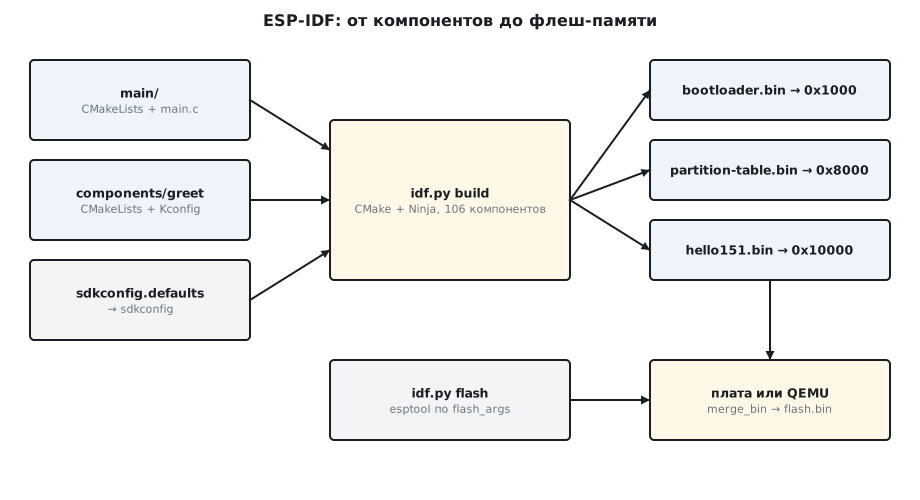
A minimal ESP-IDF project is a directory with a three-line CMakeLists.txt and
a main folder:
cmake_minimum_required(VERSION 3.16)
include($ENV{IDF_PATH}/tools/cmake/project.cmake)
project(hello151)
main is a component, and it has its own CMakeLists.txt with one command:
idf_component_register(SRCS "main.c" INCLUDE_DIRS "." REQUIRES greet spi_flash)
Everything in ESP-IDF is a component: FreeRTOS, drivers, Wi-Fi, our code. Your own
component goes into components/<name> with the same kind of CMakeLists.txt; here
it is greet with a single function:
void greet(const char *who)
{
    for (int i = 1; i <= CONFIG_GREET_TIMES; i++)
        printf("привет, %s (%d из %d)\n", who, i, CONFIG_GREET_TIMES);
}
REQUIRES lists what the component depends on. main gets a
concession: as long as REQUIRES is not written, it sees the headers of all
components in the build. As soon as you write REQUIRES with even one name,
only the listed ones and the basic ones, such as freertos and log, are visible. That is why
without spi_flash in the list the header esp_flash.h is not found. The build of
this project involves 106 components — almost all of them from ESP-IDF itself.
151.2 Kconfig: parameters without #define
A component parameter is declared in a Kconfig file next to it:
    config GREET_TIMES
        int "How many times to greet"
        range 1 10
        default 3
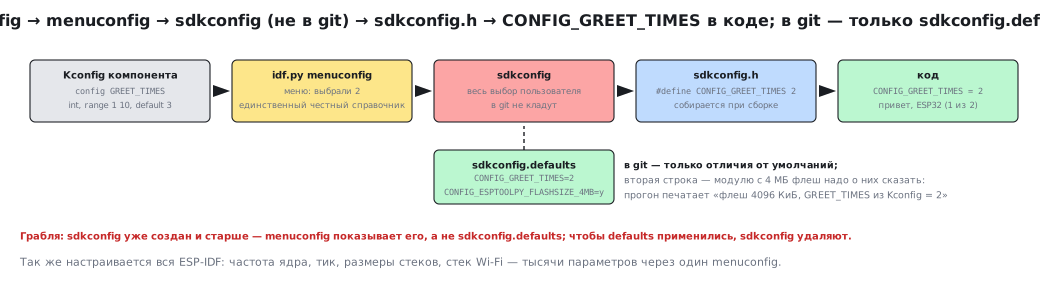
After that it appears in the idf.py menuconfig menu and in the code as
CONFIG_GREET_TIMES from sdkconfig.h. The user's choice is stored in
the sdkconfig file, which is not put into git; what goes into git is
sdkconfig.defaults — only the differences from the default values:
CONFIG_GREET_TIMES=2
CONFIG_ESPTOOLPY_FLASHSIZE_4MB=y
The second line is the very fix from section 150: a module with 4 MB of flash memory has to be told about them. The program confirms both:
I (1512) hello151: старт, флеш 4096 КиБ, GREET_TIMES из Kconfig = 2
привет, ESP32 (1 из 2)
привет, ESP32 (2 из 2)
W (1512) hello151: предупреждение печатается жёлтым, ошибка — красным
E (1512) hello151: ошибка ради примера
The whole of ESP-IDF is configured the same way, through Kconfig: core frequency, tick,
stack sizes, the Wi-Fi stack — thousands of parameters, and menuconfig is their
only honest reference.
151.3 The log: ESP_LOG
printf works, but ESP-IDF has its own log with levels:
    ESP_LOGI(TAG, "старт, флеш %lu КиБ, GREET_TIMES из Kconfig = %d", (unsigned long)(flash / 1024), CONFIG_GREET_TIMES);
    greet("ESP32");
    ESP_LOGW(TAG, "предупреждение печатается жёлтым, ошибка — красным");
    ESP_LOGE(TAG, "ошибка ради примера");
    ESP_LOGD(TAG, "отладка: по умолчанию не печатается");
The level letter, the time in milliseconds since start-up, the tag — and idf.py monitor
colours the lines by level. The default level is 3 (INFO,
CONFIG_LOG_DEFAULT_LEVEL=3), so ESP_LOGD is missing from the output: the line is not
just suppressed, it is cut out at compile time together with its
format string. Debug output for the whole project is enabled in
menuconfig ("Default log verbosity"). To enable debugging for one tag
at run time, raise "Maximum log verbosity" in the same place
(CONFIG_LOG_MAXIMUM_LEVEL_DEBUG) and leave the default level at INFO:
then the ESP_LOGD lines stay in the firmware but stay silent until
esp_log_level_set(TAG, ESP_LOG_DEBUG) opens them for the tag you need.
151.4 What idf.py does
all app bootloader clean erase-flash flash fullclean gdb menuconfig monitor openocd partition-table qemu reconfigure set-target size size-components size-files
set-target esp32 creates an sdkconfig for the chip; build (also known as all) calls
CMake and Ninja; flash calls esptool, monitor opens a terminal, flash
monitor does both in a row. size and size-components show where the memory went:
│ libc.a                  │      43459 │  576 │  316 │   260 │     0 │     0 │        0 │      40035 │ 40035 │       2848 │    2848 │        0 │        0 │           0 │        0 │                  0 │
│ libesp_app_format.a     │      26262 │   10 │   10 │     0 │     0 │     0 │        0 │        417 │   417 │      25835 │   25579 │      256 │        0 │           0 │        0 │                  0 │
│ libfreertos.a           │      18076 │ 3841 │  741 │  3100 │ 12915 │ 12915 │        0 │        364 │   364 │        956 │     956 │        0 │        0 │           0 │        0 │                  0 │
The first column is the total in bytes: the C library is 43 KB, the application description with
the certificate hash 26 KB, FreeRTOS 18 KB, of which 12.9 KB are in IRAM.
This is how you find who ate the instruction RAM. qemu starts the emulator, gdb and
openocd start debugging.
Versions in the 5.4.1 distribution: the compiler xtensa-esp-elf-gcc 14.2.0,
esptool 4.8.1, CMake 3.30.2, Ninja 1.11.1, QEMU 9.0.0 built by Espressif.
The examples directory holds 360 examples, of them peripherals 105, Bluetooth
102, system 62, protocols 43, storage 23, Wi-Fi 21.
151.5 What is in build and how it is flashed
After the build, build/ contains hello151.bin, bootloader/bootloader.bin,
partition_table/partition-table.bin and the flash_args file, which
idf.py flash passes to esptool:
--flash_mode dio --flash_freq 40m --flash_size 4MB
0x1000 bootloader/bootloader.bin
0x10000 hello151.bin
0x8000 partition_table/partition-table.bin
Three images at three addresses — exactly the boot scheme from section 150.
esptool itself can also do the reverse: image_info breaks an image into
segments, merge_bin glues all three into one flash memory file —
that is how the image for QEMU is made. The bootloader in the emulator does the
same as on the board and reports it:
boot: ESP-IDF v5.4.1 2nd stage bootloader
boot: Partition Table:
boot:  2 factory          factory app      00 00 00010000 00100000
esp_image: segment 0: paddr=00010020 vaddr=3f400020 size=0984ch ( 38988) map
esp_image: segment 3: paddr=0001bb6c vaddr=40080000 size=044ach ( 17580) load
boot: Loaded app from partition at offset 0x10000
cpu_start: cpu freq: 160000000 Hz
app_init: Project name:     hello151
app_init: ESP-IDF:          v5.4.1
map means the segment stays in flash memory and is mapped by the cache; load means it is
copied to RAM at vaddr. The application image of this build is 179144
bytes, which takes 17 % of the 1 MB partition.
151.6 Your own partition table
The table is defined by a CSV file (partitions.csv in the project plus
CONFIG_PARTITION_TABLE_CUSTOM). A ready-made table "application and two
OTA slots" from the distribution:
nvs,data,nvs,0x9000,16K,
otadata,data,ota,0xd000,8K,
phy_init,data,phy,0xf000,4K,
factory,app,factory,0x10000,1M,
ota_0,app,ota_0,0x110000,1M,
ota_1,app,ota_1,0x210000,1M,
gen_esp32part.py converts the CSV to binary form (3072 bytes — the table
with a checksum, which sits in the 4 KB partition) and back, so
you can read the table from someone else's board with esptool at offset 0x8000 and
decode it. Three applications of a megabyte each need 4 MB of flash memory —
one more reason for the FLASHSIZE_4MB line in sdkconfig.defaults.
151.7 Arduino-ESP32 and PlatformIO
The Arduino core for ESP32 is an ESP-IDF component: setup()/loop() run
inside a FreeRTOS task, and Serial, Wire and SPI call the
ESP-IDF drivers. The price of convenience is losing menuconfig (the core is built with one
sdkconfig for everyone) and a gap between versions. The same function in
core 2.0.17 and 3.2.0:
2.0.17: hw_timer_t * timerBegin(uint8_t timer, uint16_t divider, bool countUp);
3.2.0: hw_timer_t *timerBegin(uint32_t frequency);
Code with a timer number and a divider does not build on core 3.x, and there are
many such places in the move to 3.0: timers, LEDC, ADC. Examples from the internet
are most often written for 2.x. PlatformIO with the espressif32 platform
installs either of the two cores or plain ESP-IDF; building in a container without
a GUI works as in section 115.
151.8 Pitfalls
| Symptom | Cause |
|---|---|
fatal error: esp_flash.h: No such file |
main has a REQUIRES — now dependencies are explicit only |
menuconfig shows something other than sdkconfig.defaults |
sdkconfig already exists: defaults are taken only for parameters it does not contain; delete sdkconfig (fullclean does not touch it) and build again |
ESP_LOGD is silent, even after esp_log_level_set |
the default level is INFO; debug output was cut out at build time — raise "Maximum log verbosity" |
set-target refuses to clean build |
a half-built directory; delete build by hand |
| the image is built for 2 MB, the module has 4 | CONFIG_ESPTOOLPY_FLASHSIZE_4MB=y |
idf.py flash writes three files, not one |
that is how it should be: bootloader, table, application at their own addresses |
a sketch with timerBegin(0, 80, true) does not build |
Arduino core 3.x: timerBegin(frequency) |
| the partition table does not fit | 3 × 1 MB applications need 4 MB of flash memory |
| a build in a container on a Windows volume "does not see" an edit | coarse timestamps; copy the sources into the container |
151.9 Summary
- A project is a three-line
CMakeLists.txtplus components; your own component is a directory withidf_component_register; the build has 106 components. Kconfig→menuconfig→sdkconfig; into git goessdkconfig.defaults;GREET_TIMESis 3 by default, 2 in the project.ESP_LOGx: level, milliseconds, tag; INFO by default, debug cut out.idf.py set-target build flash monitor size qemu;flash_args:0x1000,0x8000,0x10000; image 179144 bytes.- The partition table is a CSV; two OTA slots:
0x110000and0x210000. - Arduino-ESP32 is a component on top of ESP-IDF; cores 2.x and 3.x are API-incompatible.
Full sources
main.c — the main component of the hello project.
/* Раздел 151: проект ESP-IDF из двух компонентов — main и свой greet с параметром в Kconfig. */
#include <stdio.h>
#include "esp_log.h"
#include "esp_flash.h"
#include "greet.h"
#include "sdkconfig.h"

static const char *TAG = "hello151";

void app_main(void)
{
    uint32_t flash = 0;
    esp_flash_get_size(NULL, &flash);
    ESP_LOGI(TAG, "старт, флеш %lu КиБ, GREET_TIMES из Kconfig = %d", (unsigned long)(flash / 1024), CONFIG_GREET_TIMES);
    greet("ESP32");
    ESP_LOGW(TAG, "предупреждение печатается жёлтым, ошибка — красным");
    ESP_LOGE(TAG, "ошибка ради примера");
    ESP_LOGD(TAG, "отладка: по умолчанию не печатается");
    printf("done\n");
}
greet.c — your own greet component with a parameter from Kconfig.
#include <stdio.h>
#include "greet.h"
#include "sdkconfig.h"

void greet(const char *who)
{
    for (int i = 1; i <= CONFIG_GREET_TIMES; i++)
        printf("привет, %s (%d из %d)\n", who, i, CONFIG_GREET_TIMES);
}
Next: section 152 — FreeRTOS on two cores.