 Embedded HandbookApps
111. Containers and infrastructure: Compose, images, reverse proxy
A device rarely lives alone: its data goes to a server where it is received, stored and displayed. That server is also part of the product, and setting it up by hand on every machine is just as bad as building firmware without a pipeline (section 110). This section builds a small but real infrastructure: a telemetry receiver in C in a container, a reverse proxy in front of it and a Compose file that brings everything up with one command. Every property is checked by experiment: the stand is brought up, crashed, recreated, and checked for what is visible from outside.
Terms used in the documentation
Term Meaning image, layer a container image, one layer of it container a running image multi-stage build building an image in several stages volume / bind mount Docker-managed storage / a host directory mounted in Compose file, service the stand description, one program in it healthcheck a check that the program inside is working restart policy when the container is restarted reverse proxy a server that accepts requests and forwards them inward rate limiting a cap on the request rate internal network a network with no way out
111.1 What we are building
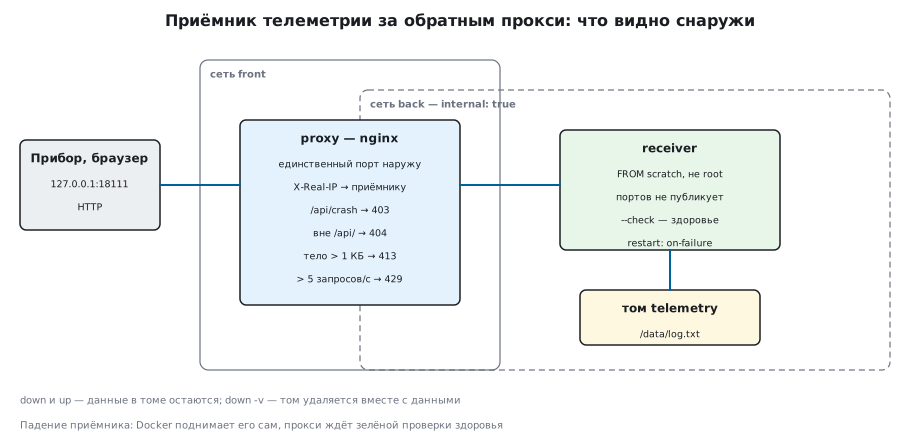
Devices send readings with an HTTP POST /api/telemetry request (section 107),
the receiver appends a line to a file and, on request, says how many lines it has
accepted. The receiver is a small C program without libraries: this shows that
the container does not care what language the program is written in.
Only the nginx proxy is open to the outside. It accepts requests, cuts off what is not needed and passes the rest to the receiver on the internal network. Three properties this is all about:
- the stand is described by files and comes up with one command on any machine;
- a program crash and a server restart do not lose data;
- from outside you see only what is intended.
111.2 The image: two stages
The image is built from a Dockerfile. The compiler is only needed to build
the program; in the running image it has nothing to do:
FROM debian:12-slim AS build
COPY receiver.c /src/receiver.c
RUN gcc -std=gnu11 -O2 -Wall -Wextra -static -o /receiver /src/receiver.c \
 && mkdir /data

FROM scratch
COPY --from=build /receiver /receiver
ENTRYPOINT ["/receiver"]
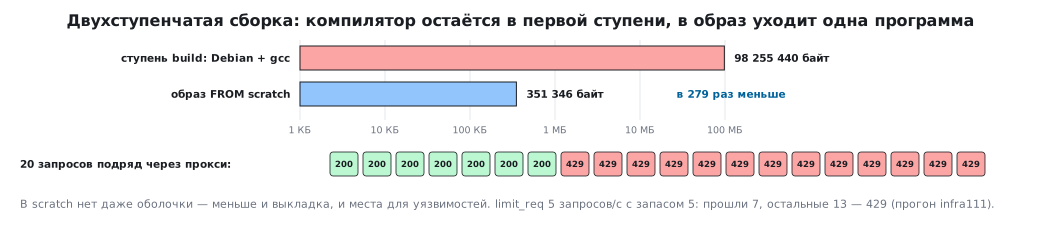
The first stage is Debian with gcc, the second is FROM scratch, an empty image into which
one statically linked program is copied. The result of the experiment: the receiver image is
351346 bytes, the stage with the compiler is 98 MB, 279 times larger. A smaller image means
faster deployment over a slow link and fewer programs in which a vulnerability
might turn up: scratch does not even have a shell.
The version of the base image is pinned the same way as the compiler version
in the pipeline: nginx:1.31.3-alpine, not nginx:latest, — otherwise tomorrow's
build will not come out the same as today's. But even a tag with a version
(nginx:1.31.3-alpine, debian:12-slim) is rebuilt with security
updates: the content changes, the name does not. Only the image hash
@sha256:… is immutable.
111.3 Not as root
By default the process in a container runs as root. The receiver does not need that:
COPY --from=build --chown=65534:65534 /data /data
USER 65534:65534
The experiment confirmed it: the container runs as user 65534. The /data directory
is created in the image with this owner right away — a new volume gets the same
permissions, and the program can write to its own file, but nowhere else.
111.4 Compose: the whole stand in one file
The compose.yaml file describes services, volumes and networks:
services:
  receiver:
    build: ./receiver
    restart: on-failure
    volumes:
      - telemetry:/data
    networks:
      - back
  proxy:
    image: nginx:1.31.3-alpine
    restart: unless-stopped
    ports:
      - "127.0.0.1:18111:80"
    volumes:
      - ./proxy/nginx.conf:/etc/nginx/conf.d/default.conf:ro
    networks:
      - front
      - back
volumes:
  telemetry:
networks:
  front:
  back:
    internal: true
The proxy is connected to both networks, the receiver only to back. A named
volume is declared at the top level of the file: without the volumes section Compose refuses
to start ("refers to undefined volume"). The healthcheck and start-up order
are in 111.5.
The commands you use every day:
docker compose up -d --build     собрать и поднять в фоне
docker compose ps                что запущено и в каком состоянии
docker compose logs -f receiver  журнал сервиса
docker compose down              остановить и удалить контейнеры
docker compose down -v           то же вместе с томами — и данными
The proxy port is published only on 127.0.0.1: on a server it is exposed
to the outside by the firewall or by an external proxy with encryption, not by Docker itself.
A port published on all addresses ("18111:80") is forwarded by Docker
with its own iptables rules before the packet even reaches the ufw rules
(and firewalld zones): the port is visible from the network even if the firewall
"forbids" it. Restrictions for published ports go into the
DOCKER-USER chain — Docker checks it before its own rules.
111.5 Healthcheck and start-up order
"The container is running" does not mean "the program is ready to answer". A healthcheck
asks the program itself. A scratch image has neither curl nor a shell —
so the receiver can check itself:
    if (argc > 1 && strcmp(argv[1], "--check") == 0)
        return self_check();
self_check() makes a GET /api/count request to itself and returns 0 on
a 200 response. In Compose:
  receiver:
    healthcheck:
      test: ["CMD", "/receiver", "--check"]
      interval: 2s
  proxy:
    depends_on:
      receiver:
        condition: service_healthy
The proxy starts only after the receiver has become healthy: the first
requests from devices will not get a "service unavailable" error.
111.6 Crash and restart
The restart: on-failure policy brings the container back up if the process exited
with an error. Experiment: a service request from inside the network made the receiver crash.
Docker restarted it by itself — RestartCount became 1 — the healthcheck
was green again, and the count of accepted lines stayed at 3: they are in a file
on the volume, not in the process memory.
unless-stopped on the proxy brings it up even after a server reboot.
A restart is insurance, not a cure: frequent restarts show up
in RestartCount and should turn into an alert (section 112).
111.7 Volumes: data separate from the container
A container is disposable: it is deleted on every image update. The data
lives in the telemetry volume mounted at /data. Experiment:
docker compose downremoved the containers and networks, the volume remained; afterupthe count is 3 again;docker compose down -vremoved the volume too — together with all the readings.
So down -v on a production server is a command after which you need
a backup. A volume with important data is backed up on a schedule — for example,
with a separate container running tar, mounted on the same volume.
111.8 Networks: only the proxy faces outward
The receiver publishes no ports and is connected only to the back network
with internal: true — it has no way out. The proxy is connected to both
networks. Experiment: a container on the external front network could not
reach the receiver, while a container on the back network could. Inside a network
services find each other by name: the proxy talks to receiver:8080,
nobody writes addresses.
If the receiver is compromised, it has nowhere to send data from the internal network; if the proxy is compromised, it sees only the receiver, not everything else on the server.
111.9 The reverse proxy
limit_req_zone $binary_remote_addr zone=tele:1m rate=5r/s;

location = /api/crash {
    return 403;
}

location /api/ {
    limit_req zone=tele burst=5 nodelay;
    limit_req_status 429;
    client_max_body_size 1k;
    proxy_set_header X-Real-IP $remote_addr;
    proxy_pass http://receiver:8080;
}
What the proxy did in the experiment:
| Request | Response |
|---|---|
three lines to /api/telemetry |
200, the receiver counted 3 |
the service /api/crash |
403 — not let out |
anything outside /api/ |
404 |
| a body larger than 1 KB | 413 |
| 20 requests in a row | 6–7 passed, the rest got 429 |
The limit is 5 requests per second with a burst of 5: a broken device
that sends non-stop will not bring the receiver down. The receiver sees the connection
from the proxy, and gets the real client address in the X-Real-IP header:
through the proxy /api/whoami returned the client address, directly — a dash.
On a production server the same proxy holds the HTTPS certificate — the receiver
knows nothing about encryption.
111.10 Pitfalls
The container "works", but the service does not answer. There is no healthcheck,
dependent services start too early. healthcheck and condition: service_healthy.
Data disappeared after an update. Data was written inside the container,
not to a volume. Everything that must outlive the container goes into volumes.
permission denied when writing to a volume. The program does not run as root,
but the directory belongs to root. Create the directory in the image with the right owner.
The build gave different images yesterday and today. The base image is latest.
Pin versions.
The receiver is reachable from the internet bypassing the proxy. Its port is published. Publish only the proxy, keep the receiver on the internal network.
Every entry in the receiver log has the same address. That is the proxy's address.
Take X-Real-IP, and have the proxy set it.
down -v on a server. It deletes volumes with data. Back up first.
111.11 Summary
- A two-stage build: the receiver image is 351346 bytes versus 98 MB
for the stage with the compiler;
FROM scratch, user 65534. - Compose describes services, volumes and networks;
up -d --buildbrings up the whole stand with one command. - The healthcheck is done by the program itself (
--check), the proxy waits forservice_healthy. - Docker brought the crashed receiver back up by itself (
RestartCount1), the data in the volume is intact;downdoes not touch it,down -vdeletes it. - Only the proxy faces outward: 403 on the service address, 404 outside
/api/, 413 on a large body, 429 on frequent requests, the client address inX-Real-IP.
Next: section 112 "Observability" — logs, metrics and alerts for this stand.