 Embedded HandbookApps
48. A custom bootloader and firmware updates
While the device is on your desk, the debugger changes the program. As soon as it has gone to the customer, you need a way to update without a debugger, without opening the enclosure and without the risk of turning the unit into a brick halfway through. This is the job of a bootloader: a small program that starts first, decides what to run, and can accept new firmware.
This section is about how it is built: the memory layout, handing over control,
the image format, the integrity check, rollback to the previous version and
over-the-air updates. The mechanics of writing to Flash are covered in section 11,
the factory bootloader and BOOT0 in section 4; here all of it is put together into
a working scheme.
Terms used in the documentation
Term Meaning bootloader the program that starts first and loads the application application, image the firmware image slot, bank a region that holds an image vector table offset (VTOR) where the vector table is located main stack pointer (MSP) the main stack pointer reset handler the reset handler, the entry point Thumb bit the lowest address bit: marks the instruction set Intel HEX a text image format with addresses firmware over the air (FOTA, OTA) updating over a wireless link rollback returning to the previous version confirm / revert confirming that it works / going back in-application programming (IAP) writing Flash from your own program read-out protection (RDP) protecting Flash from being read write protection (WRP) protecting pages from being written
48.1 When you need one and when you do not
The honest answer: more often you do not. A sensor that counts visitors is agreed with the customer at the prototype stage and the program is flashed in production; an improvement ships with the next batch, and old units are simply replaced.
A bootloader is needed where the value of the device is in the program and where physical access is expensive:
- a distributed sensor network where you cannot drive to each node;
- medical and measurement equipment with a long life cycle;
- products that gain new features after sale;
- anything where you may need to fix a bug urgently.
And a sober note right away: your own bootloader is a separate program that cannot be updated the same way. It must be simple, debugged and unchanged for years. Everything that can be moved into the application is moved into the application.
48.2 Memory layout
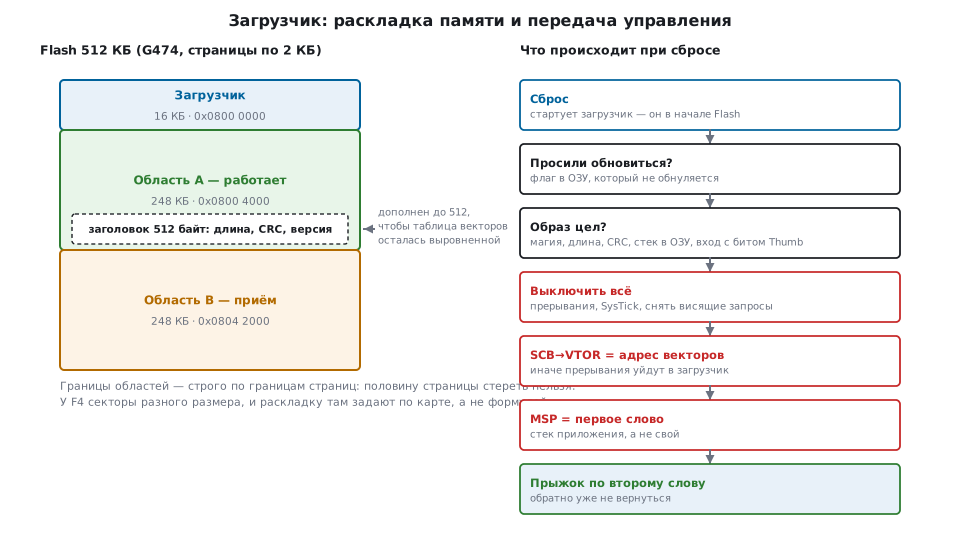
The bootloader sits at the start of Flash — it is what starts from the reset address. The rest is divided into slots for images. A scheme with two slots — active and receiving — costs twice the memory but removes the main fear: an update can be interrupted at any moment, and the running program stays intact.
One subtlety shapes the whole scheme: the application is built for its own address (48.5) and runs only from there — the vector table and the code contain absolute addresses. An image built for slot A will not run from slot B; the check from 48.4 will not even let it through — the entry point will be outside the slot. There are three ways out:
- the second slot only receives. After checking the received image, the bootloader copies it into the active slot. The copy must be able to resume after a power failure, and the previous image is lost for that time unless it is stored somewhere else as well — for example, in external memory;
- two images per release. One is built for A, the other for B, and the unit is sent the one that fits the free slot;
- two Flash banks. On chips with two banks (G474 in dual-bank
mode, F42x/F43x) the banks swap places in the address space —
with the
FB_MODEbit on the G4 andUFB_MODEon the F4 inSYSCFG_MEMRMP— and both images are built for the same address; the bootloader is then kept at the start of both banks.
#define BOOT_SIZE      (16u * 1024u)
#define SLOT_SIZE      ((FLASH_BYTES - BOOT_SIZE) / 2u)
#define SLOT_A_ORIGIN  (FLASH_ORIGIN + BOOT_SIZE)
#define SLOT_B_ORIGIN  (SLOT_A_ORIGIN + SLOT_SIZE)
| Chip | Flash | Erase unit | Bootloader | Slot |
|---|---|---|---|---|
| F103 | 128 KB | 1 KB page | 16 KB | 56 KB |
| G474 | 512 KB | 2 KB page | 16 KB | 248 KB |
| F407 | 1 MB | 16…128 KB sector | 128 KB | 384 KB |
⚠️ On the F4 the formula does not work. The sectors differ in size: four of 16 KB, one of 64 KB, then 128 KB each. Splitting "in half after the bootloader" gives 504 KB — not a multiple of any sector, and you cannot erase half a sector. The layout is set from the map: sectors 0…4 are the bootloader (128 KB), 5…7 and 8…10 are two slots of 384 KB, sector 11 is left for settings.
This is a case where _Static_assert pays off at once: slot boundaries
are checked for being a multiple of the erase unit at compile time, not at the
first update in the field.
48.3 The image header and alignment
In front of the firmware in the slot there is a header: everything needed to decide whether to run it or not.
typedef struct {
    uint32_t magic;         /* образ вообще есть */
    uint32_t size;          /* длина прошивки за заголовком, байт */
    uint32_t crc;           /* CRC-32 этих size байт */
    uint32_t version;       /* чтобы не откатиться назад молча */
    uint32_t entry;         /* адрес входа — проверяется на попадание в область */
    uint32_t flags;         /* признак «принята, но ещё не подтверждена» */
    uint32_t reserved[2];
    uint8_t  pad[IMG_HDR_SIZE - 8u * 4u];
} img_hdr_t;
32 bytes would be enough for the header, but it is padded to 512. The reason is not
room for the future but alignment: right after the header the
application's vector table begins, and its address must be a multiple of the size of the
table rounded up to a power of two. The vector table offset register
simply does not store the lower seven bits — you cannot write
0x08004020 there, and the application will fault on its very first
interrupt.
The second requirement: on the G4 Flash is written in double words, so the size of the header must be a multiple of eight. Both conditions are checked at build time.
48.4 Checking the image before running it
The first two words of any Cortex-M firmware are the initial value of the stack pointer and the address of the reset handler. The bootloader looks at them before jumping: if they do not look plausible, the application will crash before its first instruction, and finding the cause will be hard.
static int image_valid(uint32_t slot)
{
    const img_hdr_t *h = (const img_hdr_t *)slot;
    const uint32_t *vec = (const uint32_t *)(slot + IMG_HDR_SIZE);
    uint32_t sp, pc;

    if (h->magic != IMG_MAGIC)
        return 0;
    if (h->size == 0u || h->size > SLOT_SIZE - IMG_HDR_SIZE)
        return 0;

    sp = vec[0];
    pc = vec[1];
    /* Указатель стека должен смотреть в ОЗУ. */
    if (sp < RAM_ORIGIN || sp > RAM_ORIGIN + RAM_BYTES)
        return 0;
    /* Адрес входа — внутрь этой же области и с признаком Thumb. */
    if ((pc & 1u) == 0u)
        return 0;
    if (pc < slot + IMG_HDR_SIZE || pc >= slot + SLOT_SIZE)
        return 0;

    return crc32((const void *)(slot + IMG_HDR_SIZE), h->size) == h->crc;
}
The checks go from cheap to expensive: magic number, length, plausibility of the stack and the entry point — and only then the CRC over the whole image, which takes milliseconds.
What a CRC gives and what it does not. It catches corruption: an interrupted transfer, a write failure, cell degradation. It does not protect against substitution: anyone can compute the CRC of their own firmware. If it matters that the device accepts only your updates, you need a signature — an HMAC on a shared secret or, better, a digital signature with a key pair (section 43). Signature verification lives in the bootloader, and the verification key in its own immutable part.
48.5 Handing over control
The order here matters more than the code.
static void jump_to_app(uint32_t slot)
{
    uint32_t sp = *(const uint32_t *)(slot + IMG_HDR_SIZE);
    uint32_t pc = *(const uint32_t *)(slot + IMG_HDR_SIZE + 4u);
    uint32_t i;

    __disable_irq();

    /* Снять все разрешения и все висящие запросы: приложение начинает с чистого. */
    for (i = 0u; i < (sizeof(NVIC->ICER) / sizeof(NVIC->ICER[0])); i++) {
        NVIC->ICER[i] = 0xFFFFFFFFu;
        NVIC->ICPR[i] = 0xFFFFFFFFu;
    }
    SysTick->CTRL = 0u;
    SysTick->LOAD = 0u;
    SysTick->VAL  = 0u;

    SCB->VTOR = slot + IMG_HDR_SIZE;    /* где искать векторы теперь */
    __DSB();
    __ISB();

    /* Стек, разрешение прерываний и переход — одной вставкой: после смены MSP
     * компилятору нечего читать из кадра старого стека. Сюда уже не вернёмся. */
    __asm volatile ("msr msp, %0\n cpsie i\n bx %1" :: "r"(sp), "r"(pc));
}
Why exactly this way:
- First switch off interrupts and peripherals. An interrupt that arrives in the middle of the jump will find the new stack and the old vector table — and go nowhere. You have to clear both the enables and the already pending requests.
- Return the chip to its post-reset state. The code above shuts down only the NVIC
and SysTick, while the PLL, DMA and enabled blocks stay the way the bootloader
left them. An application with standard initialization expects a chip
fresh from reset: HAL returns an error if the PLL is already clocking the system with other
settings, and a DMA channel left open keeps writing into the application's RAM.
So DMA channels are stopped with the
ENbit (the F103 has no way to reset DMA through RCC), the other blocks are reset with a pulse in the reset registersRCC->APBxRSTR(on the F4 and G4 alsoAHBxRSTR), and the system clock is switched back to HSI and the PLL turned off. In HAL on the F4 and G4 this is done byHAL_RCC_DeInit()andHAL_DeInit(). The most reliable way is not to enable peripherals at all until it is decided what to run: the flag and the image are checked by the first instructions after reset with an immediate jump, and the bootloader enables peripherals only if it stays in itself. - Then move the vector table. Cortex-M0 has no offset register: there the application's table is either copied to the start of RAM and the memory region remapped, or trampolines are kept in the bootloader.
- Then the stack. After writing the stack pointer you must not access the local variables of the previous function — they no longer exist. So the stack switch and the jump are done in one assembly insert: the entry address is already in a register.
__DSBand__ISB— so that the offset write takes effect before the first interrupt.- The application must be built for its own address. In the linker
script the start of Flash is not
0x08000000but the slot address plus the header size (section 11.3).
48.6 How the application requests reflashing
The bootloader needs to know whether this is a normal start or the user requested an update. The options, from simple to reliable:
| Where the flag is kept | Survives | Cost |
|---|---|---|
| a RAM variable in a section that is not zeroed | software reset | nothing; lost when power is removed |
backup registers (VBAT domain) |
power removal with a battery | needs the backup domain |
| a Flash page | everything | an erase cycle for every request |
| a pin/button at start-up | everything | needs physical access |
The most common is the first, and it is enough: an update always starts from a running application, and it reboots in software.
#define REBOOT_MAGIC   0xB00710ADu
uint32_t reboot_flag __attribute__((section(".noinit")));

static void request_update(void)
{
    reboot_flag = REBOOT_MAGIC;
    NVIC_SystemReset();                  /* сброс без снятия питания */
}

static int update_requested(void)
{
    int yes = (reboot_flag == REBOOT_MAGIC);
    reboot_flag = 0u;                    /* прочитали — сбросили, иначе зациклимся */
    return yes;
}
The section must be excluded from zeroing in the startup code and in the
linker script; otherwise the flag is lost before main. And it must be read
exactly once, with a reset: otherwise the device will stay in the
bootloader forever.
And the key condition: the flag lives at the same address in both programs.
The bootloader and the application are each built with their own linker script, and
the .noinit section of each ends up wherever its own
variables ended: in the test build for the F103 it is 0x20000800 in the bootloader and
0x20000258 in the application. The bootloader would read a different cell from the one
the application wrote. So both scripts get the same separate
region at the end of RAM — for 20 KB it is
NOINIT (rwx) : ORIGIN = 0x20004FF0, LENGTH = 16 — and the section is placed there,
while RAM is shortened by the same 16 bytes so that the top of the stack lies below it.
You can also access the address directly:
#define REBOOT_FLAG (*(volatile uint32_t *)0x20004FF0u).
48.7 Image format: binary or Intel HEX
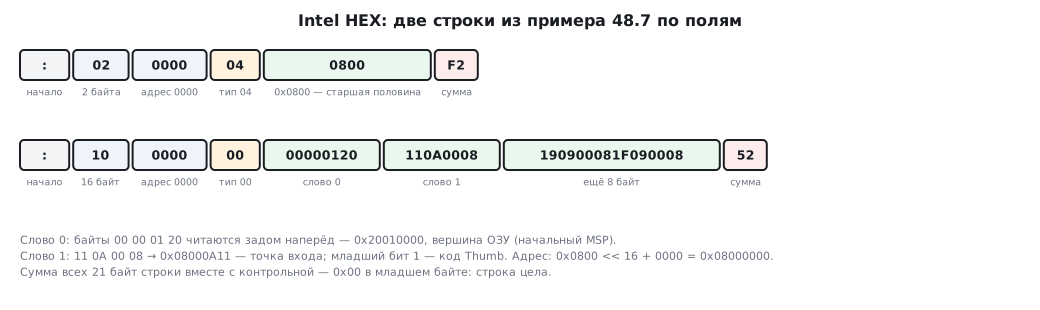
A binary file is exactly the contents of Flash: no addresses, no markup. Intel HEX is a text format in which every line carries a piece of data and the address where to put it.
:020000040800F2
:1000000000000120110A0008190900081F09000852
:00000001FF
A line: a colon, the data length, the address (two bytes), the record type, the data,
the checksum. Types: 00 — data, 01 — end of file, 04 —
extended linear address (sets the upper half of the address). A file from the
linker usually also has 05 — the start address: objcopy puts it
before the end of file. The entry point is in the second word of the vector
table anyway, so 05 is skipped — as is 03, the same kind of start address for
the segmented memory of old x86. Record 02, the segment address, is used by
some tools, and it must not be skipped: its value multiplied by 16
is added to the addresses of the following lines. There are six types in total, and the parser
must know all of them: one that understands only 00, 01 and 04 and rejects
the rest will refuse a real firmware file.
The checksum is the two's complement of the sum of all other bytes, so the sum of all bytes of a line, including it, gives zero in the low byte — and the check is built on that:
for (i = 0u; i < n; i++)
    sum += raw[i];
if ((sum & 0xFFu) != 0u)
    return 0;                        /* сумма всех байт, включая контрольную, — ноль */
Parsing the example above gives: base address 0x08000000, the first word
0x20010000 — the top of RAM, the second 0x08000A11 — the entry point with the
low bit set. Exactly what the bootloader checks.
Which to choose. HEX is convenient because it is self-checking and carries addresses — but 16 bytes of data turn into 45 bytes of file: three times more. A 60 KB firmware over UART at 115200 takes 5.3 seconds as a binary file and 15 seconds as HEX. For a link paid per megabyte the difference is decisive. A practical compromise: HEX for the desktop tool, a binary image with a header for the device.
48.8 Receiving, writing, confirming
How long it takes. Numbers for the G474 (typical Flash characteristics):
| Action | Time |
|---|---|
| erasing a 2 KB page | 22.0 ms |
| writing a 2 KB page | 20.9 ms |
| erasing a whole 248 KB slot | 2.73 s |
| writing a whole slot | 2.59 s |
| full slot update | 5.3 s |
| erasing and writing only 60 KB of firmware | 1.29 s |
Two conclusions follow. First: an update is a process of seconds during which the device is busy; you need to show this to the user and take it into account in the watchdog (section 12). Second: erasing the whole slot when the image is four times smaller wastes four seconds for nothing.
How to receive. In page-sized chunks, acknowledging each chunk, with the ability to resume from where it stopped: the link is unreliable, and starting over from the middle is annoying. A received chunk is written at once — the whole image will not fit in the microcontroller's RAM.
Confirming that it works. New firmware can pass the CRC and still not work: the wrong hardware, a bug in a new branch. The protection scheme has three steps:
- The bootloader marks the new image with a "trial" flag and runs it.
- The application, once it is sure it is alive (the link is up, the sensors respond), sets the "confirmed" flag.
- If after a reset the image is still on "trial", the bootloader treats the attempt as failed and goes back to the previous slot.
How to store these flags. In Flash they are not rewritten but appended:
a word can be written only from the erased state, and erasing the page with the
header means erasing the start of the image too. On the G4 writes go in double
words with an error-correcting code, and into a double word already written you can
at most write zeros. So each step has its own cell in the header
(on the G4 a double word each; there is room in the pad padding): "ran on
trial" and "confirmed". An erased cell (all ones) means "not yet",
a written one means "yes"; these cells are skipped when the image is written. The bootloader
writes the first before the trial run, the application writes the second; if after
a reset the first is written and the second is not — rollback.
The watchdog is an ally here: an application that hangs before confirming reboots by itself and rolls back.
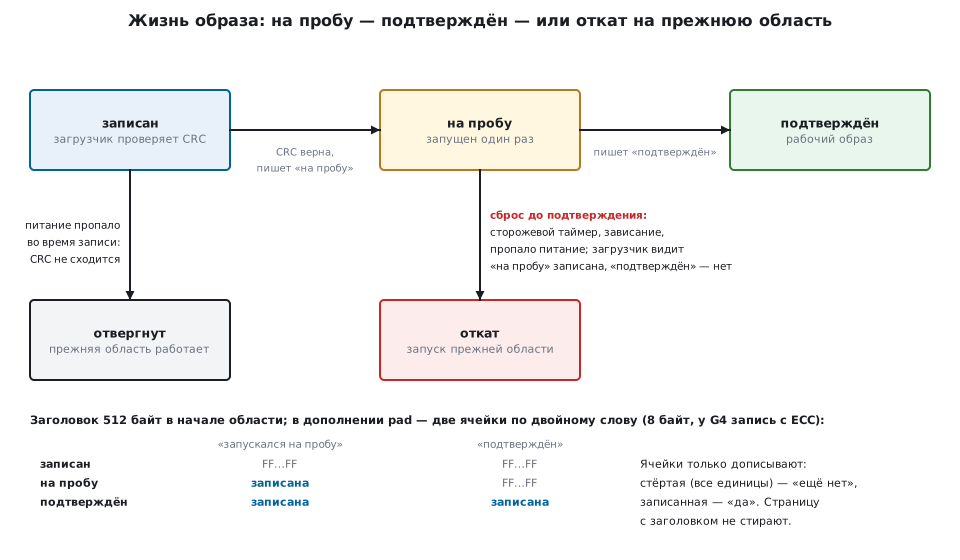
What is stored where so that rollback is possible. The previous image stays in place — that is the whole point of two slots. The bootloader remembers which one is active from the flags in the headers and the version number; it runs an image only from the slot whose address the image was built for (48.2).
48.9 Protection
The bootloader is responsible not only for the update going through but also for only the right one going through.
| Measure | Against what | Where it is configured |
|---|---|---|
| CRC-32 of the image | corruption in transfer and writing | image header |
| image signature | firmware substitution | header + key in the bootloader |
| image encryption | reading the firmware in the link and on disk | key in the bootloader (section 43) |
| read-out protection (RDP) | reading Flash with a debugger | option bytes (section 11.6) |
| page write protection (WRP) | corruption of the bootloader itself | option bytes |
| version check | rollback to an old version with a known hole | image header |
About keys: an array in the sources is not protection. The key must be in a region closed to reading, and preferably unique to each unit. A key shared by the whole batch means that opening one unit compromises them all.
⚠️ Read-out protection is removed only together with erasing the whole Flash. Once you enable it, you can no longer read the firmware — including your own during debugging. The second level is irreversible on some families.
48.10 Over-the-air updates
The link may be a wireless module, a cellular modem, USB, an SD card, a wired interface; the bootloader does not care, it needs a byte stream. The difference is where the image is kept before it is written:
- directly in the second Flash slot — simple, nothing extra;
- in external memory (SPI Flash, SD — sections 41, 42) — if the internal memory is not enough or the image must be kept for later;
- at an intermediary — the communication module receives the whole file and hands it to the microcontroller over its own interface.
What the protocol must have regardless of the link: the length and checksum of the whole image up front, numbered chunks, acknowledgement of each, resumption from the point of interruption, a timeout for the whole session. And a log: what version, when it arrived, how it ended — otherwise there will be nothing to analyze a failure in the field by.
48.11 Ready-made paths if you do not need your own
Before writing a bootloader, check whether a ready-made one is enough:
- The factory bootloader in system memory. It is in every chip;
it accepts firmware over UART, and on the larger families over USB (DFU), CAN,
SPI, I²C (section 4.9). It is started with the
BOOT0pin or from the application itself: the application returns the chip to its post-reset state (48.5) and jumps into system memory the same way the bootloader jumps into the application (the address is in the description of the family's factory bootloader). On the G4 the pin can be replaced by option bytes — thenSWBOOT0andnBOOT0bits inFLASH_OPTR. If UART or USB is brought out, this is an update without your own bootloader and without opening the enclosure — but without a signature or rollback. - A debugger over SWD. Two minutes on a unit on the desk.
- Ready-made secure update libraries. They can do signatures, two slots, rollback and a log; the price is size and the time to learn them.
You write your own bootloader when you need your own link, your own format or your own verification rules — that is, almost always if updates go over the air.
48.12 Pitfalls
A fault right after the jump. VTOR was not moved, or the application
was built for address 0x08000000 but sits at another one.
Works until there are interrupts. The same VTOR: the vectors are looked up in
the bootloader.
The image from the second slot fails the check or crashes. It was built for the address of the first: you need a separate image per slot, copying into the active slot, or a bank swap (48.2).
The vector table "will not align". The image header is not a multiple of the required alignment. Pad it to 512 bytes.
The device is stuck in the bootloader forever. The request flag is not cleared after reading, or the no-zeroing section is zeroed by the startup code after all.
The application requests reflashing, but the bootloader does not see it. The flag
in .noinit is at different addresses in the two programs: you need a common region
in both linker scripts.
The firmware was received but does not start. Check the order: was a byte lost in transfer, does the length in the header match what was actually written, is the CRC computed over the same boundaries as at build time.
An erase fails. A slot boundary does not match a page or sector boundary; on the F4 — an attempt to use the formula instead of the sector map.
The watchdog interrupts the update. A page erase takes tens of milliseconds; either refresh the watchdog inside the write loop or use a longer interval for the duration of the update.
Power was lost in the middle of a write. This is exactly why there are two slots: the active one is intact, the bootloader sees the unfinished image by its flag and runs the previous one.
New firmware "bricks" the device. There is no confirmation that it works and no rollback.
The Flash endurance ran out. 10000 cycles is 27 years with an update once a day, but only a week if the application writes settings to the same page once a minute. Put settings in a separate page, with rotation.
The bootloader turned out to have a bug. It cannot be updated by the same mechanism. Hence the rule: minimal code, no experiments, thorough testing before a batch is released.
48.13 Summary
- A bootloader is needed where the value is in the program and physical access is expensive; otherwise a debugger and the factory bootloader are enough.
- Two slots instead of one cost twice the Flash and remove the risk of an interrupted update. An image is built for the address of its own slot and will not run from the "other" one: it is copied into the active slot, two images are built, or the banks are swapped.
- The reflash flag in
.noinitis placed at the same address in both programs — in a common region at the end of RAM. - Slot boundaries lie strictly on page boundaries; on the F4 the layout is set from the sector map because the sectors differ in size.
- The image header is padded to 512 bytes: the vector table follows it, and its address must be aligned.
- Before the jump, check the magic, the length, the stack pointer, the entry point with the Thumb bit and the CRC; a CRC catches corruption but not substitution — a signature protects against substitution.
- Handing over control: disable interrupts, return the peripherals and the clock
to the post-reset state, move
VTOR, setMSP, jump to the address in the second word. - Intel HEX is self-checking and carries addresses, but is three times longer than a binary image: 15 seconds versus 5.3 at 115200.
- A full update of a 248 KB slot takes about 5.3 seconds: erase plus write; it makes sense to erase only the pages in use.
- Confirming that it works and rollback are a mandatory part; otherwise one bad firmware costs a trip to the device.
Next: section 48а "Firmware signing: the bootloader checks who built it".