 Embedded HandbookApps
73. Measuring time and performance
"Faster" and "slower" without a measurement are an opinion. On a microcontroller time is not an idle question: an interrupt handler must finish before the next interrupt, a control loop must fit into its period, a protocol response must arrive before the other side decides the link is lost.
This section covers what to measure time with on the chip and on a computer, how to convert cycles into time — and above all, how not to fool yourself with a measurement. One of the examples is a "speed-up" that in fact turned out to be a broken wait loop.
Terms used in the documentation
Term Meaning execution time, latency how long code runs, the delay before a response cycle count, CPI the number of cycles, cycles per instruction cycle counter (DWT CYCCNT) the core register that counts cycles timestamp a time mark for an event resolution, overhead the smallest step, the cost of the measurement itself wall-clock time, CPU time real elapsed time, time the processor spent monotonic clock a clock that never jumps backwards benchmark a reference measurement warm-up runs made before measuring logic analyzer an instrument that records digital lines profiling finding where the time goes
73.1 What to measure with on the chip
| Tool | Resolution | Where available | When to use |
|---|---|---|---|
| a pin and an oscilloscope or logic analyzer | nanoseconds | everywhere | time "from outside", without affecting the code |
cycle counter DWT->CYCCNT |
one cycle | Cortex-M3, M4, M7, M33 | precise measurement of a code section; on some M7 chips access to the block is first unlocked by writing 0xC5ACCE55 to DWT->LAR |
SysTick |
millisecond | any Cortex-M | long intervals, timeouts |
| hardware timer | timer tick | everywhere | intervals between events, capture |
| marks in the debug channel | cycle | M3 and up | an event log with time |
A pin and an oscilloscope is the most honest method. Before a code section
you raise a pin, after it you lower it, and the instrument shows the pulse
width. Two writes to BSRR cost almost nothing, and the instrument does not depend
on what happens in the program. A logic analyzer also
shows the interface lines alongside — you can see how much time passes between
bytes.
The cycle counter is a 32-bit counter built into the core that
increments on every cycle. How to enable and use it is covered in section 35.3.
It is important to know that Cortex-M0 and M0+ do not have it at all: their core
headers have neither a DWT block nor CYCCNT, and code that reads DWT->CYCCNT simply
does not build with the F072 header. On F0 you measure time with a timer or a
pin.
SysTick gives milliseconds (section 7.4), a hardware timer gives
everything in between, and capture mode measures intervals between
external events without the processor (section 13.6). Marks in the
debug channel are a log with time that barely slows the
program down (section 21).
73.2 Cycles and time
The conversion is simple: time is cycles divided by frequency.
| Core frequency | One cycle | The cycle counter overflows after |
|---|---|---|
| 72 MHz (F103) | 13.9 ns | 59.7 s |
| 168 MHz (F407) | 5.95 ns | 25.6 s |
Overflow does not get in the way of measuring short sections: the difference
end − start in unsigned arithmetic is correct across zero as well
(section 7.4). It only gets in the way of measuring longer than these seconds.
The SysTick counter is 24 bits wide: at the full frequency with no prescaler it
goes through all 2²⁴ values in 233 ms at 72 MHz and in 99.9 ms at 168 MHz.
That is why it is used not as a stopwatch but as the source of an interrupt once
a millisecond — and the milliseconds are counted in software.
The same number of cycles is not the same time, and vice versa. At a high frequency Flash cannot keep up with the core and inserts wait states (section 6.4): the same code at 72 MHz takes more cycles than at 24. So you record a measurement result together with the frequency and the Flash settings.
73.3 The cost of a call: HAL versus the register
A popular claim: "a library call is slow, write to the
registers". Let us check it on the pin write function from the F4 library —
HAL_GPIO_WritePin, built from its source with optimization:
HAL_GPIO_WritePin:
    cmp     r2, #0
    it      eq
    lsleq   r1, r1, #16        ; сброс — сдвинуть маску в старшую половину
    str     r1, [r0, #24]      ; запись в BSRR
    bx      lr
Five instructions. The call HAL_GPIO_WritePin(GPIOA, GPIO_PIN_5, GPIO_PIN_SET)
adds five more: four put the three arguments into registers (the port address
takes two) and one branches to the function. The direct write
GPIOA->BSRR = GPIO_PIN_5 is four instructions plus a return.
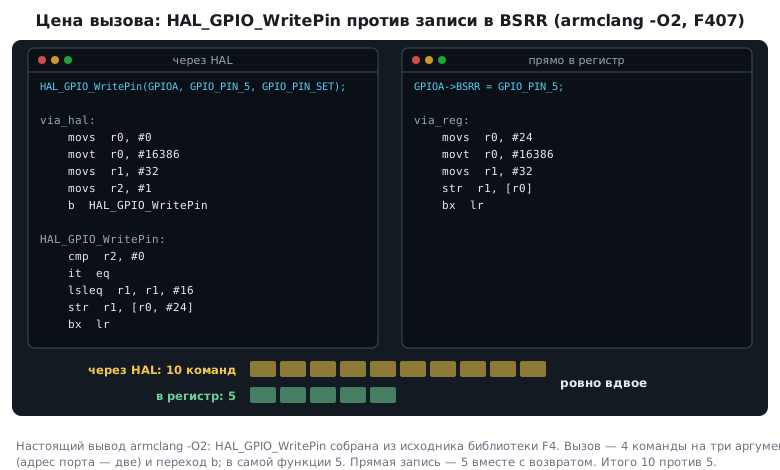
In total that is ten instructions against five — twice as many by instruction count. But an instruction is not a cycle: a branch and a return on Cortex-M3 and M4 cost from two to four cycles (the pipeline refills), and after a branch Flash may add wait states (73.2). In time the ratio comes out at about two, but only the cycle counter on the board gives the exact number (73.1). Not five times and not ten times — that is clear even without it. The difference shows in a loop that toggles the pin millions of times, and is invisible wherever something else happens between the writes.
The picture changes if you build without optimization or enable the library's parameter
checking (USE_FULL_ASSERT): then every call grows
checks and overhead. The conclusion is simple: a "library versus registers"
comparison depends on the library, the optimization level
and the build settings — you measure it, you do not take it on faith.
73.4 A "speed-up" that turned out to be a bug
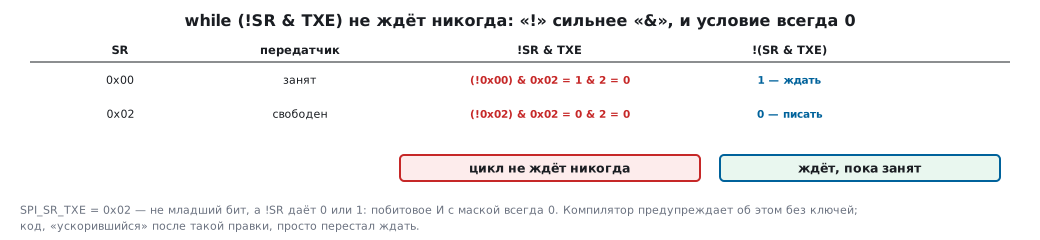
Sometimes code rewritten "directly with registers" starts running noticeably faster. Before you celebrate, check that it works correctly. Here is a typical way to write a wait for a flag:
while (!SPI1->SR & SPI_SR_TXE) { } /* ждём, пока освободится передатчик */
The negation ! binds tighter than the bitwise & (section 65.3), so the condition reads
as (!SPI1->SR) & SPI_SR_TXE. !SR is 0 or 1, and the flag mask is not
the least significant bit, so the result is always zero. The compiler does exactly
that: after reading the register, it returns the constant 0 — the wait loop
never waits. The correct form is while (!(SPI1->SR & SPI_SR_TXE)).
The code became "faster" because it stopped waiting. Bytes are now written to the transmitter without waiting for it to become free, and some of them are lost or corrupted — but on an oscilloscope this is not obvious at once.
The good news: the compiler warns about such code without any flags — "logical not is only applied to the left hand side of this bitwise operator". The rule from this example is broader: a suspiciously good measurement result is a reason to check correctness first.
73.5 Measuring on a computer
| Function | What it measures |
|---|---|
clock() |
the program's CPU time; CLOCKS_PER_SEC = 1000000 |
clock_gettime(CLOCK_MONOTONIC, …) |
wall-clock time, resolution 1 ns |
time() |
seconds — not suitable for measurements |
These are the Linux values. On Windows with the Microsoft library clock() counts
elapsed time rather than CPU time, CLOCKS_PER_SEC equals 1000, and
there is no clock_gettime — QueryPerformanceCounter is used instead.
struct timespec a, b;
clock_gettime(CLOCK_MONOTONIC, &a);
work();
clock_gettime(CLOCK_MONOTONIC, &b);
double ms = (b.tv_sec - a.tv_sec) * 1e3 + (b.tv_nsec - a.tv_nsec) * 1e-6;
A monotonic clock does not jump when the system time is changed — that is why it is the one used for measurements, not the real-time clock.
CPU time from clock() does not grow while the program waits for input or
sleeps — this is useful when you need to separate computation from waiting.
73.6 Method: how not to fool yourself
The optimizer throws away work whose result is not needed. A loop of
a hundred million steps that sums numbers into a variable nobody
reads afterwards "ran" in almost zero milliseconds on a computer:
the compiler simply removed it (section 63.5). The same loop writing to
a volatile took noticeable time. The measured work is either used —
the result is printed — or stored in a volatile variable.
Measurements do not repeat. Five identical measurements in a row on a computer give five different numbers: other programs, caches and the processor frequency interfere. Repeat the measurement many times and take the smallest value — it is closest to the code's own cost. On the chip the spread is smaller, but interrupts introduce it: a short section is measured either with interrupts disabled or many times.
To check deadlines on the chip you need the opposite — the largest value:
a handler and a control loop must fit even in the worst case, while the
minimum hides rare long runs — an interrupt in the middle of the section, a Flash
accelerator miss, a long branch. The maximum is accumulated right in the program,
if (dt > dt_max) dt_max = dt;, and looked at after a long run (section 76.9).
The measurement itself costs time. Reading the counter takes a few cycles; for very short sections you subtract the cost of an "empty" measurement.
Printing inside the measured section ruins everything. One character at 115200 baud takes 86.8 µs, a 20-character line takes 1.74 ms, that is 125000 cycles at 72 MHz. That is longer than almost any section you would want to measure. Store the timestamp in a variable and print afterwards.
Compare under the same conditions: the same frequency, the same optimization level, the same data. A measurement without these three labels is useless.
73.7 Measurement as an argument
A measurement is good when it answers a specific question. An example from section
66.8: a recursive fib(30) and an iterative one. The difference is visible even without a clock
(2692537 calls against 30 steps), but a measurement confirms it
quantitatively — the recursive version is thousands of times slower. The exact
number varies from run to run, but the order of magnitude stays.
Such a measurement almost always shows that what matters is the algorithm, not "library versus registers": choosing a different way to compute gives thousands of times, rewriting one function gives percents. How to evaluate algorithms without measuring is covered in section 76, how to speed up code in section 75.
73.8 Pitfalls
After a rewrite the code "got five times faster". Check that it
works: for example, the wait loop !SR & FLAG never waits.
The measurement shows zero. The optimizer threw away work whose result is not used.
The measurement results jump around. Interrupts, other programs and caches interfere; repeat and take the smallest, and for deadline checks the largest.
A measurement with printing shows milliseconds. The time went into printing, not into the code.
DWT->CYCCNT does not compile on F0. Cortex-M0 has no cycle
counter; measure with a timer or a pin.
The cycle counter "jumped" over zero. For short measurements this is harmless — the subtraction is unsigned; for long ones — more than a minute at 72 MHz — you need another tool.
SysTick as a stopwatch does not reach a second. 24 bits at full
frequency are less than a quarter of a second; count milliseconds with an interrupt.
The same code at a different frequency took a different number of cycles. Flash wait states.
A library function is "many times slower". Check the optimization
level and USE_FULL_ASSERT.
73.9 Summary
- On the chip you measure time with a pin and an oscilloscope, the cycle counter,
SysTick, a timer; Cortex-M0 and M0+ have no cycle counter. - A cycle is 13.9 ns at 72 MHz and 5.95 ns at 168 MHz; the cycle counter overflows in 59.7 and 25.6 seconds.
SysTickis 24-bit: it counts milliseconds with an interrupt, not the whole interval in one count.HAL_GPIO_WritePinwith optimization is 5 instructions, the call another 5; the direct write is 5. The difference is twofold in instructions, about the same in cycles, and it depends on the build settings.!SR & FLAGis always zero: the "speed-up" turned out to be a wait that does not work. The compiler warns about it.- On a computer use
clock_gettime(CLOCK_MONOTONIC)with a resolution of 1 ns;clock()counts CPU time. - The optimizer throws away work whose result is not needed; repeat the measurement and take the smallest value; printing inside a measurement is not allowed — a character at 115200 baud costs 86.8 µs.
- The main gain comes from the algorithm, not from the way the code is written.
Next: section 74 "C libraries".