 Embedded HandbookApps
115б. The serial port from the computer side: bridges, drivers, terminals, latency
Section 16 set up the port on the STM32 side: the frame, the divider, TXE and TC.
Section 20.7 covered the virtual port over the chip's own USB, section 194 the raw
port mode in Linux in C. Between the TX wire and a line of text in a program
on the computer there is a whole chain: a bridge or a debugger, a driver, the port
name, a terminal with its settings. This section covers who sits in that chain, what the port
is called in Windows and Linux, why the board resets when the port
is opened, where latency comes from and why a USB CDC port disappears.
Sources: the pyserial 3.5 sources from the stm-pio:1 image (list_ports_linux.py,
serialposix.py, serialwin32.py, the miniterm.py terminal), the PlatformIO udev rules
from the same image, the driver INF files from the Windows driver store
of this machine (CH341SER.INF, stlink_vcp.inf, stmcdc.inf,
usbser.inf), the Linux 6.1 kernel headers from stm-sys:1, the USB
Device library and the CDC_Standalone example from the STM32Cube F1 1.8.7 package. Experiments ran on
a virtual port pair (Linux pseudo-terminals in stm-arm:1) and with firmware
in QEMU netduinoplus2 via -serial pty. No real bridges or boards were at hand:
everything that depends on hardware is marked as such.
Terms used in the documentation
Term Meaning USB-to-UART bridge a USB–UART bridge, an adapter virtual COM port (VCP) a COM port that exists only in software CDC ACM the USB "serial port" class DTR (Data Terminal Ready), RTS (Request To Send) control signals: "terminal ready", "request to send" local echo the terminal itself shows what you type line ending: CR, LF, CRLF end of line: 0x0D, 0x0A or both in a row SET_LINE_CODING, SET_CONTROL_LINE_STATE CDC requests: line format; DTR and RTS state round-trip latency time from sending a question to getting the answer exclusive access only one program may hold the port
115б.1 Who stands between the device and the program
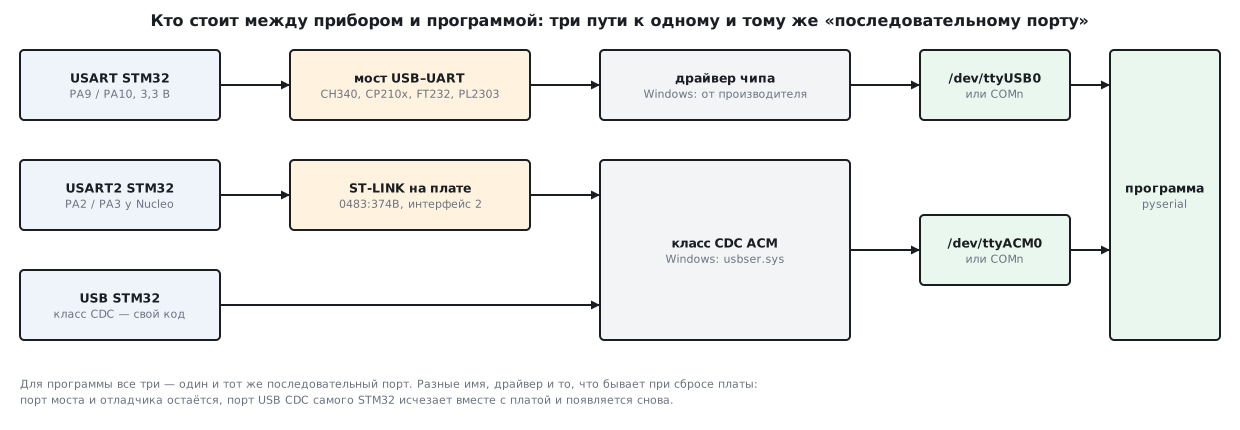
There are three paths, and to a program they all look the same — like a serial port:
- A USB–UART bridge — a separate chip on an adapter (section 16.7) or
on the board: the chip's USART goes into it, and it goes into USB. A bridge needs its own driver.
In the PlatformIO udev rules: CH340 —
1a86:7523, CP210x —10c4:ea60, FT232 —0403:6001, PL2303 —067b:2303. The CH340 driver for Windows on this machine isCH341SER.INFversion 3.9 from WCH. - The debugger's virtual port. The ST-LINK on a Nucleo is a composite device:
debugging and a port in one cable. In
stlink_vcp.infthe port is a separate interface: for0483:374Aand0483:374Bit is interface 2, for0483:374Cit is interface 1. On the NUCLEO-F103RB, CubeMX assigns USART2 on PA2 and PA3 up front, labelledUSART_TXandUSART_RX: this is how the board talks to the debugger. - USB CDC of the STM32 itself (section 20.7) — there is no bridge, the port is the firmware.
In the ST examples it is
0483:5740, and the PlatformIO rules label it exactly that way: "STM32 virtual COM port".
The last two are of the CDC ACM class, and they share one driver. stlink_vcp.inf and
stmcdc.inf from ST carry no driver of their own: both just point to
usbser.sys. And the usbser.inf of Windows itself (on this machine, version
10.0.26100) picks up any device of class 02, subclass 02
(USB\Class_02&SubClass_02) on its own as a "USB Serial Device". In the Linux kernel these are
different drivers: for bridges — CONFIG_USB_SERIAL_CH341, _CP210X,
_FTDI_SIO, _PL2303, for CDC — CONFIG_USB_ACM; in the Debian 6.1 kernel all
of them are built as modules.
115б.2 Port names: COMn, /dev/ttyUSB, /dev/ttyACM
Windows gives a port a COMn number. pyserial lists devices of the
"Ports" and "Modem" classes — all four INF files above put the device into the
Ports class. For COM1…COM8 the name is passed as is; starting from COM9 pyserial
prepends \\.\ itself — Windows requires this (serialwin32.py).
Linux names a port after its driver. pyserial looks for ports by patterns
(list_ports_linux.py); the main ones:
| Name | What it is |
|---|---|
/dev/ttyS* |
built-in port |
/dev/ttyUSB* |
a bridge with its own driver: CH340, CP210x, FT232, PL2303 |
/dev/ttyACM* |
CDC ACM class: the ST-LINK port, USB CDC of the STM32 itself |
/dev/ttyAMA* |
built-in ARM port (Raspberry Pi) |
/dev/rfcomm* |
port over Bluetooth |
The number in the name is the order of connection, not the socket: a second adapter becomes
ttyUSB1. A stable name comes from the udev symbolic links in
/dev/serial/by-id; list_ports.comports(include_links=True) also adds
links to the found ports to the list. What most often prevents opening a port is not
the name but permissions: ports belong to the dialout group (section 194.5).
For a USB port pyserial builds a description from the descriptors. hwid is built
like this (list_ports_common.py), for the values substituted in the experiment:
USB VID:PID=0483:374B SER=066DFF LOCATION=1-1.2:1.2
Choosing a port by number is a lottery; by VID:PID it is reliable:
def find_port(vid, pid):
    """Первый порт с нужными VID:PID — имя COMn или /dev/tty… не важно."""
    for p in list_ports.comports():
        if (p.vid, p.pid) == (vid, pid):
            return p.device
    return None
On the substituted list the function found /dev/ttyACM0 by 0483:374B,
/dev/ttyUSB0 by 1a86:7523 and returned None for FT232, which was not
in the list. Two identical adapters are told apart by serial_number —
if the bridge has one.
On the Windows machine where the section was written, pyserial found 7 ports, COM3…COM10
— and not a single cable: all seven are "Standard Serial over Bluetooth link",
with an empty vid. A port picked "at random" here is almost certainly someone else's.
115б.3 The terminal: CR and LF, local echo, hex view
A terminal is a program that sends pressed keys to the port and prints what
it receives. All terminals have three common settings, and all three break
the conversation with a device. The experiment uses miniterm from pyserial, a real terminal
whose keys were "pressed" through a pseudo-terminal. At the other end is firmware
in QEMU: it does not repeat what it receives, and answers a line with ok <text> rx=<bytes
of the line>. The firmware was built in two variants: line ending \n only, like
cdc_line in section 20.7, and "\r or \n, skip empty lines", like
the thermostat console in section 196.
Line ending. The Enter key goes to the port as CR, LF or both —
depending on the terminal setting; miniterm uses CRLF by default. Typed: get and Enter:
| Terminal sends | Firmware "end is LF" | Firmware "CR or LF" |
|---|---|---|
| CR | silent | 67 65 74 0D |
| LF | 67 65 74 0A |
67 65 74 0A |
| CRLF | 67 65 74 0D 0A |
67 65 74 0D |
With "LF only" firmware, a terminal set to CR will never get an answer:
the line simply never ends. The "CR or LF" firmware answers everything, and takes 0A
after 0D for an empty line and skips it. Hence the rule: a device
accepts any line ending, and sends \r\n itself — every terminal
understands it.
Local echo. The device does not repeat what it receives, so the typed get is not
visible on the screen — only the answer ok get rx=67 65 74 0A. With the --echo switch
the terminal prints what you type itself, and the screen shows get with the answer below it.
If the device also echoes and the terminal has local echo enabled,
every letter appears twice.
Hex view. For a binary protocol the text view is useless:
0x00, 0x0D and bytes above 0x7F cannot be told apart on the screen. With the
--encoding hexlify switch miniterm both shows received data and interprets typed input
in hex: typed 70 69 6E 67 0A — ping and LF went out,
and the screen shows the answer 70 6F 6E 67 0D 0A, that is pong\r\n. For debugging
there is also the --filter debug filter: it labels each chunk [TX:…] and [RX:…].
Exit miniterm with Ctrl+], open the menu with Ctrl+T.
115б.4 DTR and RTS: why the board resets when the port is opened
Besides TX and RX, a port has control signals left over from modems:
DTR — "terminal ready", RTS — "request to send". A bridge brings them out to
its own pins. In USB CDC they reach the device as the
SET_CONTROL_LINE_STATE (0x22) request: bit 0 is DTR, bit 1 is RTS (the Linux kernel
cdc.h header). In the ST template usbd_cdc_if_template.c this request is
empty — "Add your code here": the firmware could, for example, send nothing
until DTR is raised, that is, until someone opens the port.
The board resets when the port is opened if DTR or RTS is wired to
reset — boards with automatic bootloader entry do this. And pyserial
raises both on open: in serialutil.py the initial state of DTR and
RTS is True, and open applies it right away. The experiment intercepted the call
that pyserial makes on open:
| How it was opened | Call | State afterwards |
|---|---|---|
serial.Serial(port, 115200) |
TIOCMBIS, DTR — raise |
DTR and RTS — True |
open_quiet(port) |
TIOCMBIC, DTR — lower |
DTR and RTS — False |
A virtual wire pair has no DTR: the call returns ENOTTY, pyserial
silently ignores this error, and never gets to RTS. On a real port
RTS follows DTR. To avoid toggling the lines, set their state before
opening:
def open_quiet(port, baud=115200):
    """Открыть порт, не поднимая DTR и RTS: плата с автосбросом не перезагрузится."""
    s = serial.Serial()
    s.port, s.baudrate, s.timeout = port, baud, 1
    s.dtr = False
    s.rts = False
    s.open()
    return s
In miniterm the same is done with --dtr 0 --rts 0; while it runs, the lines
are toggled with Ctrl+T Ctrl+D (DTR) and Ctrl+T Ctrl+R (RTS). Not only the program
can touch the lines: CH341SER.INF contains a commented-out line that puts
the Windows serenum filter on the port. By default WCH does not enable it; what
this filter does with DTR and RTS was not checked here.
115б.5 Latency: USB frames, the bridge tick, answers in a batch
Round-trip latency runs from writing a question to the arrival of the answer. The UART itself
has almost nothing to do with it: the answer pong\r\n is 6 bytes, which at 115200 baud is half a millisecond.
The time is eaten by the links in between:
- USB frames. The host marks the start of a frame once per millisecond and polls the device on its own schedule (sections 20.2 and 20.9) — the device cannot start a transfer by itself;
- the bridge tick. A bridge accumulates what it receives from the UART and hands it to the computer in a batch.
In the ST CDC_Standalone example for F1, where the STM32 itself works as a
USB–UART bridge, data received from the UART goes to USB on a timer once every
CDC_POLLING_INTERVAL= 5 ms (allowed from 1 to 65). Bridges from other vendors have their own timers in the driver; their values were not checked here.
The experiment is a model on a virtual pair: the "device" answers pong to ping
instantly, but the answer goes to the port only on a tick, like the ST bridge.
The program is pyserial, the time is time.perf_counter:
def ask(s, cmd):
    """Команда и ответ одной строкой; время круга — по perf_counter."""
    t0 = time.perf_counter()
    s.write(cmd + b"\n")
    reply = s.readline()
    return reply, time.perf_counter() - t0
| Model | Question and answer, median | 200 exchanges in a row | 100 questions in one write | Reads for 100 answers |
|---|---|---|---|---|
| no tick | 0.065 ms | 14.255 ms | 0.141 ms | 1 |
| 1 ms tick | 0.998 ms | 199.722 ms | 0.999 ms | 1 |
| 5 ms tick | 4.999 ms | 999.735 ms | 5.007 ms | 1 |
The firmware in QEMU answered ping in 0.202 ms (median of 200). This is not
USB: a pseudo-terminal and QEMU are the fastest links there are, and they
only show that the latency is added by the tick, not by the program.
The conclusion from the table: every "question — answer" exchange costs a whole tick. The answer is ready at once but waits for the nearest tick, and the next question goes out right after the answer — and again waits a full tick. 200 questions in a row with a 5 ms tick take a second, while 100 questions in one write take one tick, and all 100 answers arrived in one read. Hence two rules:
- design the protocol so that there are few questions: one "give me everything" request instead of twenty "give me parameter N" requests, a telemetry stream without questions;
- answers arrive in a batch — several frames in one read and half a frame in another; the parser must assemble frames from the stream (sections 194.4 and 189.6).
115б.6 USB CDC: the baud rate "does not matter", the port disappears on reset
Baud rate. The STM32's own USB CDC port has no UART — bytes travel in
USB packets of up to 64 bytes (CDC_DATA_FS_MAX_PACKET_SIZE, section 20.7), and
the baud number affects nothing. A virtual pair behaves the same way: 1000 bytes
there and back at "9600" take 0.109 ms, at "115200" 0.106 ms. A real
UART at 9600 baud would carry them one way in 1041.667 ms.
The baud rate set by the program does still reach the device — with the
SET_LINE_CODING (0x20) request: 7 bytes, the rate in 4 bytes, then the stop bits,
parity and data bits (struct usb_cdc_line_coding in the kernel header).
The ST template simply stores the rate. But in the CDC_Standalone example,
where the STM32 works as a bridge, this request reconfigures the UART —
for a bridge the rate matters, for a "pure" CDC it does not.
The port disappears on reset. A bridge and the ST-LINK are separate chips, and their
port stays alive while the board resets. A USB CDC port is the firmware:
a reset, reflashing, a HardFault — and the device leaves the bus, and the port
disappears. A program that held it open gets an error. In the experiment
the "device" on a virtual pair was stopped in the middle of a read, and pyserial responded:
device reports readiness to read but returned no data (device disconnected or multiple access on port?)
The device may come back under a different name: if the old one is still taken
(the program did not close the port), the new one gets the next — ttyACM1 instead of
ttyACM0. That is why the program is written to reopen the port by a
stable name — a link from /dev/serial/by-id or by VID:PID via
find_port:
def read_lines(port, handle):
    """Читать строки; порт пропал — подождать и открыть заново по тому же имени."""
    while True:
        try:
            with serial.Serial(port, 115200, timeout=1) as s:
                for line in iter(s.readline, None):
                    if line and handle(line) is False:
                        return
        except serial.SerialException as e:
            print("порт пропал:", e)
            time.sleep(0.5)
In the experiment the device sent a line every 20 ms and was stopped; at that time the old name
was held by another program, and the new device got a different
/dev/pts/N, but the link stayed the same. read_lines got 15 lines
from the first device, one error and another 15 lines from the second.
115б.7 Pitfalls
The port is open, but bytes arrive only now and then. Another program holds the port:
a second terminal, the IDE's serial monitor, a forgotten script. In Linux opening
is not exclusive, and two programs split the stream however it falls. In the experiment the device
sent 1800 bytes to two open pyserial instances: one got 841 bytes, the other 951,
eight bytes went to nobody, and both got 60-odd errors with the same
hint "multiple access on port?" as with a vanished device. Who
holds the port is shown by fuser or a walk through /proc:
def who_holds(dev):
    """Кто держит порт открытым — то же делает fuser: обход /proc/*/fd."""
    real, pids = os.path.realpath(dev), []
    for pid in filter(str.isdigit, os.listdir("/proc")):
        try:
            fds = os.listdir("/proc/%s/fd" % pid)
            if any(os.path.realpath("/proc/%s/fd/%s" % (pid, fd)) == real for fd in fds):
                pids.append(int(pid))
        except OSError:
            pass
    return pids
exclusive=True did not protect. pyserial puts a
flock lock on the port: in the experiment a second Serial(port, exclusive=True) failed with "Could not
exclusively lock port", while a third, opened without this switch, opened
without trouble. The lock works only between programs that
ask for it; miniterm, for example, asks for it by default.
A service grabs the port. Besides your own programs, a new port in Linux
can be opened by system services. The PlatformIO udev rules give the
CH340, CP210x, FT232 and PL2303 bridges, the STM32 port 0483:5740 and all ST devices
the ID_MM_DEVICE_IGNORE tag — "hands off" for the modem service. The second
kind of grab is a console and a login service on the port (section 194.5).
Windows: the port will not open, "Access is denied". The port is already open.
In Windows opening is exclusive: pyserial passes CreateFile a zero
share mode. Close the terminal or the IDE's serial monitor,
then open.
Many COM ports, but the board is not among them. The author's machine has seven ports,
and all of them are Bluetooth. Search by VID:PID (find_port), do not take the first one.
The board resets on every open. DTR or RTS is wired to
reset, and pyserial raises them. Set dtr and rts before open
(open_quiet) or use --dtr 0 --rts 0 in miniterm.
The command went out, no answer. The terminal sends CR, and the firmware waits for LF.
The firmware should accept both, like the console in section 196.
You cannot see what you type, or every letter appears twice. Local echo is off with a silent device — or on with a device that echoes.
A poll of 200 questions takes a second. Every exchange costs a bridge tick or a USB frame. Ask in a batch, send telemetry as a stream.
After reflashing, the program crashes with a port error. The USB CDC port
vanished together with the device and came back, possibly under a different name.
Reopen by a stable name (read_lines).
"Permission denied" in Linux. The user is not in the dialout group
(section 194.5).
115б.8 Summary
- Three paths to one "port": a USB–UART bridge (CH340
1a86:7523, CP210x10c4:ea60, FT2320403:6001, PL2303067b:2303) with its own driver, the ST-LINK port (0483:374A,374B,374C) and USB CDC of the STM32 itself (0483:5740) — both of the latter throughusbser.sysin Windows. - Names:
COMnin Windows (fromCOM9on —\\.\COM9),/dev/ttyUSB*for bridges and/dev/ttyACM*for CDC in Linux. The number is the connection order; search by VID:PID. The author's machine has 7 COM ports, and all of them are Bluetooth. - Terminal: Enter goes out as CR, LF or CRLF (miniterm uses CRLF); "LF only" firmware is silent on CR, "CR or LF" firmware answers everything. Local echo and hex view are separate settings.
- pyserial raises DTR and RTS on open; a board with reset wired to them
will restart.
dtr = False,rts = False— beforeopen. - Every "question — answer" exchange costs a tick: with a 5 ms tick 200 exchanges take 999.735 ms, 100 questions in one write take 5.007 ms and one read. A virtual pair without a tick takes 0.065 ms per exchange; this is not USB.
- USB CDC: the baud rate has no effect (1000 bytes in 0.109 ms at "9600" versus
1041.667 ms for a UART), but it reaches the device with the
SET_LINE_CODINGrequest. The port disappears on reset and may come back under a different name. - In Linux anyone else can read the port too — the bytes get split (841 and 951 out of
1800);
exclusive=Trueprotects only against those who also set it. In Windows the port is exclusive.
Next: section 115в "Python next to the device: port, bytes, log, test script" — pyserial is used to write a test script that runs the device through a scenario and logs the exchange.