 Embedded HandbookApps
23. Why you need an operating system
For twenty-two sections the program has been built the same way: setup, then an endless loop. As long as the job was blinking an LED, that was more than enough. From here on comes arithmetic that breaks this scheme, and part IV is about the tool that replaces it.
The conversation is worth starting with an honest admission: an operating system is far from always needed. Section 23.6 is devoted to exactly that — when not to use one.
Terms used in the documentation
Term Meaning real-time operating system (RTOS) an operating system with guaranteed response times superloop / bare metal a program with no operating system: one endless loop kernel the core of the RTOS task / thread an independent flow of execution scheduler the part that decides who runs preemption taking the CPU away from a running task context switch saving one task's registers and restoring another's tick the system timer period, the time quantum blocked state waiting for an event or a timeout idle task the task that runs when nothing else can determinism predictable response time latency the delay before the response port the adaptation of the kernel to a specific CPU core cooperative scheduler a scheduler where each task hands back control itself deadline the time by which a run must start jitter variation in the start moment wraparound a counter overflowing and passing through zero
23.1 The superloop and its limits
Let us start with the most naive form — a busy-wait delay:
for (;;) {
    led_on();
    delay_ms(500);
    led_off();
    delay_ms(500);
}
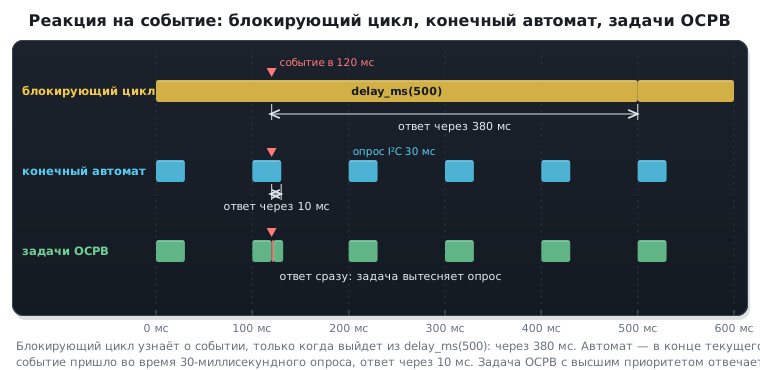
It blinks. Now add a sensor poll every 100 ms — and it turns out there is
nowhere to put it: the CPU spends half a second spinning inside delay_ms
and can do nothing else during that time.
The first limit: a blocking delay eats all the time. The response to any event is bounded by the length of the longest delay in the loop.
The cure is to drop delay_ms in favour of a time counter. We set up a tick
in SysTick (section 7.4) and turn the loop into a state machine:
volatile uint32_t g_ms;                 /* инкремент в обработчике SysTick */

for (;;) {
    uint32_t now = g_ms;

    if ((uint32_t)(now - led_at) >= 500u) {
        led_at = now;
        led_toggle();
    }
    if ((uint32_t)(now - sensor_at) >= 100u) {
        sensor_at = now;
        sensor_poll();
    }
}
This is already a working scheme, and a huge number of devices rely on it.
Note the subtraction inside the cast to uint32_t — that way
the comparison stays correct when the counter overflows (the trap from section 3).
But it has its own limits too, and they do not show up at once.
The second limit: a long operation delays everything else. The loop is passed through in full, step by step. If a sensor poll over I²C took 30 ms, all the other branches stood still for those 30 ms. One slow piece spoils the response time of the whole program.
The third limit: there are no priorities. In a superloop all jobs are equal. You cannot say "motor control is more important than the display" — there is one queue and it is shared. The only way to rank importance is interrupts, but their handlers must be short, and you cannot move the logic into them.
The fourth limit is the main one: complexity grows faster than the number of tasks. Every new job means its own time variable, its own set of states and its own transition conditions. Three jobs still fit in your head. Eight no longer do: any edit in one branch changes the timing of the others, and bugs appear that reproduce once a day.
| Blocking loop | State machine | RTOS tasks | |
|---|---|---|---|
| response to an event | up to the delay length | up to the loop pass length | by priority |
| long operation | stops everything | stops everything | is preempted |
| priorities | no | no | yes |
| reads as | a sequence | a state table | a sequence |
| growth of complexity | linear | quadratic | linear |
The last row explains what all this is for. A state machine forces you to tear every job into pieces between loop passes — and the code loses its coherence. A task, on the other hand, is written linearly, as if it were alone in the device.
How the three approaches respond to the same event — on a trace:
23.2 What a real-time operating system is
Three ideas, and each of them is simple on its own.
A task is a function with its own stack. An ordinary function with an endless loop, but it has a private memory area for local variables and return addresses. That is exactly why it can be stopped mid-sentence and resumed later: all its state lives in its stack.
The scheduler decides which task runs right now. Every task has a priority. There is one rule and it is strict: the ready task with the highest priority runs. Not "in turn", not "fairly" — by priority.
Waiting gives the CPU away. Instead of delay_ms, which spins an empty
loop, the task calls vTaskDelay and enters the blocked state.
While it waits, the scheduler gives the CPU to others. This is the key point
that turns the whole picture around: waiting stops being a waste of time.
The same device built on tasks:
static void led_task(void *arg)
{
    for (;;) {
        led_toggle();
        vTaskDelay(pdMS_TO_TICKS(500));   /* процессор свободен */
    }
}

static void sensor_task(void *arg)
{
    for (;;) {
        sensor_poll();
        vTaskDelay(pdMS_TO_TICKS(100));
    }
}

int main(void)
{
    xTaskCreate(led_task,    "led",    128, NULL, 1, NULL);
    xTaskCreate(sensor_task, "sensor", 128, NULL, 2, NULL);
    vTaskStartScheduler();                /* назад не возвращается */
    for (;;) { }
}
Each task again reads as a simple sequence of actions. No time counters, no states, no looking over its shoulder at the neighbours. Adding a third job means writing a third function without touching the first two.
⚠️
vTaskStartSchedulerdoes not return. The scheduler takes the CPU and hands it out to the tasks; the line after the call will never run — unless there was not enough memory for the idle task. The empty loop after it is placed there for exactly this case.
What is "real-time" about it
This term confuses people more often than any other in the field.
Real time is not about speed but about predictability. A real-time system guarantees that an event will be handled no later than a known deadline. How fast is a separate question.
An example shows the difference. A program that usually responds within 10 µs but once a day stalls for 300 ms is not a real-time system. A program that always responds within 5 ms and never within 6 is a real-time system, even though it is six hundred times slower.
Hence the practical consequence: everything in the kernel is bounded. The context switch time is known, the time to post to a queue is known, and they depend neither on the number of tasks nor on what happened before. This boundedness is exactly what you pay for.
What an RTOS is not
The words "operating system" carry associations, and not one of them applies here:
| Expectation | What it is really like |
|---|---|
| "it loads at power-up" | the kernel is just a set of .c files linked into your firmware |
| "it separates memory between tasks" | not by default: any task sees all memory and can corrupt another task's stack |
| "it provides peripheral drivers" | no: you set up GPIO, UART and timers exactly as in parts II and III |
| "it provides a file system and networking" | separate libraries, not part of the kernel |
| "it isolates failures" | a bug in one task brings down the whole device |
The kernel gives you exactly three things: a scheduler, means of waiting and means of exchange between tasks. Everything else is still up to you.
23.3 How it works inside
Understanding the mechanics spares you half of the questions to come.
The system tick. A timer (usually SysTick) interrupts the CPU
at a constant rate — 1000 times per second in a typical setup. In every
interrupt the kernel checks whether anyone's wait has expired
and whether it is time to hand the CPU to a higher-priority task.
Two conclusions follow at once. The first: the resolution of all delays equals one
tick. At a rate of 1 kHz you cannot ask to "wait 200 µs" with vTaskDelay;
the minimum is a millisecond. The second: the tick is an overhead
that runs all the time, even when the device has nothing to do.
The context switch. Once the decision is made, the kernel saves the registers
of the current task to its stack and restores the registers of the next one. On Cortex‑M
this is done by the PendSV exception handler, and the whole of it fits
into nineteen instructions:
PendSV_Handler PROC
    MRS   r0, PSP              ; указатель стека уходящей задачи
    ISB
    LDR   r3, pxCurrentTCBConst
    LDR   r2, [r3, #0]         ; её блок управления
    STMDB r0!, {r4-r11}        ; дописать в стек то, что не сохранил процессор
    STR   r0, [r2, #0]         ; запомнить вершину стека в блоке управления
    PUSH  {r3, lr}
    MOV   r0, #0x50            ; поднять порог маскирования прерываний
    MSR   BASEPRI, r0
    BL    vTaskSwitchContext   ; выбрать следующую задачу
    MOV   r0, #0
    MSR   BASEPRI, r0          ; вернуть порог обратно
    POP   {r3, lr}
    LDR   r1, [r3, #0]         ; блок управления пришедшей задачи
    LDR   r0, [r1, #0]         ; её вершина стека
    LDM   r0!, {r4-r11}        ; восстановить регистры
    MSR   PSP, r0
    ISB
    BX    lr                   ; выход из исключения довосстановит остальное
    ENDP
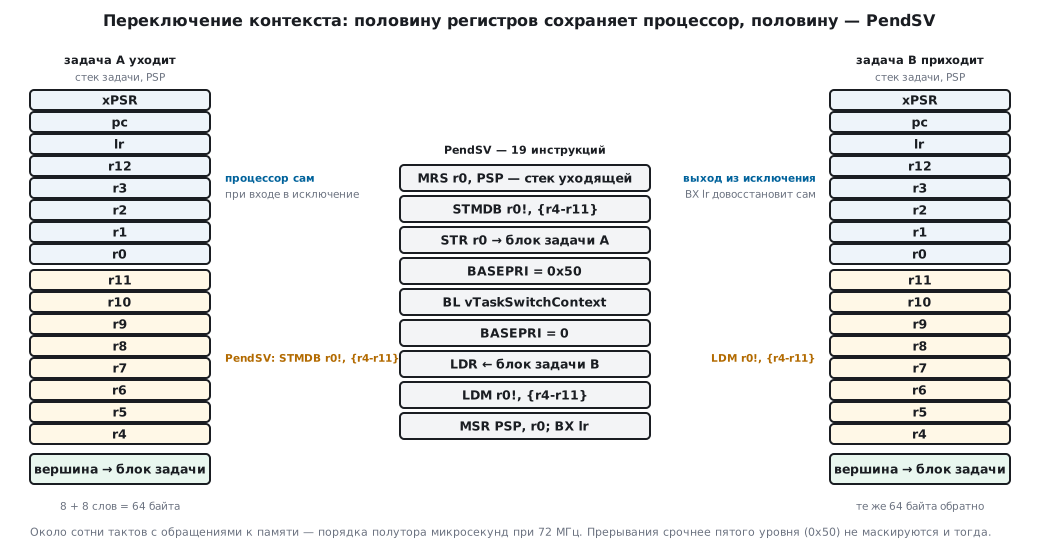
The subtlety that explains the brevity: only r4–r11 are saved. The registers
r0–r3, r12, lr, pc and xPSR are pushed onto the stack by the CPU itself on
exception entry and popped by it on exit (section 7). The kernel is left with
exactly the half the CPU did not take care of.
You can also see a detail we will come back to in section 28. The value 0x50,
which the kernel writes to BASEPRI while it picks the next task, is
not magic but a configuration parameter: priority level five, shifted
into the upper four bits, which are the significant ones on STM32. Interrupts with priority numbers
0…4 (on Cortex-M a lower number means a more urgent interrupt) are not
affected by this mask and keep running even during a context switch — but
they are not allowed to call the kernel.
The nineteen instructions are only an assembly wrapper: the next task
is chosen by the C function vTaskSwitchContext, and the CPU pushes and pops
the eight words of the frame itself. All together it is on the order of one to one and a half hundred cycles:
about one and a half microseconds at 72 MHz, and more with stack checking and run-time
accounting. Not much, but if you
switch thousands of times per second, the cost becomes noticeable.
Two stack pointers. Cortex‑M has separate pointers for handler
mode and for threads. The kernel uses this directly: tasks run
on PSP, each on its own stack, and interrupt handlers on the shared MSP.
The hardware was designed with exactly this scheme in mind.
23.4 The cost
Everything below was measured by building one and the same device — blinking plus a sensor poll — in two ways, with the compiler optimizing for size.
| Superloop | With tasks | |
|---|---|---|
| code | 384 bytes | 6836 bytes |
| static RAM | 100 bytes | ≈ 2.4 KB + heap |
Flash: about 6.4 KB. For the F103C8 with its 64 KB that is a tenth, for the F407 with a megabyte it is unnoticeable. The figure depends on what is enabled: software timers, event groups and stream buffers each add another kilobyte or two to it.
RAM is where you have to count carefully. It goes in three parts:
| What | How much |
|---|---|
| task control block | 92 bytes |
| task stack | as much as you allocate, the minimum is usually 512 bytes |
| kernel service structures | ≈ 300 bytes plus the idle task |
A task with the minimum stack costs 604 bytes. The F103C8 has only 20 KB: a dozen tasks with some stack headroom — and there is no memory left for anything else. A queue header adds 80 bytes on top of the data itself, a software timer — 44 bytes.
⚠️ The heap easily eats half of the BluePill's memory. The heap size is set by
configTOTAL_HEAP_SIZE; the kernel has no default of its own. The configuration templates from the CMSIS-FreeRTOS pack for Keil use 4 or 8 KB, the examples in this handbook use 10 KB, and the F103C8 has 20 KB of memory. With the usual way of creating them, tasks, queues and semaphores are taken from there, so the heap size is chosen to fit the device rather than left as it is. Details are in section 25.
CPU time. A tick interrupt at 1 kHz when there is nobody to wake is four dozen instructions and a hundred and fifty cycles: about 0.2 % of an F103 CPU at 72 MHz. Context switches add about one and a half microseconds each. Against what an F4 can do this is nothing; on an F103 under heavy load it is already a figure worth remembering.
And a cost you cannot measure by building: a new class of bugs. Races between tasks, priority inversion, a stack overflow in one task, deadlock. None of them reproduces on demand or gets caught by the debugger on the first try. Sections 30 and 36 are devoted to exactly these.
23.5 Terminology
Words that are used from here on without explanation.
Task — a function with an endless loop and its own stack. Other systems call the same thing a thread; in FreeRTOS both words mean the same.
Scheduler — the part of the kernel that chooses who gets the CPU.
Priority — a number; the larger it is, the more important. Numbering starts at zero; zero is taken by the idle task, so tasks are usually given one and above.
Task states — there are four:
| State | What it means |
|---|---|
| running | occupies the CPU right now; there is only one such task |
| ready | could run, but there is a higher-priority one |
| blocked | waits for an event or a timeout and consumes no CPU |
| suspended | taken out of the game by hand; the scheduler ignores it |
Preemption — forcibly handing the CPU to a higher-priority task without asking the current one. The opposite is cooperative mode, where a task gives up the CPU only by itself.
Tick — the period of the system timer, the unit in which all delays are measured.
Idle task — created by the kernel automatically and runs when all the others are waiting. Its priority is zero. It frees the memory of tasks that deleted themselves and, if configured, puts the CPU to sleep.
Critical section — a piece of code during which task switching is disabled.
Port — the set of files that ties the portable part to a specific CPU. They differ for Cortex‑M3 and Cortex‑M4, and substituting one for the other is a typical reason why "nothing works and it is impossible to tell why".
23.6 When you do not need an operating system
A section that usually goes unwritten — and it matters more than the previous ones.
You do not need one if there are one or two jobs and they are simple. Blinking an LED and polling a button is done better by a superloop: less code, less memory, nothing to break.
You do not need one for response speed. The tick is the resolution of delays and timeouts (1 ms), not of response: a task woken from an interrupt gets the CPU right at the interrupt's exit, within a few microseconds (28.3). And whatever needs a response within a few cycles is done by interrupts and hardware — the same with the kernel as without it.
You do not need one if memory is tight. On the F103C8 with 20 KB the kernel and heap take more than half. On chips with 8 KB or less you need not even think about it.
You do not need one if the device must be as predictable as possible. Paradoxical as it is, a carefully written superloop can be verified completely: all paths are visible, there are no interleavings. Multitasking creates a combinatorial explosion of states that cannot be enumerated. Where failure is expensive, simplicity is worth more than convenience.
You do need one when there are several independent streams of work with different urgency, when there are long operations that must not hold up everything else, when the device talks over several interfaces at once, and when the amount of code has outgrown your ability to keep the timing of all branches in your head.
The practical rule: a superloop as long as it is readable. As soon as a third time counter appears in the loop, along with the first branch of the kind "and if a transfer is in progress right now, let us postpone it" — that is the signal.
23.7 A scheduler of your own
Between the superloop and an operating system there is an intermediate step — a cooperative scheduler. Tasks remain ordinary functions, and the main loop calls, from a table, those whose deadline has arrived. Tasks have no stacks of their own, there is no preemption, and every task must return quickly. This is often enough to make the superloop readable again.
People usually start with timestamps:
if (HAL_GetTick() - ts > delay) {      /* так делать не надо */
    work();
    ts = HAL_GetTick();                 /* отметка — после работы */
}
This scheme has two mistakes, and both stretch the period. The comparison > instead of
≥ adds a millisecond. Taking the "now" stamp after the work adds
the time of the work itself and the loop delay. This is the same mistake as with
vTaskDelay in section 26.4, and it is cured the same way: the next deadline is
the previous deadline plus the period.
#define SCHED_MAX 8

struct task {
    void (*fn)(void);
    uint32_t period;                    /* мс */
    uint32_t next;                      /* срок следующего запуска */
};

struct sched {
    struct task t[SCHED_MAX];
    unsigned count, current;
    uint32_t skipped;                   /* пропущено сроков из-за отставания */
};

/* Срок наступил: now не раньше due. Разность в 32 битах без знака
 * переживает переполнение счётчика, если периоды короче 24 суток. */
static int due(uint32_t now, uint32_t when)
{
    return (uint32_t)(now - when) < 0x80000000u;
}

/* Задача сама меняет свой период — следующий срок отсчитается по-новому */
void sched_delay(struct sched *s, uint32_t period)
{
    s->t[s->current].period = period;
}

/* Из главного цикла: запустить всё, чему пришёл срок. Время берётся
 * заново перед каждой задачей — предыдущая могла работать долго. */
void sched_run(struct sched *s, uint32_t (*now)(void))
{
    for (unsigned i = 0; i < s->count; i++) {
        struct task *t = &s->t[i];
        if (!due(now(), t->next))
            continue;
        s->current = i;
        t->fn();
        t->next += t->period;           /* от прошлого срока: период не уплывает */
        while (due(now(), t->next)) {   /* отстали больше чем на период — пропустить */
            t->next += t->period;
            s->skipped++;
        }
    }
}
sched_add puts a function, its period and its first deadline into the table. The main
loop boils down to for (;;) sched_run(&s, HAL_GetTick);. The scheduler
takes 24 bytes of stack on Cortex-M3.
Counter overflow. A 32-bit millisecond counter overflows
after 49.7 days. The comparison now >= next breaks at that moment;
the unsigned difference comparison does not. It works for any periods
shorter than 24.9 days.
Falling behind. The main loop may get stuck somewhere. Then the task must not run in a burst, catching up on all the missed deadlines. It runs once and skips the extra deadlines. Example: the scheduler stood still for 1000 ms, a task with a period of 300 ms ran once, skipped 3 deadlines, and its next deadline is 1500 ms.
Experiment. One minute of operation on a model. The millisecond clock starts 4 seconds before the overflow. The tasks: - two LEDs with periods of 300 and 500 ms, work of 1 ms each; - a button poll every 20 ms, work of 7 ms.
| LED 300 ms | LED 500 ms | Button 20 ms | |
|---|---|---|---|
"now" stamps and > |
194 | 119 | 2143 |
| scheduler | 199 | 119 | 2999 |
| scheduler lateness, at most | 0 ms | 1 ms | 2 ms |
The scheduler ran every task at every deadline that fit into
the minute, including when the counter passed through zero. The naive scheme
lost 28.5 % of the button polls: 7 ms of work and the > comparison turned
the 20 ms period into 28. The scheduler's lateness is no more than the sum of the work
of the other tasks: a task lower in the table could start a moment before the deadline,
and the upper ones will still go first in the next pass. In the experiment
the LEDs were hardly late only because all the periods are multiples of
20 ms: the deadlines coincide, and in a pass the top task goes first. Change
the button period to 23 ms — and the LEDs are late by 6 and 7 ms.
That is why fast and important tasks are put at the top of the table, and long work
is cut into short steps.
Sharing data. All tasks run in one thread, one after another.
A shared variable between them is safe; volatile is not needed. volatile and
atomicity are needed only if the data comes from an interrupt (section 7). When
the data becomes a stream — bytes from a UART, button events — you need
a queue. In FreeRTOS it comes ready-made (section 27).
The limits of this scheme are the same as those of the superloop. One long task delays all the others. There are no priorities apart from the order in the table. You cannot wait inside a task. When tasks need to wait — for data, a flag, a resource — it is time to move to the kernel (23.6).
23.8 Pitfalls
Code after vTaskStartScheduler does not run. That is by design: the scheduler does not
return control — only if there was not enough memory for the idle task (23.2).
Half of the BluePill's RAM is taken although nothing has been created yet. The heap in the handbook's configuration is 10 KB out of the F103C8's 20 KB; the heap size is chosen to fit the device (23.4).
23.9 Summary
- A superloop runs into a limit not of speed but of coherence: as the number of jobs grows, every edit affects the timing of the others.
- A task is a function with its own stack; that is why it can be interrupted and resumed, and the code inside is written linearly.
- The scheduler has one rule: the ready task with the highest priority runs.
- Waiting through the kernel gives the CPU to others — that is the whole gain.
- "Real time" means a predictable deadline, not speed.
- The kernel is files in your firmware. It gives you neither drivers, nor memory isolation, nor protection from failures.
- The assembly part of the context switch on Cortex‑M is nineteen instructions: the CPU saves half of the registers itself.
- The cost: ≈ 6.4 KB of code, 92 bytes per task control block plus its stack, and a heap that in the handbook's configuration equals half of the BluePill's memory.
- The real cost is not memory but races, priority inversion and stack overflows.
- If the superloop is still readable, you do not need an operating system.
- The intermediate step is a cooperative scheduler. The next deadline in it equals the previous deadline plus the period, deadlines are compared by an unsigned difference, and a task that has fallen behind skips deadlines rather than catching up. In the experiment naive "now" stamps lost 28.5 % of the button polls.
Next: section 23а "A device without an OS: state machines, an event queue, non-blocking drivers" — how far a superloop can reach without a kernel if you give it a queue, state machines and software timers, and what that costs.