 Embedded HandbookApps
89. Network protocols and mesh networks
A device on a network answers two questions: how to transmit — wire or radio, and which one exactly — and what to transmit — which language to speak with the server. The first decides range, power and cost, the second the amount of traffic and how the device survives a loss of the link.
This section is a map of both levels for a device, and separately of mesh networks, where devices pass each other's messages themselves. Checked by experiment: a CoAP client in portable C against a real CoAP server in a container, and a model of a mesh network of 49 nodes.
Terms used in the documentation
Term Meaning application protocol, transport the data protocol, the way it is carried CoAP: confirmable (CON), non-confirmable (NON), acknowledgement (ACK) a message that must be acknowledged, one that need not be, the acknowledgement piggybacked response a response carried inside the acknowledgement message ID, token the message number, the token differential pair, driver enable (DE) a differential pair, the transmitter enable holding register a read/write register (Modbus) LPWAN low-power long-range networks spreading factor (SF), time on air, duty cycle the spreading factor, the time on air, the share of time on air mesh, router, end device, gateway a mesh network, a relaying node, an end device, a gateway flooding, routing, TTL resending to everyone, routing, the hop limit self-healing recovering by itself
89.1 Two levels: how and what
Data protocols describe what the bytes mean. Network technologies describe how those bytes get there. One hardly depends on the other: MQTT runs over Ethernet, Wi-Fi and a cellular network in the same way, and Modbus runs over RS-485 and over TCP.
| Data protocol | Runs over | Model | For a device |
|---|---|---|---|
| MQTT | TCP | publish–subscribe through a broker | the main choice (sections 37.2 and 87) |
| CoAP | UDP | request–reply, like REST | nodes for which TCP is heavy: little memory, sleep, 802.15.4 networks |
| HTTP | TCP | request–reply | simple and everywhere, but heavy: text headers (section 88) |
| AMQP | TCP | queues with delivery guarantees | between servers, not on a device |
| Modbus | RS-485, TCP | a master polls slaves | industrial equipment, meters |
89.2 CoAP: REST over UDP
CoAP carries the ideas of HTTP — methods, resource addresses, response codes — into a binary format over UDP. A message starts with four bytes:
| Byte | What is inside |
|---|---|
| 0 | version (1), type: 0 — confirmable, 1 — non-confirmable, 2 — acknowledgement, 3 — reset; token length |
| 1 | code: class and detail — 0.01 GET, 0.02 POST, 2.05 content, 2.04 changed, 4.04 not found |
| 2–3 | message ID — used to recognize a repeat |
Next come the token (it lets a response find its request), the options (path,
data format) and, after the 0xFF byte, the data itself. An option number is written
as an increment over the previous one, so options go in ascending order of number:
/* Опция: номер — приращением к предыдущей, поэтому опции идут по возрастанию */
static size_t coap_option(uint8_t *p, unsigned delta, const void *val, size_t len)
{
    uint8_t ext[4];
    size_t n = 0;
    unsigned d = coap_nibble(delta, ext, &n);
    unsigned l = coap_nibble(len, ext, &n);
    p[0] = (uint8_t)((d << 4) | l);
    memcpy(p + 1, ext, n);
    memcpy(p + 1 + n, val, len);
    return 1 + n + len;
}

/* Запрос: 4 байта заголовка, 2 байта токена, по опции Uri-Path на каждую
 * часть пути, формат данных (fmt < 0 — без него, до 255), 0xFF и данные */
size_t coap_request(uint8_t *buf, unsigned type, unsigned code, uint16_t mid, uint16_t token,
                    const char *path, int fmt, const void *data, size_t len)
{
    size_t k = 0;
    unsigned last = 0;
    buf[k++] = (uint8_t)(0x40 | (type << 4) | 2);   /* версия 1, тип, длина токена */
    buf[k++] = (uint8_t)code;
    buf[k++] = (uint8_t)(mid >> 8);
    buf[k++] = (uint8_t)mid;
    buf[k++] = (uint8_t)(token >> 8);
    buf[k++] = (uint8_t)token;
    while (*path) {
        const char *e = strchr(path, '/');
        size_t n = e ? (size_t)(e - path) : strlen(path);
        k += coap_option(buf + k, COAP_URI_PATH - last, path, n);
        last = COAP_URI_PATH;
        path += e ? n + 1 : n;
    }
    if (fmt >= 0) {
        uint8_t v = (uint8_t)fmt;
        k += coap_option(buf + k, COAP_CONTENT_FORMAT - last, &v, fmt > 0);  /* ноль — пустое значение */
    }
    if (len) {
        buf[k++] = 0xFF;
        memcpy(buf + k, data, len);
        k += len;
    }
    return k;
}
coap_nibble puts a number or a length into 4 bits, and if it is greater than 12,
it adds one or two extension bytes. The path sensors/temp becomes
two options: 0xB7 (number 11 — Uri-Path, length 7) and 0x04 (increment
0, length 4). The whole GET request is 19 bytes. Parsing the response (coap_parse) is
the mirror image: code, message ID, token and the data after 0xFF; the device
does not need the option numbers here.
Experiment. On the container network a real CoAP server (aiocoap) runs with two resources. The "device" is the same code built for a computer:
| What the device sent | What the server answered |
|---|---|
GET /sensors/temp, confirmable, ID 8901, token a1b2 |
an acknowledgement with code 2.05, the same ID and token, data 21.50 |
POST /count with JSON, ID 8902 |
2.04, counter 1 |
| the same packet again — as if the response was lost | 1 — the server recognized the ID and did not execute the request a second time |
POST /count, ID 8903 |
2 |
GET /nope |
4.04 |
The response came right inside the acknowledgement: one packet there, one back, and no connection at all. The server must recognize a repeat with the same message ID and answer with the previous response. Hence the firmware rule: when you repeat after a timeout, the message ID is the same; for a new request it is new. This protection lasts minutes, while the server remembers the IDs; writing data still needs idempotency (section 88.4).
CoAP repeats a confirmable message by itself: the first wait is random, from 2 to 3 s, each next one twice as long. Four repeats fit into 45 s, and after 93 s the sender gives up. Code 4.xx means "the request is wrong" — repeating it is pointless, just as in HTTP.
89.3 One measurement — three ways
The same thing each time — {"temp":21.50} to sensors/temp:
| Message | With IP and UDP/TCP headers | What else is needed | |
|---|---|---|---|
| CoAP | 36 bytes | 64 | nothing: a datagram and an acknowledgement |
| MQTT | 30 bytes | 70 | an open TCP connection and a CONNECT once |
| HTTP | 127 bytes | 167 | with Connection: close — a new TCP connection for every request |
The CoAP and MQTT messages themselves are almost equal; the difference is in what surrounds them. MQTT pays off when the connection is kept open all the time and there are many messages. CoAP pays off when the device wakes up, sends one measurement and goes back to sleep: setting up a TCP connection costs more than the measurement itself.
89.4 Wires: Ethernet, RS-485 and Modbus, M-Bus
Ethernet is the fastest and most reliable link: on the F407 the controller is on the die, and for any chip there are ICs with a built-in stack (section 37.1). Power can be supplied over the same cable.
RS-485 is an electrical standard: a differential pair on which dozens of devices hang, and distances up to a kilometer. Modbus is a protocol: what the bytes mean. They are often named together, but these are two levels: Modbus runs both over RS-485 and over TCP, and more than just Modbus runs over RS-485.
⚠️ "10 Mbit/s at 1200 m" is two limits in one line. For RS-485 there is a rule: the product of the speed and the line length is about 10⁸. At 1200 m that is about 100 kbit/s, and 10 Mbit/s works for roughly 10 m.
Two things are mandatory on an RS-485 line. Terminators — 120 Ω each between A and B, exactly two, at the ends of the line: without them, on a long cable at high speed, the edges reflect and the bytes get corrupted. Biasing — pulling A up to the supply and B down to ground, one set for the whole line. While all transmitters are off, the line otherwise floats between the receiver thresholds (±200 mV) and picks up false start bits from noise — exactly in the gaps by which Modbus finds the end of a frame. Across the two terminators (60 Ω together) the bias must give at least 200 mV: with a 5 V supply that means 560–680 Ω resistors (254 and 211 mV), with 3.3 V about 390 Ω (236 mV; 560 Ω give only 168 mV there). In many newer transceivers the threshold is shifted so that an idle line reads as a one, — then no biasing is needed.
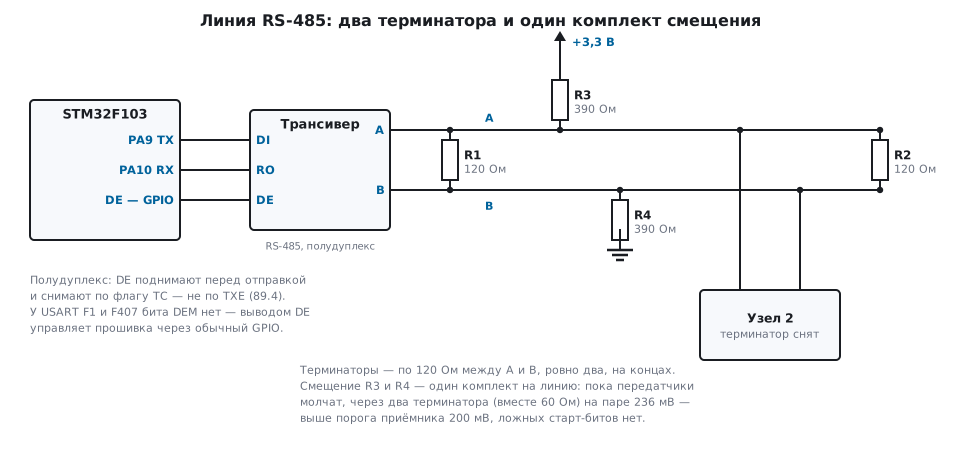
The line is half-duplex: the transmitter is enabled with the DE pin before sending and
disabled afterwards. The USART of the F1 and the F407 has no hardware control of this pin —
the headers have neither the DEM bit nor the RTOEN receiver timeout. The firmware does
everything: set DE, send, wait for the TC flag — not
TXE, — clear DE. TXE means "the data register is free", while the last
byte is still going out onto the line at that moment (section 16).
A Modbus RTU frame is address, function, data and CRC:
/* CRC-16/MODBUS: полином 0xA001 (отражённый 0x8005), начальное 0xFFFF */
uint16_t crc16_modbus(const uint8_t *p, size_t n)
{
    uint16_t crc = 0xFFFF;
    while (n--) {
        crc ^= *p++;
        for (int i = 0; i < 8; i++)
            crc = (crc & 1) ? (uint16_t)((crc >> 1) ^ 0xA001) : (uint16_t)(crc >> 1);
    }
    return crc;
}

/* «Прочитать регистры хранения» (функция 3): адрес, функция, первый регистр
 * и их число — старшим байтом вперёд, а CRC — младшим */
size_t modbus_read_holding(uint8_t *p, uint8_t addr, uint16_t first, uint16_t count)
{
    p[0] = addr;
    p[1] = 3;
    p[2] = (uint8_t)(first >> 8);
    p[3] = (uint8_t)first;
    p[4] = (uint8_t)(count >> 8);
    p[5] = (uint8_t)count;
    uint16_t crc = crc16_modbus(p, 6);
    p[6] = (uint8_t)crc;
    p[7] = (uint8_t)(crc >> 8);
    return 8;
}
"Read 10 registers starting from zero on device 1" is 01 03 00 00 00 0A C5 CD.
Data goes high byte first, and the CRC low byte first: this is where people go wrong
most often.
The end of a frame in Modbus RTU is silence on the line for 3.5 characters. A character is
11 bits, so at 9600 baud this is 4.0104 ms, at 19200 it is 2.0052 ms (the timer
is set rounded up: 4.011 and 2.006 ms), and above
19200 the gap is fixed at 1.75 ms. The IDLE flag (section 16.5) is set
after one character of silence — less than needed; the 3.5 characters are counted by a
timer that is restarted by every received byte.
M-Bus is a bus for water, heat and gas meters. The master powers the slaves over the same pair it polls them on, so a meter does not need its own battery for the link. M-Bus also has a wireless variant at 868 MHz.
89.5 Radio
| Technology | Frequency | Range | Speed | Power | Network |
|---|---|---|---|---|---|
| Wi-Fi | 2.4 and 5 GHz | tens of meters | tens of Mbit/s and more | high | your own, available almost everywhere |
| Bluetooth LE | 2.4 GHz | meters to tens of meters | up to 2 Mbit/s on air | low | a phone nearby or a gateway |
| Zigbee | 2.4 GHz | tens of meters per hop | 250 kbit/s | low for end devices | your own, mesh |
| NFC | 13.56 MHz | centimeters | — | the reader powers the tag | — |
| RFID | several bands | from centimeters to meters | — | passive tags without a battery | — |
| LoRaWAN | 868 MHz | kilometers | 0.3–5.5 kbit/s | very low | your own or an operator's |
| Sigfox | 868 MHz | kilometers | 100 bit/s | very low | operator's only |
| NB-IoT, LTE-M | licensed | like cellular | tens of kbit/s and more | low with sleep | operator's, a SIM card |
Wi-Fi is everywhere, but expensive in energy: joining a network takes seconds (section 37.1), and keeping it up on a battery for long will not work. Its place is devices with mains power, a display, over-the-air updates.
Bluetooth comes in two kinds. Classic is for streams: audio, file transfer. BLE is for short messages and long sleep; 2 Mbit/s is the on-air speed in the fast mode, and noticeably less useful data gets through. iBeacon beacons are BLE that only advertises itself:
| iBeacon frame field | Bytes |
|---|---|
| flags: length, type, value | 3 |
| length and type "manufacturer data" | 2 |
| manufacturer code | 2 |
| iBeacon type and remaining length (21) | 2 |
| location identifier (UUID) | 16 |
| major and minor — zone and beacon number | 4 |
| power at a distance of 1 m | 1 |
| total | 30 of a possible 31 |
The phone compares the received power with the recorded one and estimates the distance — roughly: "immediate", "near", "far" (why roughly — section 92).
Zigbee is a mesh from the start: 62.5 thousand symbols per second, 4 bits each, gives 250 kbit/s. It shares the 2.4 GHz band with Wi-Fi and BLE, and channels should be chosen with care:
| Who | Does not overlap Wi-Fi 1, 6 and 11 |
|---|---|
| Zigbee | channels 15, 20, 25, 26 |
| BLE, advertising channels | 2402, 2426 and 2480 MHz — chosen exactly for this |
NFC and RFID. The wavelength at 13.56 MHz is 22.1 m, while NFC works at centimeters — deep in the near field, where the antennas do not radiate but are coupled like the two coils of a transformer. That is why a tag does not need a battery: it is powered by the reader's field. A tag on metal cannot be read without a special design — the metal kills the field.
LoRaWAN trades speed for range. The spreading factor SF stretches every symbol: the larger it is, the farther it is heard and the longer the packet stays on air. The time on air is calculated by a formula:
/* Время пакета в эфире, мкс: sf 7…12, bw в Гц (125000, 250000, 500000),
 * cr 1…4 (4/5…4/8), преамбула 8 символов, явный заголовок, CRC включён.
 * Оптимизация низкой скорости — при символе длиннее 16 мс. */
uint32_t lora_airtime_us(unsigned sf, uint32_t bw, unsigned cr, unsigned payload)
{
    uint32_t tsym = (1000000u << sf) / bw;          /* при SF12 — 4,096·10^9, ещё влезает */
    unsigned de = tsym > 16000u;
    int num = 8 * (int)payload - 4 * (int)sf + 28 + 16;
    int den = 4 * ((int)sf - 2 * (int)de);
    uint32_t blocks = num > 0 ? (uint32_t)((num + den - 1) / den) : 0;
    uint32_t quarters = 4u * 8u + 17u + 4u * (8u + blocks * (cr + 4u));  /* 8 + 4,25 символа преамбулы */
    return quarters * tsym / 4u;
}
10 bytes of data plus 13 LoRaWAN overhead bytes, a 125 kHz bandwidth:
| SF | Time on air | Messages per hour at 1 % on air |
|---|---|---|
| 7 | 61.7 ms | 583 |
| 8 | 113.2 ms | 318 |
| 9 | 205.8 ms | 174 |
| 10 | 370.7 ms | 97 |
| 11 | 823.3 ms | 43 |
| 12 | 1.48 s | 24 |
The same calculation for your own SF, bandwidth, CR and packet length is done by the "LoRa" tab in the app's calculators.
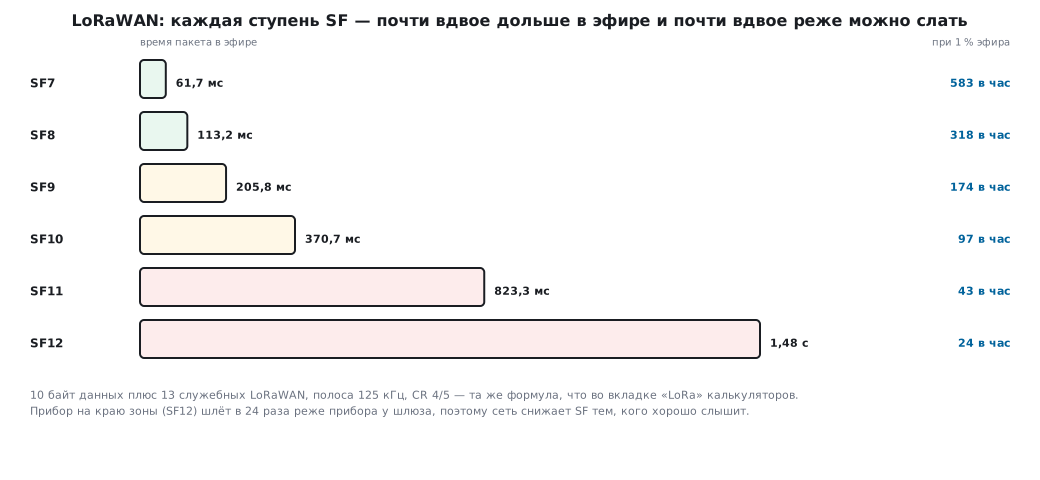
In the European 868 MHz band a device may occupy the air for no more than 1 % of the time — the rules of a particular country are in its frequency regulations. A device at the edge of coverage (SF12) transmits 24 times less often than a device near the gateway, so the network itself lowers the SF for those it hears well. The speed at 125 kHz is from 293 bit/s (SF12) to 5.5 kbit/s (SF7).
Sigfox goes the other way, with an ultra-narrow band: a message occupies a tiny piece of the spectrum and so gets through the noise. The limits are strict: 12 bytes per message and 140 messages per day — 1680 bytes. This is not the operator's whim but a consequence of the same 1 %: a day is 86400 s, 1 % is 864 s, and every message goes out three times on different frequencies and lasts about 2 s — 140 × 3 × 2 = 840 s. Only the operator has the network: no coverage from it — no link.
NB-IoT and LTE-M are cellular links for devices in licensed bands. NB-IoT takes 180 kHz — one LTE resource block, 12 subcarriers of 15 kHz, — and is good for stationary devices in basements and manholes. LTE-M is faster and hands over between towers on the move — for trackers. Both can sleep deeply: the device agrees with the network that it will be unreachable for hours, and spends no energy on keeping the link.
Antennas are tied to the wavelength. A quarter-wave whip:
| Frequency | Wavelength | Quarter wave |
|---|---|---|
| 13.56 MHz | 22.1 m | — (the antenna is a coil) |
| 868 MHz | 34.5 cm | 8.6 cm |
| 2.4 GHz | 12.5 cm | 3.1 cm |
That is why an 868 MHz module with a "spring" antenna does noticeably worse than a module with a proper whip, and a metal enclosure around the antenna kills the link on any band.
89.6 How to choose
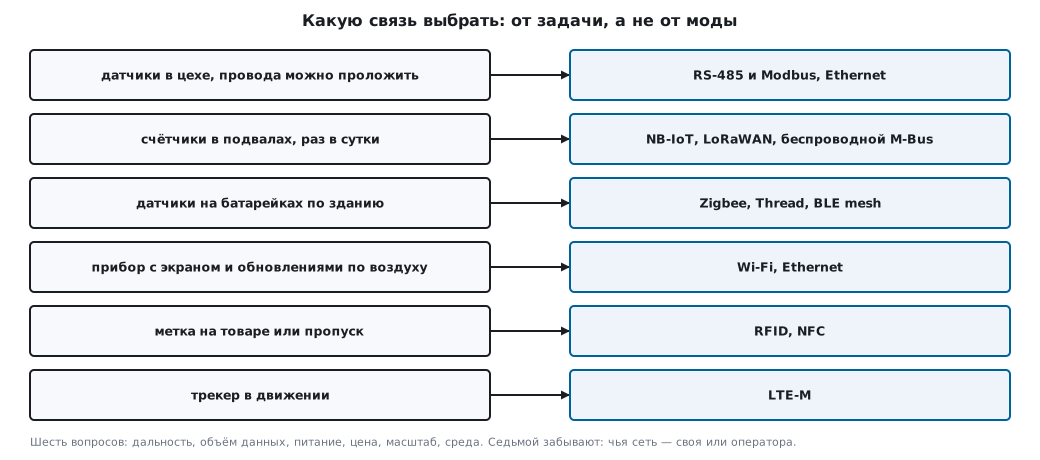
The choice comes down to six questions: range; the volume and frequency of data; power — mains or battery, and for how many years; cost — the module, the gateway and the subscription fee; scale — how many devices per gateway; environment — walls, metal, basements. A seventh question is often forgotten: whose network is it. Your own network needs maintenance, an operator's network depends on its coverage and tariffs.
| Task | Sensible choice |
|---|---|
| sensors in a workshop where wires can be laid | RS-485 and Modbus, Ethernet |
| meters in basements, once a day | NB-IoT, LoRaWAN, wireless M-Bus |
| battery sensors throughout a building | Zigbee, Thread, BLE mesh |
| a device with a display and over-the-air updates | Wi-Fi, Ethernet |
| a tag on goods or an access pass | RFID, NFC |
| a tracker on the move | LTE-M |
89.7 Mesh networks
In a "star" network each device talks to the gateway directly. In a mesh network devices pass each other's messages, and a message reaches the gateway in several hops. The node roles:
| Role | What it does |
|---|---|
| router | receives and forwards other nodes' messages — the receiver is always on |
| end device | only its own traffic: wakes up, sends to the nearest router, goes back to sleep |
| gateway | the exit from the mesh network to the internet |
Hence a consequence that is often missed: a mesh saves energy only for end devices. Take a 2000 mAh battery. A router with a receiver that is always on at 5 mA lives 16.7 days. An end device that wakes up for 10 ms every minute draws on average 2.83 µA (0.83 µA — 10 ms at 5 mA once a minute, and 2 µA of sleep current) and lives for decades — longer than the battery itself. That is why routers are mains-powered: in Zigbee these are sockets, lamps, switches.
The network structure comes in three kinds. In an infrastructure network the routers form a backbone, and clients connect to them as a star. In a client network the client devices route by themselves. A hybrid network combines both approaches.
How a message finds its way. There are two ways: flooding — everyone forwards everything it heard — and routing — everyone knows whom to pass it on to. Flooding needs two protections: a hop limit (TTL) and a duplicate cache — a node remembers what it has already forwarded:
/* Узел помнит последние сообщения, чтобы не пересылать их повторно: кольцо
 * пар «отправитель, номер». Адрес 0 не используется — им помечена пустая
 * ячейка. Вернёт 1, если сообщение уже видели. */
#define MESH_SEEN 16

struct mesh_cache {
    uint16_t src[MESH_SEEN];
    uint16_t seq[MESH_SEEN];
    unsigned head;
};

int mesh_seen(struct mesh_cache *c, uint16_t src, uint16_t seq)
{
    for (unsigned i = 0; i < MESH_SEEN; i++)
        if (c->src[i] == src && c->seq[i] == seq)
            return 1;
    c->src[c->head] = src;
    c->seq[c->head] = seq;
    c->head = (c->head + 1) % MESH_SEEN;
    return 0;
}
Model. A 7 × 7 grid, 49 nodes, each hears only its side neighbors. The gateway is in one corner, the sender in the opposite one. The gateway receives a message but does not forward it further:
| Method | Transmissions | Result |
|---|---|---|
| route from a table | 12 | arrived in 12 hops |
| flooding with a duplicate cache, TTL 12 | 48 | arrived in 12 hops |
| flooding without a cache, TTL 12 | 577067 | 924 copies reached the gateway |
Flooding with a cache touches every node exactly once: the cost of a message grows with the size of the network, not with the number of paths. Without a cache the air fills up with copies of one message. The claim "the number of nodes does not affect efficiency" is true only for routing: every flooded message costs as many transmissions as there are nodes in the network.
Failure. The sender is now in the adjacent corner, six hops from the gateway. Then a "wall" fails — six nodes across the network, and a passage remains only at the edge:
| What happens | Result |
|---|---|
| route from the old table | lost: the next node is silent |
| flooding with TTL 8 — a margin of 2 over the usual path | 20 transmissions, did not arrive |
| table rebuilt | 18 hops instead of 6 |
| flooding with TTL 18 | 42 transmissions, arrived in 18 hops |
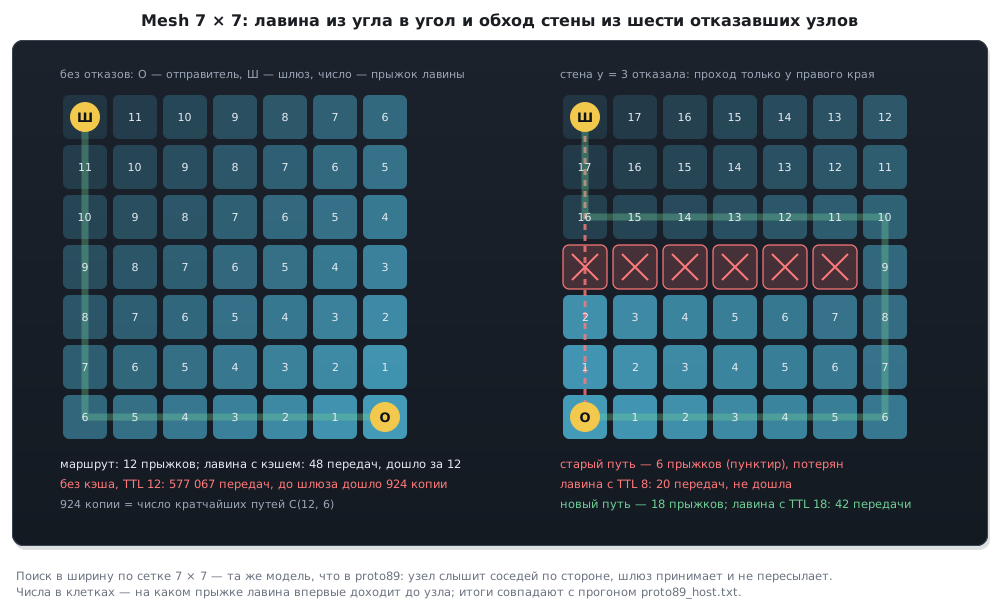
"Self-healing" is not a property of the network but work: routes have to be rebuilt, and the hop limit has to be chosen for the worst path, not for the usual one. A path three times longer means three times the delay. A network that routes around failures by itself also hides them: to find a failed node, every node has to report its neighbors and its battery level to the gateway.
⚠️ Which routing is actually used. "Shortest Path Bridging" (SPB), which is mentioned next to mesh, is a standard for wired Ethernet switches. Wireless networks solve the problem differently: Zigbee looks for a route on demand, when it is needed; in Thread the routers exchange tables; BLE mesh uses exactly flooding with a TTL and a duplicate cache, as in the model above; Wi-Fi mesh uses its own protocol from the 802.11s standard or a vendor solution.
Wi-Fi mesh covers a home or a workshop without wires, but pays for every hop on the same channel with airtime: a router first receives, then transmits the same thing, and the speed drops with every hop. The nodes need power, and their placement has to be planned — that is what a site survey is (section 92).
89.8 Pitfalls
RS-485 loses the last byte of the response. DE is cleared on TXE, but it should be on
TC.
Modbus answers with a CRC error. The CRC bytes are swapped: the CRC goes low byte first, unlike the data.
Modbus frames stick together or get cut. The end of a frame is detected by the IDLE flag
or by a fixed gap, not by 3.5 characters of silence at the given
speed.
The CoAP server executed a command twice. The repeat was sent with a new message ID — for the server that is a new request.
A CoAP response "from the wrong" request. The device does not check the token: with several requests in a row, the responses arrive in any order.
A LoRaWAN device goes silent for minutes. At SF12 a packet takes one and a half seconds, and the 1 % on air runs out after a couple of dozen messages per hour.
Zigbee loses packets when Wi-Fi is working nearby. The chosen channel overlaps a Wi-Fi channel.
An NFC tag cannot be read on the enclosure. The enclosure is metal, and the tag is an ordinary one.
A battery-powered mesh router died in two weeks. The router's receiver is always on.
The mesh network chokes after nodes are added. The flooding has no duplicate cache, or the TTL is too large.
Messages disappear after a node fails. The route is not rebuilt, and the TTL was chosen for the usual path.
89.9 Summary
- The data protocol (MQTT, CoAP, HTTP, Modbus) and the way it is carried (wire or radio) are chosen independently.
- CoAP is REST over UDP: the response comes in the acknowledgement, and the server does not execute a repeat with the same ID a second time; for a device that wakes up for one message it is cheaper than TCP.
- RS-485 is electrical, Modbus is a protocol. The RS-485 rule is speed ×
length ≈ 10⁸. The transmitter is turned off after
TC, the Modbus CRC goes low byte first, the end of a frame is 3.5 characters of silence. - LoRaWAN pays for its range with time on air: 61.7 ms at SF7 and 1.48 s at SF12 for 10 bytes. The 1 % on-air rule limits messages per hour. The Sigfox limits — 12 bytes and 140 messages per day — follow from the same 1 %.
- At 2.4 GHz it is best to put Zigbee on channels 15, 20, 25 or 26.
- A mesh saves energy for end devices, not for routers. Flooding needs a duplicate cache and a TTL for the worst path. After a failure the route is rebuilt, and the path can grow threefold.
Next: section 90 "IoT solution architecture".