 Embedded HandbookApps
36а. Instruments on the bench: multimeter, oscilloscope, logic analyzer
Section 36 ended with the advice "put a scope on the line": the debugger sees registers, but it does not see the wire. This section is about the instruments themselves: what each of them can do, where it lies and how to notice that it lies. Instruments do not deceive at random, but by physics: the multimeter shunt drops the supply, the probe ground lead rings, a narrow bandwidth stretches the edge, a low sample rate loses bits. All of this can be calculated in advance.
The numbers in this section are verified: pin edges and thresholds come from the tables of the
STM32F103 datasheet (pack Keil.STM32F1xx_DFP), probe ringing and compensation from models
in ngspice, decoding of analyzer captures from a run in _verify/bench36a.
Terms used in the documentation
Term Meaning DMM, digital multimeter digital multimeter burden voltage voltage drop across the multimeter's current shunt probe, 1×/10× attenuation probe; division 1:1 / 1:10 probe compensation matching the probe divider to the scope input bandwidth the frequency range the instrument passes sample rate how many samples per second are taken trigger: edge, level, single trigger: on an edge, threshold level, one-shot capture pre-trigger recording what happened before the trigger moment logic analyzer an instrument that records zeros and ones on many channels logic threshold the voltage that separates logic zero from logic one protocol decoder software that turns a capture into protocol data CC / CV, constant current / voltage current limiting / voltage regulation
36а.1 Multimeter: what it can do and what it keeps quiet about
A multimeter is an instrument for steady-state values: a few readings per second, each one an average over the measurement window. That is enough for three quarters of the questions on the bench:
- is there supply voltage and how much — at the regulator pin, at the microcontroller pin (after connectors and traces, not before);
- continuity — does the trace reach its end, is the supply shorted to ground before power-up;
- resistance — is a pull-up fitted and which one: the internal pull-up of the F103 (30–50 kΩ according to table 35 of the datasheet) and an external 4.7 kΩ are told apart by the ohmmeter at once;
- supply current — the meter goes in series with the supply.
Current is the main trap. An ammeter measures the drop across its own shunt, and the shunt stays in the circuit: on the milliamp range it is a few ohms, on the microamp range hundreds. While the device sleeps at 5 µA, a 100 Ω shunt drops 0.5 mV — unnoticeable. But the device wakes up, and a 30 mA spike across the same shunt is already 3 V: of the 3.3 V supply only 0.3 V is left at the device — below the PDR reset threshold (typical 1.88 V according to table 11 of the datasheet).
⚠️ The device restarts as soon as the multimeter is switched to microamps — this is not a coincidence, it is the shunt. The device wakes up, the shunt drops the supply, the supervisor resets, consumption falls, the supply comes back — and round it goes. Average sleep current is measured with a capacitor next to the device plus a range with a small shunt, or with a separate current meter (section 101 — how INA219 does it).
What a multimeter will not show at all: a short spike (the averaging window is thousands of times longer), ringing and overshoot on edges, converter ripple. On PWM in DC voltage mode it shows the average — 1.65 V for a 3.3 V square wave with a 1/2 duty cycle — and that is the correct average, but it says nothing about the waveform. Everything that changes faster than a fraction of a second goes to the oscilloscope.
36а.2 Probe: attenuation, compensation, ground lead
An oscilloscope starts not with the screen but with the probe. An ordinary passive probe has two switch positions:
| 1:1 | 1:10 | |
|---|---|---|
| signal at the instrument input | as is | attenuated 10 times |
| input seen from the tip | ~1 MΩ and ~100 pF of cable | ~10 MΩ and 10–15 pF |
| when to use | slow millivolt signals | by default — always |
Capacitance is the main difference. The oscilloscope input itself is 1 MΩ and ~20 pF, plus the capacitance of the probe cable, about a hundred picofarads in total. For comparison: the F103 pin capacitance is 5 pF (table 35 of the datasheet). Hanging 100 pF on a line in 1:1 mode loads it more heavily than everything else connected to it; an I²C bus with a 4.7 kΩ pull-up will noticeably slow its edges from such an addition (the time constant — section 17.3). A 1:10 probe divides the signal with a 9 MΩ resistor in the tip and presents only 10–15 pF to the line — that is why it is the default position.
But a 9 MΩ / 1 MΩ divider divides correctly only DC
voltage. In parallel with the 9 MΩ in the tip sits a trimmer
capacitor C1, and on edges it is the capacitances that divide: C1 against the capacitance
of the cable and the input. Until C1 is adjusted, the divider has two different
ratios — 1:10 by resistance, and whatever it happens to be by capacitance.
Model in ngspice (_verify/bench36a/comp36a.cir: 9 MΩ and C1 against
1 MΩ and 100 pF, a 3.3 V square wave):
| C1 | square-wave edge | steady state | on screen (×10) |
|---|---|---|---|
| 5 pF — undercompensated | 0.159 V | 0.329 V | a step: edge 1.6 V, plateau 3.3 V |
| 11.1 pF — exact | 0.330 V | 0.330 V | a clean 3.3 V square wave |
| 22 pF — overcompensated | 0.593 V | 0.333 V | overshoot to 5.9 V, then a plateau of 3.3 V |
🔧 Recipe. The oscilloscope front panel has a calibrator output — a square wave of about 1 kHz. Hook the probe on it and turn the trimmer capacitor until the square wave has right-angled corners. Check after every change of probe and channel: compensation is a property of the probe-input pair. An uncompensated probe lies about amplitude by tens of percent on any signal with edges — the table above shows a spread from 1.6 to 5.9 V on the same 3.3 V square wave.
The third part of the probe is the ground lead. The signal returns
to the oscilloscope through the "alligator clip", and a 15 cm lead is
an inductance of about 150 nH (an estimate of ~1 nH per millimetre).
Together with the 15 pF probe capacitance it forms a series resonant circuit
right at the tip. Model in ngspice (probe36a.cir, a 5 ns edge —
an F103 pin in 50 MHz mode, table 37 of the datasheet):
| probe ground | inductance | what is on screen |
|---|---|---|
| 15 cm "alligator clip" | 150 nH | ringing at 105 MHz, peak 4.63 V — 40 % overshoot |
| 1.5 cm spring on the probe barrel | 15 nH | peak 3.44 V — 4 % overshoot, almost no ringing |
The calculated frequency agrees with the model: 1/(2π·√(L·C)) = 106 MHz for 150 nH and 15 pF.
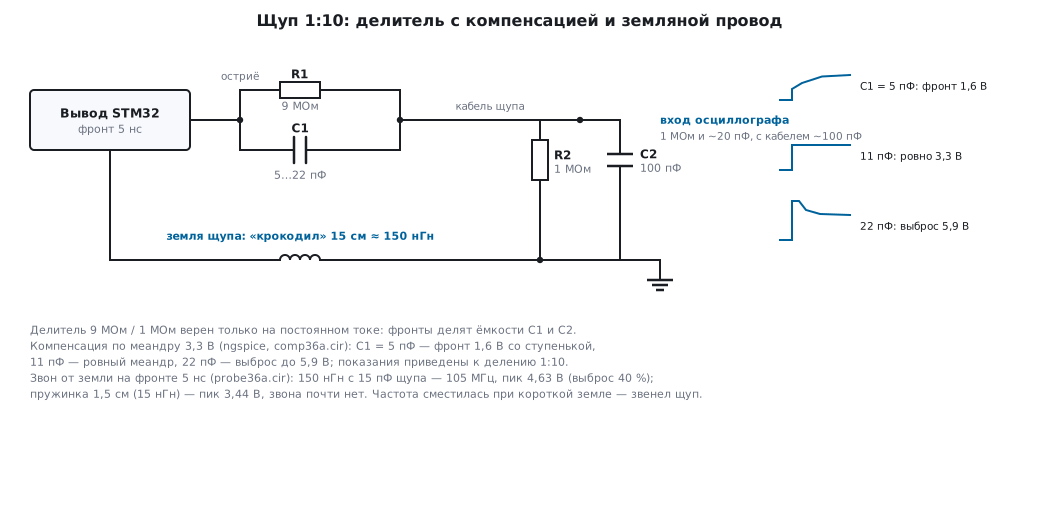
⚠️ Ringing on the screen — whose is it? Shorten the ground: if the ringing frequency shifted (in the model — from 105 MHz to hundreds of megahertz and almost to zero in amplitude), the probe was ringing, not the circuit. If it did not shift, the ringing is real, in the line itself (section 160). On the ground-lead loop on a switching converter — section 58.9: there it does not just spoil the picture, it restarts the converter.
36а.3 Bandwidth and sample rate: which edge you can see
The oscilloscope bandwidth is related to the shortest edge it can display by a simple rule:
t_фронта ≈ 0,35 / полоса полоса ≈ 0,35 / t_фронта
The edges of an F103 pin are known from table 37 of the datasheet — and they show what bandwidth you need to look at "just a GPIO":
OSPEEDR mode (section 8) |
edge | signal bandwidth 0.35/tr |
|---|---|---|
| "2 MHz" | 125 ns | 2.8 MHz |
| "10 MHz" | 25 ns | 14 MHz |
| "50 MHz", 50 pF | 8 ns | 43.75 MHz |
| "50 MHz", 30 pF | 5 ns | 70 MHz |
The instrument and the signal add as the root of the sum of squares: t² = tsignal² + tinstrument². A 5 ns edge on different oscilloscopes:
| instrument bandwidth | instrument's own edge | a 5 ns edge appears as |
|---|---|---|
| 20 MHz | 17.5 ns | 18.2 ns — the instrument shows itself |
| 100 MHz | 3.5 ns | 6.1 ns (+22 %) |
| 350 MHz | 1.0 ns | 5.1 ns (+2 %) |
Hence the working rule: the instrument bandwidth should be 3–5 times the signal bandwidth, then the edge error is a few percent. For STM32 lines in fast mode this means "from 100 MHz", while a 20 MHz instrument honestly shows only the slow GPIO modes.
The sample rate is the second number on the nameplate, and it must not be confused with bandwidth. 1 GS/s on a 100 MHz signal is 10 points per period: the shape is visible. A sample rate equal to the bandwidth would give one point per period — an instrument with such figures draws a pretty but invented curve (interpolation between points). The rule is the same: the sample rate several times higher than the fastest component, and for single events all the more so, since there you cannot average over repetitions.
36а.4 Triggering: edge, level, single shot
An oscilloscope does not "show the signal" — over and over it catches a moment and draws the record around it. The moment is set by the trigger:
- source — the channel we trigger on;
- condition — rising or falling edge;
- level — the voltage at which the condition fires;
- mode — auto (the sweep runs even without an event: you see at least something), normal (draws only on an event), single (one record — and stop).
As long as the condition hits the same point in the period, the picture stands still. A "running" picture means the signal is not synchronous with the trigger: the level landed in noise or in edge ringing (36а.2 — ringing of tens of percent of the amplitude crosses the level several times per edge). The level is set to the middle of the transition, away from ringing and from logic thresholds.
Single is the debugger's main mode. A glitch once a minute cannot be caught with a running sweep: you set single with a level slightly above the normal swing — and the instrument waits even for an hour, and once it catches the event it holds the record. Thanks to pre-trigger recording you also see what came before the event — usually that is the most interesting part.
🔧 Recipe: catch a rare glitch on the supply line. Channel on the supply, AC coupling, scale in millivolts per division, trigger normal with a level above the ripple, then single. In the morning the screen shows that one dip that made the device reboot during the night.
36а.5 Oscilloscope ground is mains-outlet ground
The probe "alligator clip" is not a separate measurement wire. Inside the oscilloscope it is connected to the chassis, and the chassis to the protective earth of the outlet. Two consequences follow.
The clip must not be attached to a point under voltage. Connecting the probe ground to a "minus" that is not actually the circuit ground means shorting that point to outlet earth through the instrument chassis. At best — a supply dip and a reboot, at worst — a burnt trace or instrument input.
A mains-connected circuit is a separate discipline. The primary side of a switching power supply is not isolated from the mains: the "ground" there is the rectified mains, hundreds of volts relative to outlet earth. You do not go there with an ordinary probe at all — that is a job for an isolation transformer or a differential probe. And even the secondary side of a cheap supply without an earth pin "floats": a divider of two Y capacitors holds it at about half the mains — 115 V on a 230 V mains. The current is tiny (through 2.2 nF at 50 Hz — about 79 µA, which is why such a supply tingles rather than shocks), but at the moment the probe touches, all of that potential discharges into the line being measured.
USB adds the same loop from the other side: a board powered from a computer is already connected to it through ground; a USB oscilloscope on the same computer, an SWD debugger and a mains-powered oscilloscope tie the grounds together once more. The ground loop collects noise and confuses millivolt measurements. A simple bench rule: power the board under debug from a lab power supply (36а.8), not from the same computer that the analyzer is plugged into.
36а.6 Logic analyzer and PulseView
An oscilloscope answers "what shape is the signal", a logic analyzer answers "what does it say". It records only 0 and 1 on each channel relative to a threshold, but it has eight channels and records for a long time: a typical cheap USB analyzer has 8 channels at 24 MS/s, and that is enough for UART, I²C and SPI at once. Captures are viewed in PulseView, which is also home to the protocol decoders.
Threshold. The instrument compares the input with a fixed level — usually about 1.5 V. The F103 input thresholds (table 35 of the datasheet): zero is up to 0.35·VDD = 1.15 V, one is from 0.65·VDD = 2.15 V at a supply of 3.3 V. The 1.5 V threshold lies between them — fine for 3.3 V logic. For 1.8 V logic a one of 1.8 V is only 0.3 V above the threshold — you need an instrument with an adjustable threshold.
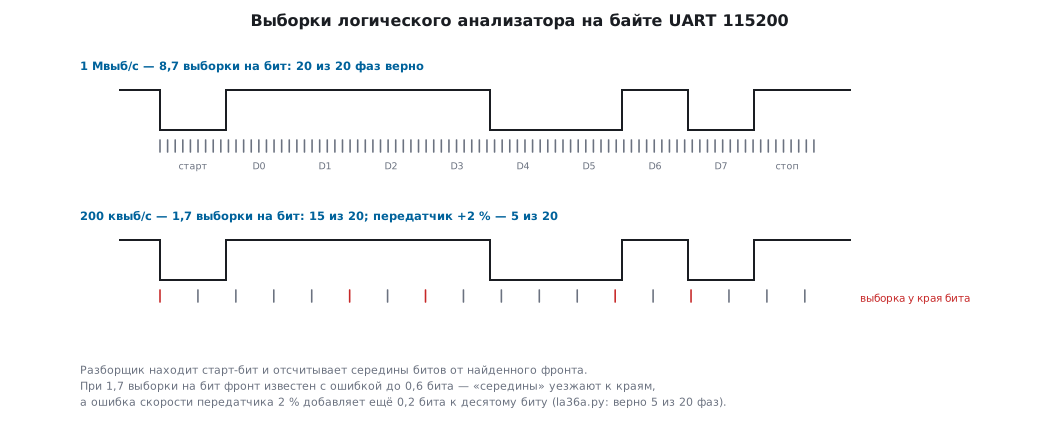
Sample rate. An analyzer is not an oscilloscope: between samples it is
blind, and the question "how many samples per bit" decides everything. The experiment
(_verify/bench36a/la36a.py: the message 4F 4B 0D 0A at 115200,
decoded at 20 different sampling phases; the second column is a transmitter
running 2 % faster, as a UART clocked from an RC oscillator may do,
section 16):
| sample rate | samples per bit | exact baud rate | transmitter +2 % |
|---|---|---|---|
| 1 MS/s | 8.7 | 20 of 20 phases correct | 20 of 20 |
| 250 kS/s | 2.2 | 20 of 20 | 16 of 20 |
| 200 kS/s | 1.7 | 15 of 20 | 5 of 20 |
On an ideal capture two samples per bit are still enough, but once the transmitter speed drifts by the permitted 2 %, decoding falls apart every other time. Hence the rule: no fewer than four to five samples per bit, and better ten. For SPI the same is calculated instantly: 24 MS/s on an 8 MHz SCK is 3 samples per period, already too few.
Protocol decoders turn a capture into the text of the exchange. The same 100 kHz I²C capture (writing 0xAF to register 0x00 of slave 0x3C) after the decoder:
START
адрес 0x3C запись ACK
данные 0x00 ACK
данные 0xAF ACK
STOP
And this is SPI mode 0: command 0x9F — reading the JEDEC ID of a flash memory
(section 41), the reply contains three identifier bytes:
MOSI: 9F 00 00 00
MISO: 00 EF 40 18
You see what the debugger does not give you: both sides of the exchange and the time between them. NACK instead of ACK — the slave did not answer (address? pull-ups? — section 17); bytes in MISO shifted by one clock — CPHA phase (section 18); a millisecond pause between UART bytes — someone is holding the processor.
36а.7 Marker pin in the code: section timing and jitter
Instruments do not only look at interfaces. One free pin turns the oscilloscope into a timer inside the firmware — this is the very first row of the "what to measure with" table from section 73.1:
void mark_init(void)
{
    RCC->APB2ENR |= RCC_APB2ENR_IOPAEN;         /* такт порта A */
    GPIOA->CRH = (GPIOA->CRH & ~(GPIO_CRH_CNF8 | GPIO_CRH_MODE8))
               | GPIO_CRH_MODE8;                /* PA8: выход push-pull, 50 МГц */
}

static inline void mark_up(void)   { GPIOA->BSRR = GPIO_BSRR_BS8; }
static inline void mark_down(void) { GPIOA->BSRR = GPIO_BSRR_BR8; }
Around the section being measured:
uint32_t measured(uint32_t x)
{
    mark_up();                                  /* фронт вверх — старт */
    x = work(x);
    mark_down();                                /* фронт вниз — конец */
    return x;
}
The pulse width on the screen is the section time. Writes to BSRR cost almost
nothing (section 73.1), so the measurement does not distort what is measured —
unlike a breakpoint, which stops everything (section 35).
Two techniques beyond a simple measurement:
- Jitter. Trigger on the rising edge of the marker and accumulate many passes on the screen (persistence): the rising edge stands still, the falling edge is smeared — the width of the smeared band is the jitter of the section duration. An interrupt that occasionally cuts into the measured code shows up as a separate "step" of the falling edge.
- Correlation with the exchange. A marker on a logic analyzer channel next to the UART/SPI lines shows when the code runs relative to the bytes on the wire: how much time passes from the last byte to the reaction, whether the handler finishes before the next one.
The same measurement without an oscilloscope — with a cycle counter via SWO — is assembled in recipe 21.9.
36а.8 Lab power supply with current limiting
The last instrument does not measure anything, but it is the one that most often saves the board. A lab power supply holds either the set voltage (CV mode) or, when the load demands more than the set current, the set current (CC mode), letting the voltage sag. Going into CC is both a protection and an indicator.
🔧 First power-up recipe. Voltage 3.3 V, current limit slightly above the expected consumption: for a board that should draw 30 mA, set 50 mA. A short circuit or a part mounted backwards does not burn: the supply goes into CC, the display shows a sagging voltage instead of 3.3 V, and you see it before you smell it. If it works, raise the limit to the working value with a margin.
The current reading on the supply is a second multimeter, always connected in the supply: the board consumption is visible all the time, with no shunt in series. A current jump after flashing a new version is a reason to look for what stopped going to sleep (section 10); a rise of tens of milliamps means something extra got switched on.
A computer USB port has none of this: it limits current late and crudely, does not show consumption, and ties ground to the computer (36а.5). Power on the bench comes from the supply; USB is for what is debugged over USB.
36а.9 Pitfalls
Ringing at ~100 MHz on every edge. First shorten the probe ground (36а.2): if it shifted, the probe was ringing. Fifteen centimetres of "alligator clip" is 150 nH and a 40 % overshoot on a clean edge. On a switching converter the ground-lead loop adds its own trouble — section 58.9.
The calibrator square wave has a step or an overshoot. The probe is not compensated: amplitudes are off by tens of percent — from 1.6 to 5.9 V on a 3.3 V square wave in the model from 36а.2. Compensation is a property of the probe-input pair: check after every rearrangement.
All edges are "18 ns". A 20 MHz bandwidth: the instrument's own edge is 17.5 ns, and it will not show anything faster (36а.3). The instrument shows itself.
Multimeter on microamps — the device restarts. The shunt drops the supply on a consumption spike: 30 mA through 100 Ω is minus 3 V (36а.1).
The analyzer reads garbage instead of UART. Too few samples per bit, or the transmitter speed drifted: 1.7 samples per bit with a speed error of 2 % gives one correct decode out of four (36а.6). Sample rate — from four per bit; check the baud rate.
A "minus" under voltage met the alligator clip. A supply dip, a reboot, at worst a burnt trace or instrument input: the probe ground is connected to outlet earth (36а.5). On mains-connected circuits — only isolation or a differential probe.
The board draws zero — and does not work. The supply current limit was left at 20 mA since the first power-up: the supply is in CC, the voltage has sagged, the device is in a reset loop. A glance at the CC indicator comes before any oscilloscope (36а.8).
36а.10 Summary
- A multimeter is an instrument for steady-state values: supply, continuity, average current. Its shunt stays in the circuit: the microamp range drops 3 V on a 30 mA spike — and the device resets in a loop.
- The probe is 1:10 by default: 10–15 pF on the line instead of a hundred in 1:1. Compensate it on the square wave after every rearrangement: without this amplitudes are off by −52 to +80 %.
- The ground lead is an inductance: 15 cm is 150 nH, ringing at 105 MHz with a 40 % overshoot on a 5 ns edge. A spring instead of the "alligator clip" removes almost all of it; if the ringing shifted, the probe was ringing.
- Bandwidth from the edge: 0.35/tr. The fast F103 edge, 5 ns, needs a bandwidth from 70 MHz; a 20 MHz instrument shows its own edge, not yours.
- Triggering: level in the middle of the transition, a rare event — single with pre-trigger recording.
- Probe ground = outlet earth: the clip only on the real circuit ground; do not approach the mains without isolation.
- Analyzer: threshold against the logic levels, samples — from four per bit; protocol decoders show both sides of the exchange.
- A marker pin + an oscilloscope give the time and jitter of a code section (73.1, 21.9); a lab supply with current limiting is the first instrument you switch on and the last protection of the board.
Full sources
tag36a.c — a marker pin around the code section being measured.
/* 36а.7: вывод-метка вокруг измеряемого участка кода (F103, PA8).
 * Сборка: armclang --target=arm-arm-none-eabi -mcpu=cortex-m3 -DSTM32F10X_MD
 *         -include stm32f10x.h -O2 -Wall -Wextra -c tag36a.c
 */

void mark_init(void)
{
    RCC->APB2ENR |= RCC_APB2ENR_IOPAEN;         /* такт порта A */
    GPIOA->CRH = (GPIOA->CRH & ~(GPIO_CRH_CNF8 | GPIO_CRH_MODE8))
               | GPIO_CRH_MODE8;                /* PA8: выход push-pull, 50 МГц */
}

static inline void mark_up(void)   { GPIOA->BSRR = GPIO_BSRR_BS8; }
static inline void mark_down(void) { GPIOA->BSRR = GPIO_BSRR_BR8; }

uint32_t work(uint32_t x);                      /* измеряемый участок */

uint32_t measured(uint32_t x)
{
    mark_up();                                  /* фронт вверх — старт */
    x = work(x);
    mark_down();                                /* фронт вниз — конец */
    return x;
}
Next: section 36б "Run-time self-test: core, RAM, flash, clock" — the device checks its own core, RAM, flash memory and clock, with no person nearby.